2-50
CHAPTER 2 NEW FUNCTIONS
COPYRIGHT
©
2001 CANON INC. 2000 2000 2000 2000 CANON CLC5000 REV.0 JAN. 2001
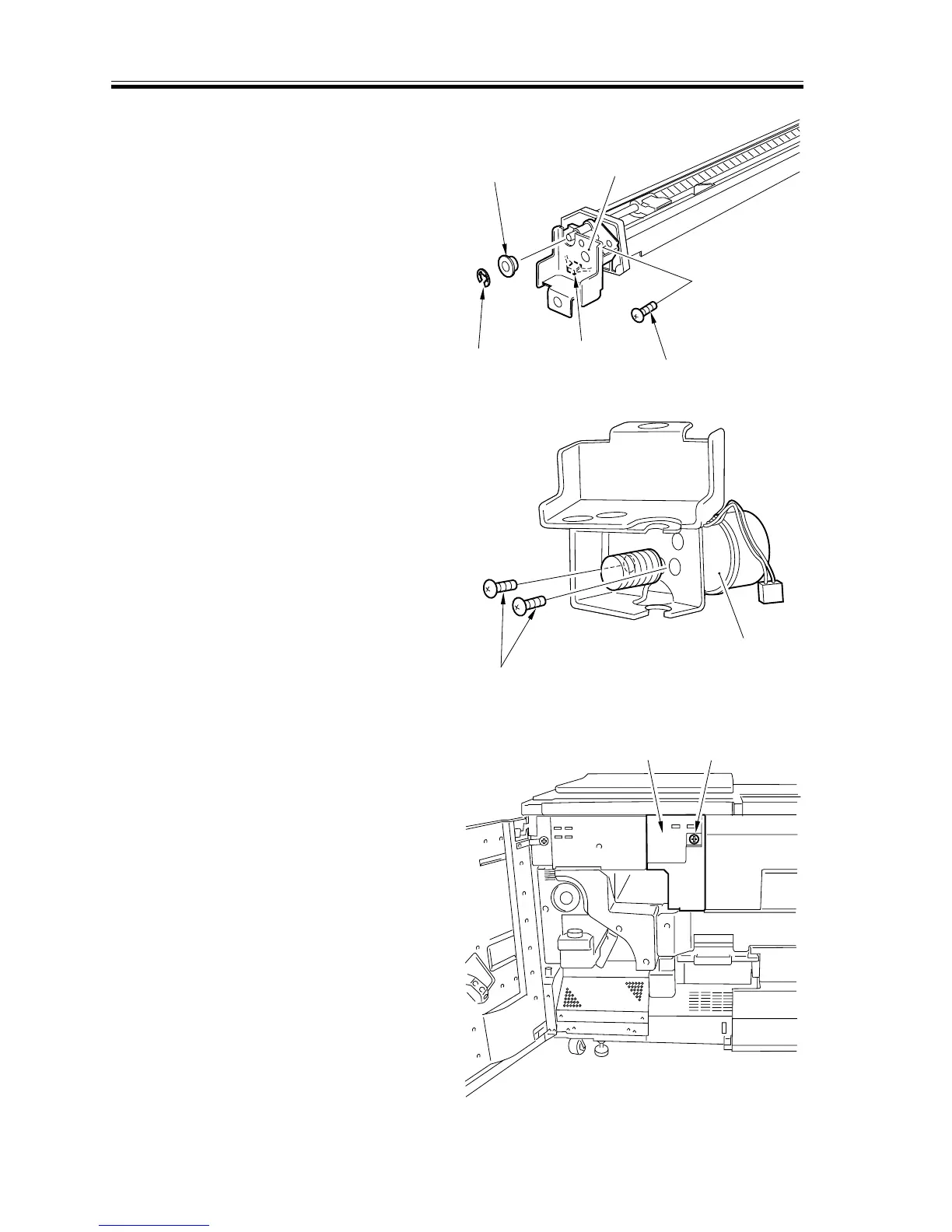
4.5.1 Charging System
a.Removing the Primary Charging Assembly Motor
1) Lift the hopper assembly. (See CLC
1000 Chap. VII. “Hopper System.”)
2) Pull out the primary charging assembly.
3) Remove the E-ring [1] and the bushing
[2].
4) Disconnect the connector [3], and re-
move the screw [4]; then, detach the pri-
mary charging assembly motor support
plate [5].
[1]
[2]
[3]
[4]
[5]
F02-405-01
5) Remove the two screws [6], and detach
the primary charging assembly motor
[7].
[6]
[7]
F02-405-02
b-1. Removing the Separation Charging Assembly
1) Open the front cover.
2) Remove the screw [1], and detach the
hopper unit left cover [2].
[2]
[1]
F02-405-03














 To Next Page