COPYRIGHT
©
2001 CANON INC. 2000 2000 2000 2000 CANON CLC5000 REV.0 JAN. 2001
CHAPTER 5 TROUBLESHOOTING IMAGE FAULTS/MALFUNCTIONS
5-39
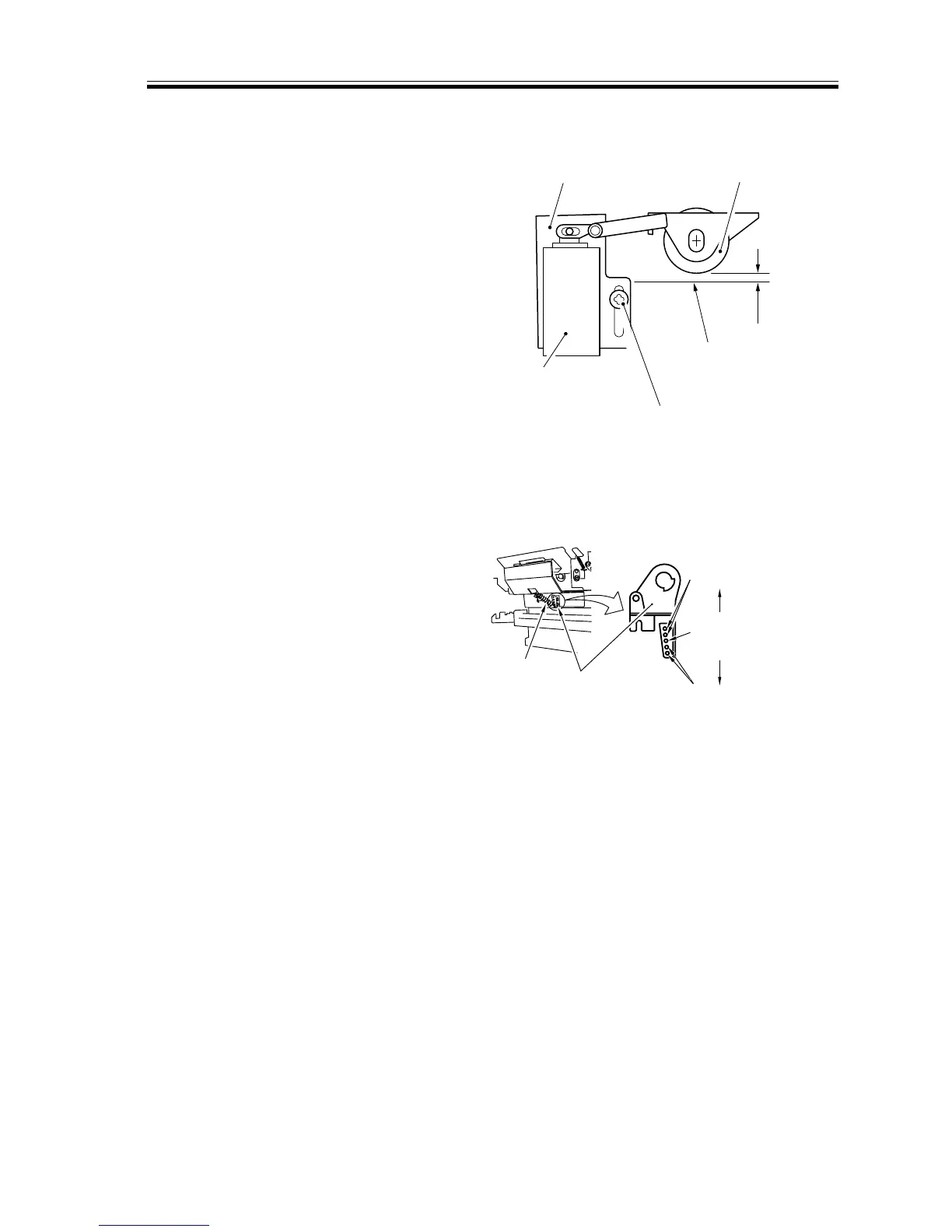
2.7.9 Adjusting the Position of the Paper Deck Pick-Up Roller Releasing
Solenoid (SL8001)
Install the solenoid where the paper deck
pick-up roller is 4.0 ±1 mm from the sur-
face of the paper when the plunger of the
solenoid is pushed in. (Keep one sheet of
paper on the paper deck lifter.)
F05-207-11
2.7.10 Adjusting the Pressure of the Paper Deck Separation/Feeding
Roller
If pick-up faults or double-feeding occurs
in the paper deck, change the position of the
spring hooked on the retard stay.
a. If pick-up faults occur, increase the
pressure.
b. If double-feeding occurs, decrease the
pressure.
F05-207-12
2.7.11 Positioning the Cassette Pickup Roller Releasing Solenoid (SL9,
SL10)
The position of the solenoid needs not be
adjusted; however, be sure that it is where it
is when it is shipped from the factory. If
you must remove it, be sure to mark its po-
sition with a scribe in advance.
Mounting plate
4.0±1mm
Adjusting screw
Copy paper surface
(keep one sheet on
the paper deck lifter)
Pick-up roller
releasing solenoid
Pick-up roller
Standard (move to the
next hole results in a
change of about 50 g.)
Decrease the
pressure.
Increase the
pressure.
Spring
Retard stay














 To Next Page