2-205
CHAPTER 2 NEW FUNCTIONS
COPYRIGHT
©
2001 CANON INC. 2000 2000 2000 2000 CANON CLC5000 REV.0 JAN. 2001
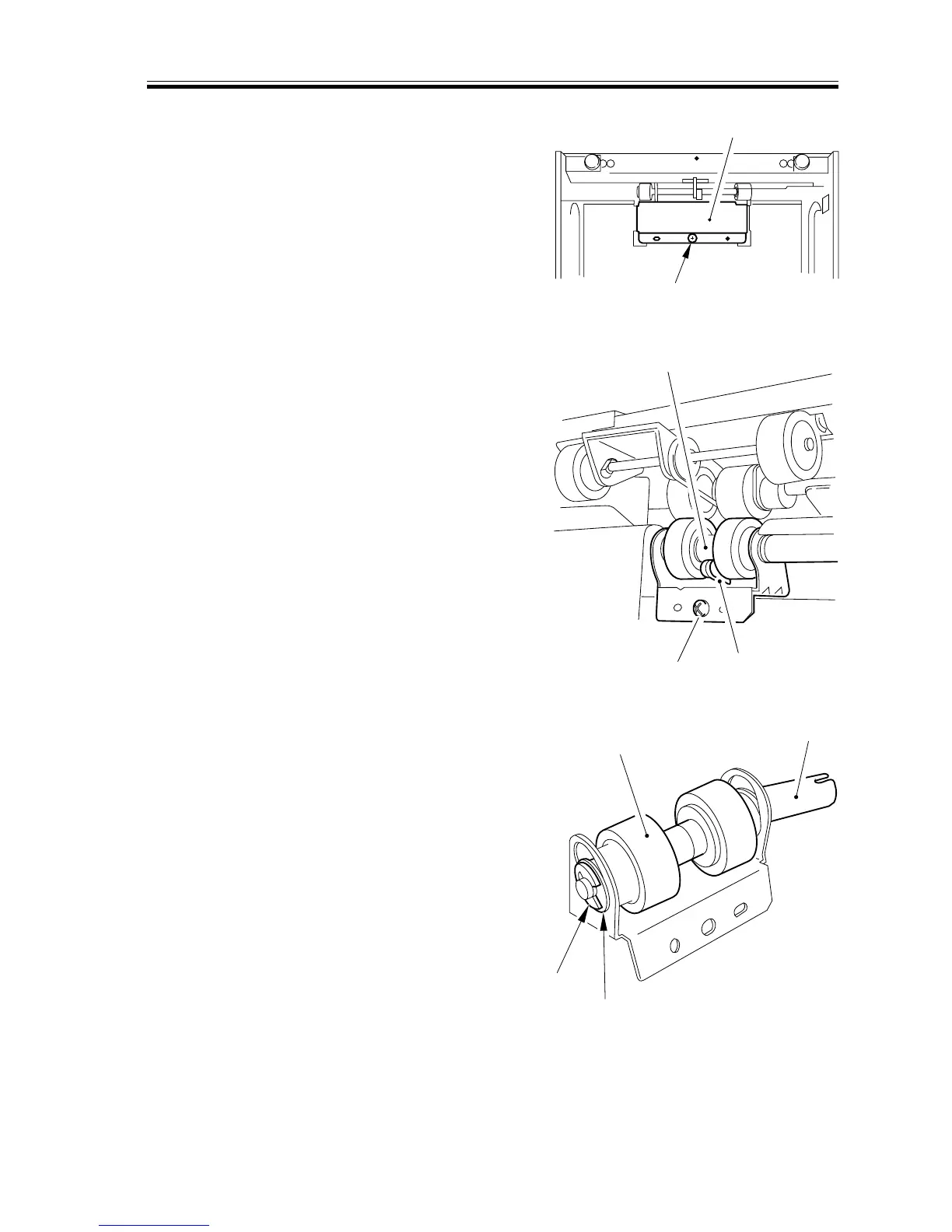
8.4.3 Removing the Separation Roller
1) Open the paper deck cover; then, re-
move the mounting screw [1], and de-
tach the separation roller assembly
cover [2].
F02-804-08
2) Remove the mounting screw [3]; then,
while pushing down the separation
roller pressure member [4], detach the
separation roller assembly [5] together
with its support plate.
F02-804-09
3) Remove the resinic E-ring [6] and the
bearing [8] at the front of the separation
roller assembly; then, pull out the sepa-
ration roller shaft [8], and detach the
separation roller [9].
F02-804-10
[2]
[1]
[5]
[3]
[4]
[6]
[7]
[9]
[8]














 To Next Page