COPYRIGHT
©
2001 CANON INC.
2000 2000 2000 2000
CANON CLC5000 REV.0 JAN. 2001
CHAPTER 3 INSTALLATION
3-40
Step Work Remarks
Belt retaining
member
protrusion
protrusion
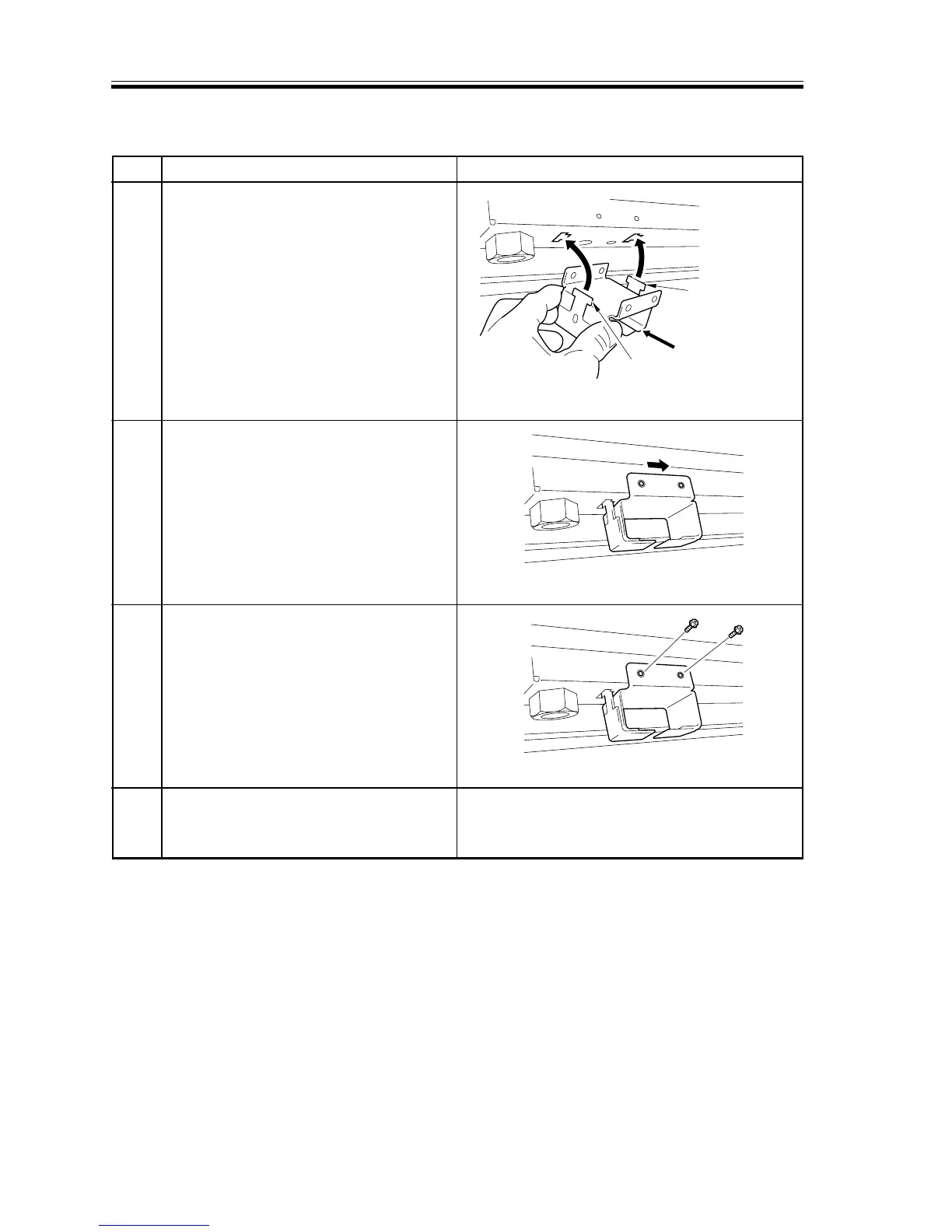
8.2.2 Mounting the Belt Retaining Members
1 Fit the protrusion of the top of the belt
retaining member into the T-shaped
opening in the bottom plate of the
machine.
2 Slide the belt retaining member toward
the center of the machine so that the 6-
mm dia. hole of the belt retaining member
and its corresponding 4-mm dia. hole in
the bottom plate match.
3 Using the M4x8 screws used to keep the
externals, secure the belt retaining
member to the base plate.Be sure to
tighten the screws while butting the belt
retaining member upward and toward the
center of the machine.
4 Likewise, mount the belt retaining
member to the right front, right rear, and
left rear.
F03-802-05
F03-802-06
F03-802-07














 To Next Page