COPYRIGHT
©
2001 CANON INC. 2000 2000 2000 2000 CANON CLC5000 REV.0 JAN. 2001
CHAPTER 5 TROUBLESHOOTING IMAGE FAULTS/MALFUNCTIONS
5-37
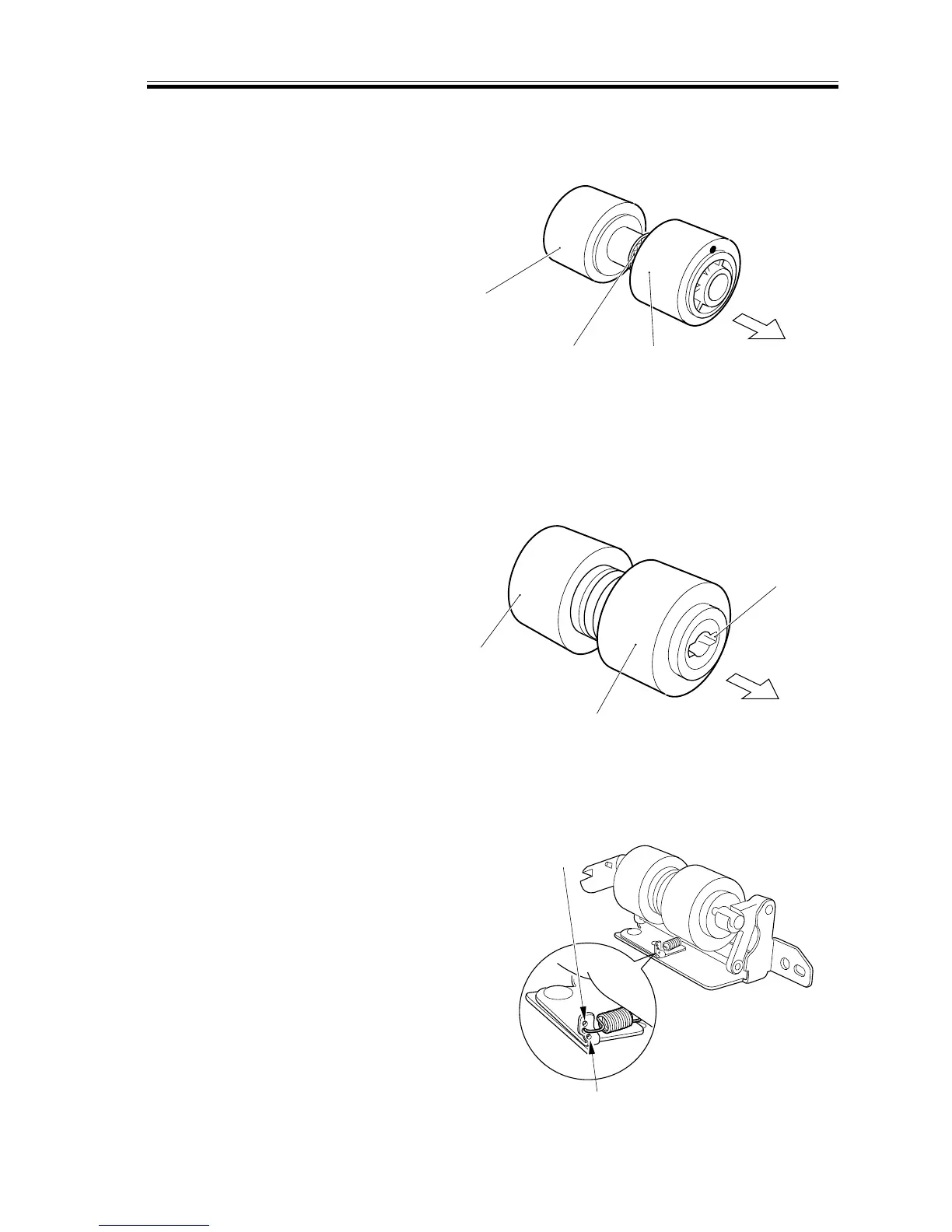
2.7.3 Orientation of the Cassette Feed Roller
When mounting the feed roller [1] to the
pickup assembly, be sure that the gear [2]
mounted to the feed roller is to the front of
the machine.
F05-207-04
2.7.4 Orientation of the Cassette Separation Roller
When mounting the separation roller [1]
to the pickup assembly, be sure that the nar-
row groove [2] for the parallel pin found in
the collar is toward the rear of the machine.
F05-207-05
2.7.5 Adding the Pressure of the Cassette Separation Roller
If double-feeding or pickup failure occurs
during pickup operation, change the posi-
tion of the pressure spring of the separation
roller:
a. If double-feeding occurs, move the
hook of the spring in the direction of
[A].
b. If pickup failure occurs, move the hook
of the spring in the direction of [B].
F05-207-06
[2]
[1]
Note)
Color of roller : gray
Front of the machine
[1]
[2]
Note)
Color of roller : gray
Rear of the machine
[A]
[B]














 To Next Page