Motors
Removing the Deck Pickup Motor (M103/203/303)
■ Preparation
1. Remove the Deck Rear Upper Cover.“Removing the Deck Rear Upper Cover” on page 79
2. Remove the Deck Rear Middle Cover.“Removing the Deck Rear Middle Cover” on page 79
3. Remove the Deck Rear Lower Cover.“Removing the Deck Rear Lower Cover” on page 79
4. Remove the Deck Left Rear Cover.“Removing the Deck Left Rear Cover” on page 80
■ Procedure
NOTE:
The removal procedure of the Deck Pickup Motor from the Middle Deck is described below. The procedure of the Upper and Lower
Decks is the same.
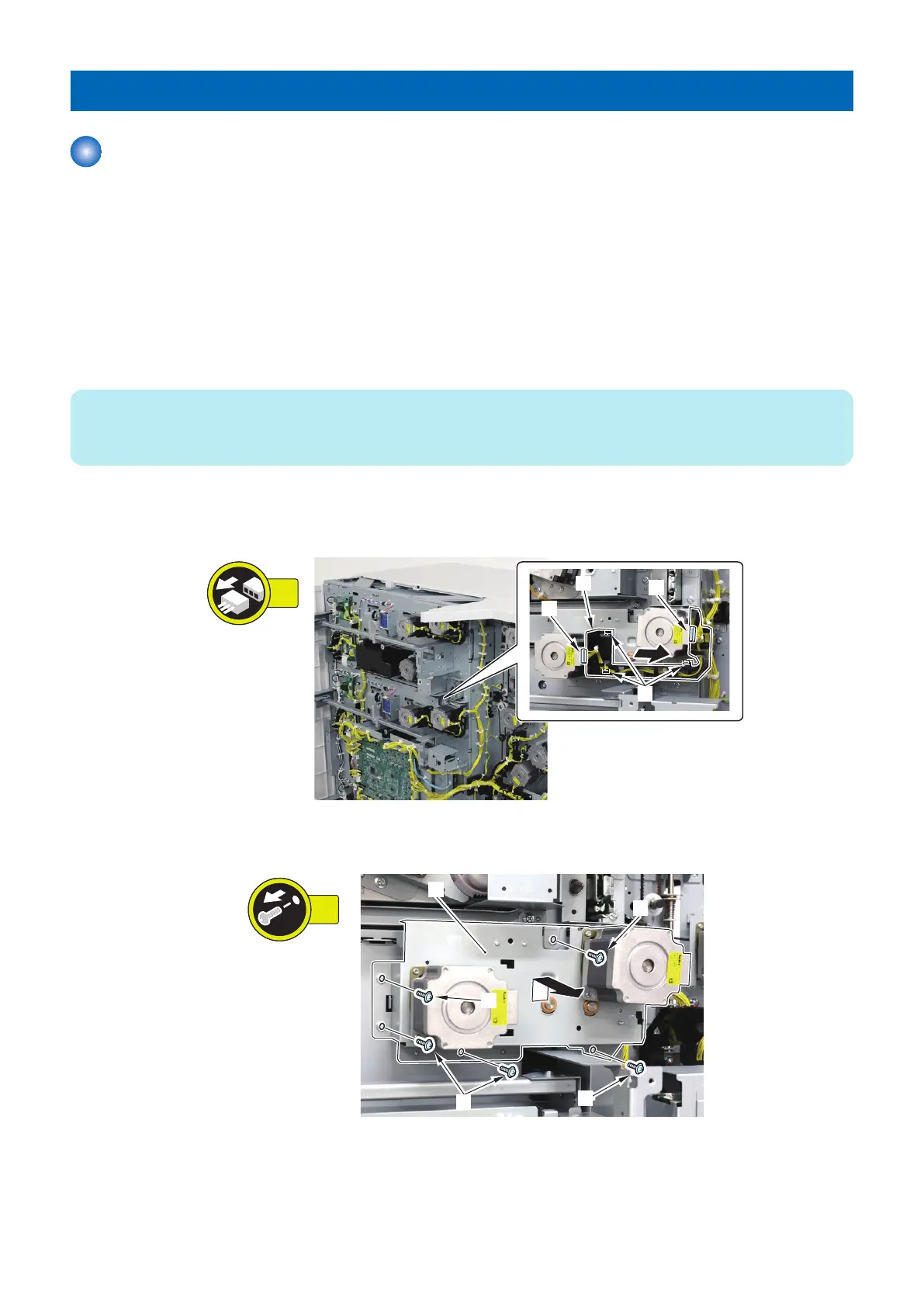
1. Remove the Cable Guide [1] with the cable.
• 2 Connectors [2]
• 3 Hooks [3]
2. Remove the Deck Drive Motor Unit [1].
• 5 Screws [2]
4. Parts Replacement and Cleaning
107













 To Next Page