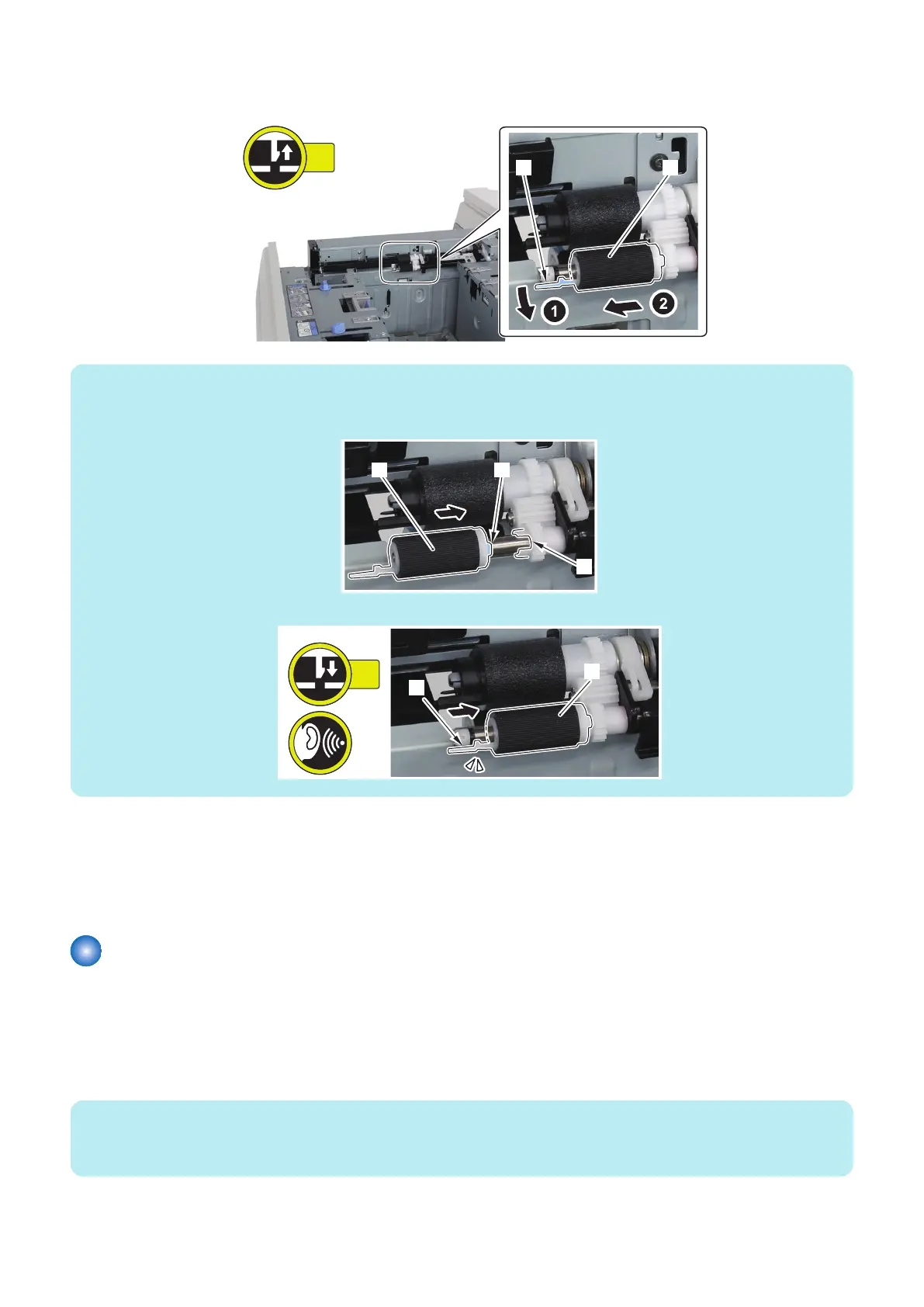
1. Remove the Deck Pickup Roller [1].
• 1 Claw [2]
NOTE:
How to install the Deck Pickup Roller
• Be sure to align the protrusion [2] of the Deck Pickup Roller [1] with the groove [3] of the gear to install the roller.
• Be sure to insert the Deck Pickup Roller [2] until the claw [1] is hooked.
■ Actions when Replacing the Parts
1. Clear the parts counter in the following service mode.
COPIER > COUNTER > DRBL-2 > MD-PU-R1/R2/R3 (M Deck Upper/Middle/Lower)
COPIER > COUNTER > DRBL-2 > MD2-PUR1/R2/R3 (Sec M Deck Upper/Middle/Lower)
Removing the Deck Pickup/Feed Roller
■ Preparation
1. Release the lock to open the target Deck. “Releasing the Deck” on page 77
■ Procedure
NOTE:
The removal procedure of the Deck Pickup/Feed Roller from the upper deck is described below. The procedure of the middle and
lower decks is the same.
4. Parts Replacement and Cleaning
102













 To Next Page