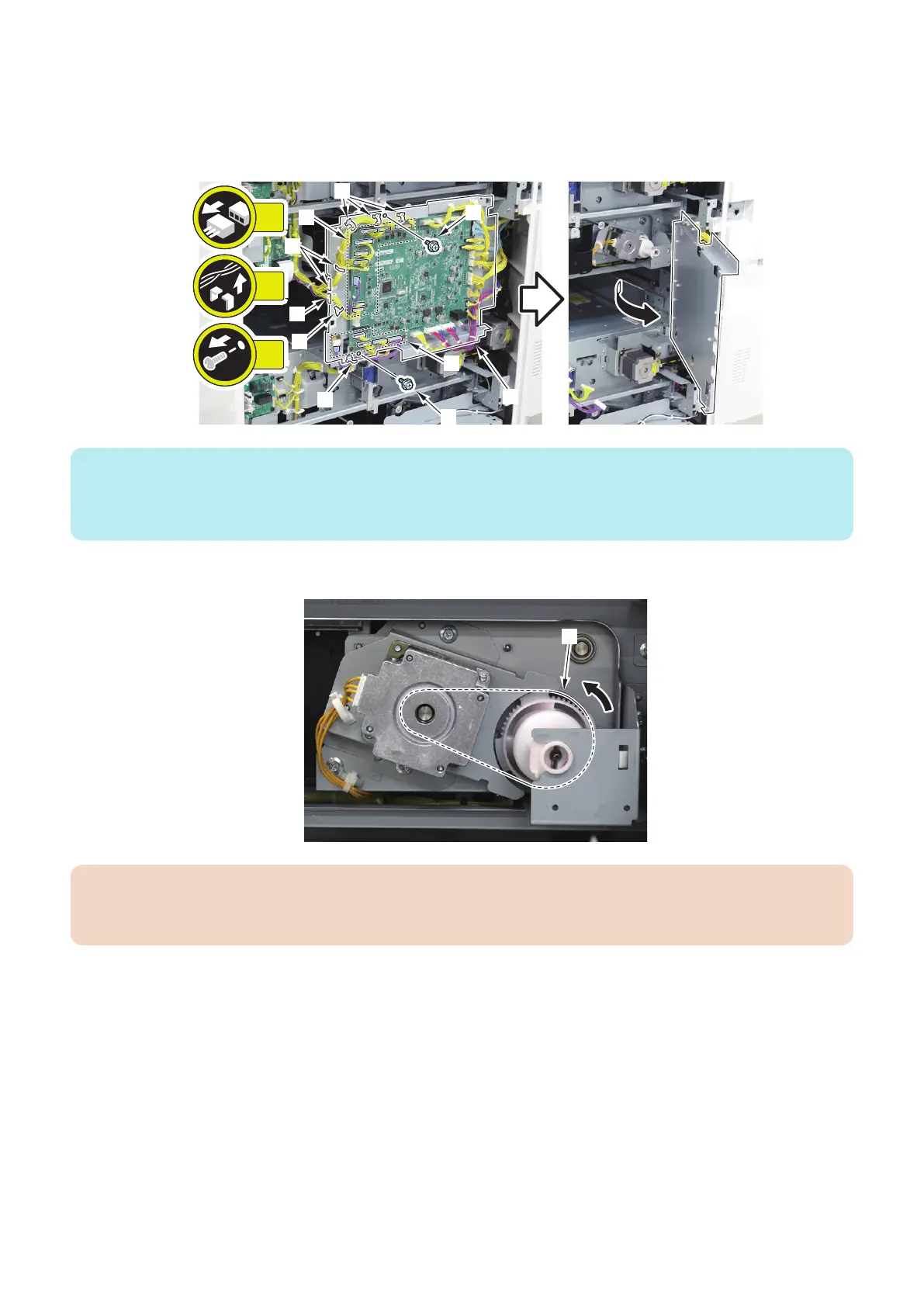
1. Open the Deck Controller PCB Unit [1].
• 14 Connectors [2]
• 3 Wire Saddles [3]
• 5 Reuse Bands [4]
• 2 Screws [5]
2x
14x
8x
[1]
[5]
[5]
[2]
[3]
[3]
[2]
[4]
[4]
[4]
NOTE:
This step is unnecessary when the Upper Deck Lifter Motor is to be removed.
When removing the Lower Deck Lifter Motor, remove the Power Supply Unit 1, instead of following this step. “Removing the DC
Power Supply PCB 1 (PCB005)” on page 134
2. Turn the Timing Belt [1] in the direction of the arrow to lower the lifter until it bottoms.
CAUTION:
Removing the Deck Lifter Motor will cause the lifter to drop by its own weight; be sure to lower the lifter to the bottom position
beforehand.
4. Parts Replacement and Cleaning
110













 To Next Page