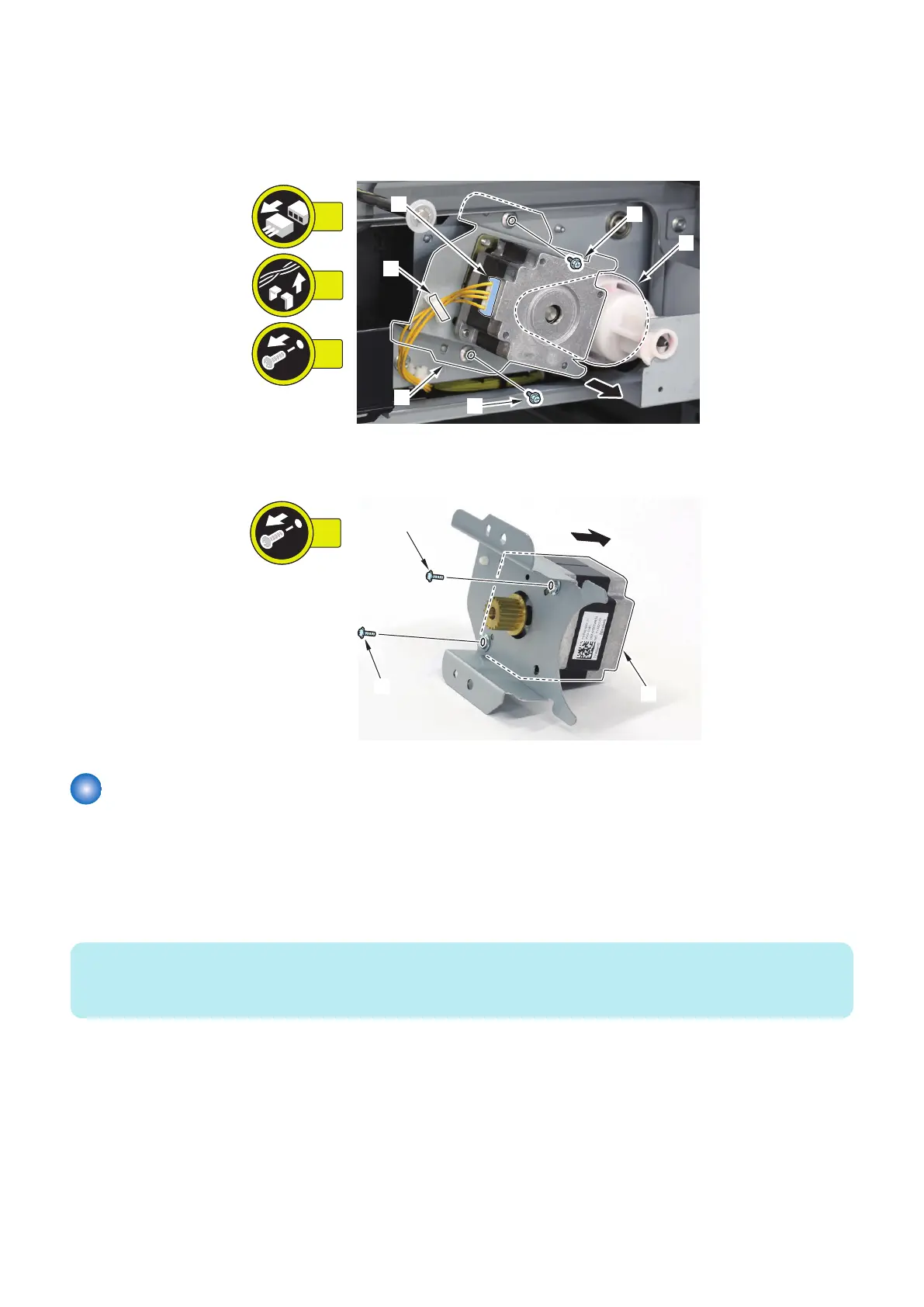
3. Remove the Deck Lifter Motor Unit [1].
• 1 Connector [2]
• 1 Wire Saddle [3]
• 2 Screws [4]
• 1 Timing Belt [5]
4. Remove the Deck Lifter Motor [1].
• 2 Screws [2]
Removing the Deck Swing Motor (M102/202/302)
■ Preparation
1. Release the lock to open the target Deck.“Releasing the Deck” on page 77
2. Remove the Right Cover of the target Deck.“Removing the Deck Right Upper Cover” on page 83, “Removing the
Deck Right Middle Cover” on page 82, “Removing the Deck Right Lower Cover” on page 83
NOTE:
When installing the Secondary Multi-drawer Paper Deck, the Stack Bypass or the POD Deck Lite C/XL, remove the Rear Cover
of the target Deck.
3. Remove the Deck Unit.“Removing the Deck Unit” on page 88
■ Procedure
1. Move the side guide plate of the deck to the outside.
4. Parts Replacement and Cleaning
111













 To Next Page