■ Procedure
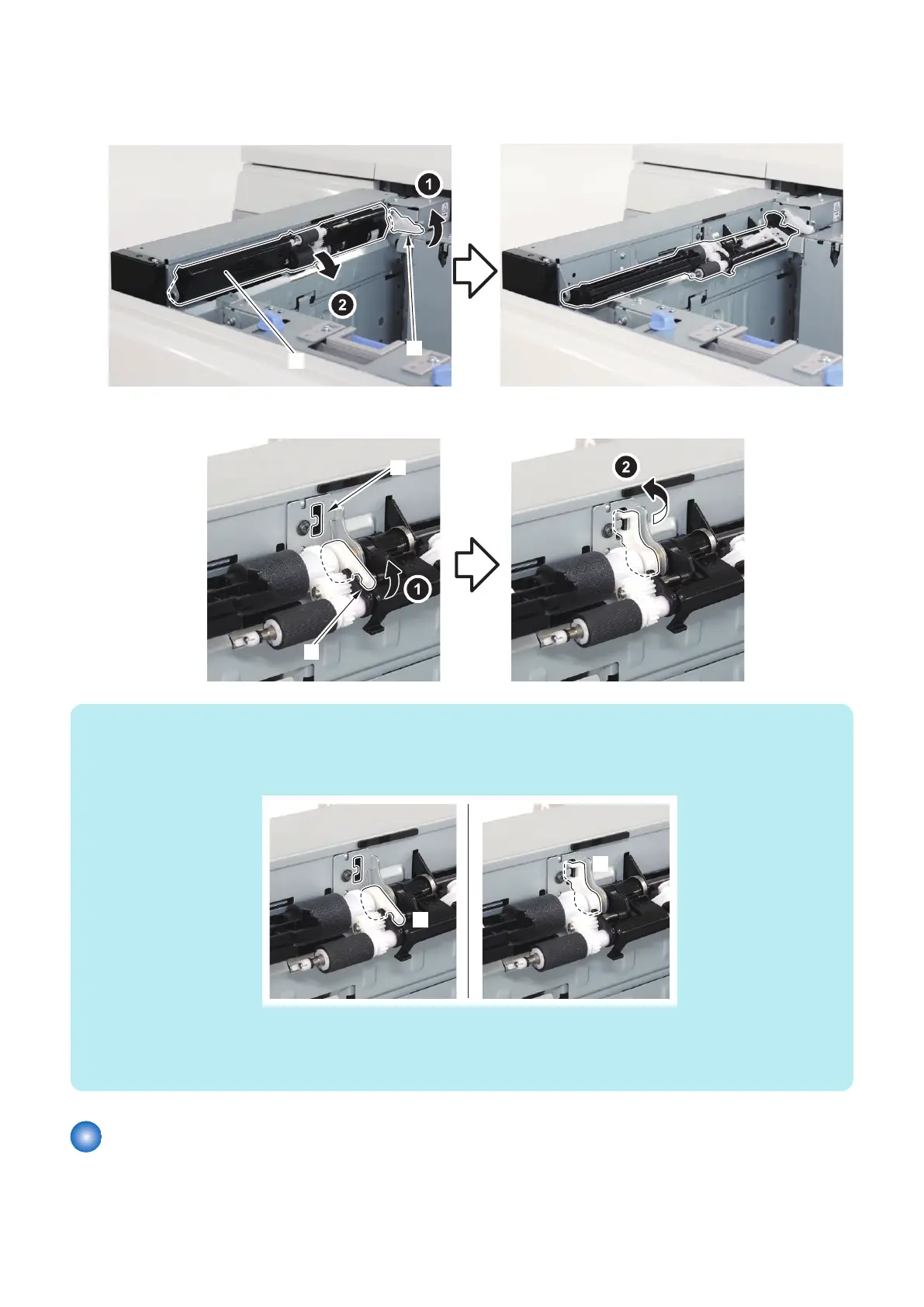
1. Lift the Lock Lever [1] and lower the Deck Pickup Roller Assembly [2].
2. Lift the Pickup Roller Pressure Lever [1], and set it to the Lever Keep Hook [2].
NOTE:
• When the position of the Pickup Roller Pressure Lever is [A], the pressure of the Deck Pickup Roller is an initial value.
• When the position of the Pickup Roller Pressure Lever is [B], the pressure of the Deck Pickup Roller is down.
• At the time of shipment, the position of the Pickup Roller Pressure Lever is [A].
Case of down the pressure of the Deck Pickup Roller
• When the double feeding occurs in the high frictional paper (plain paper, recycled paper, matt coated paper, etc).
• When the Pickup Roller trace on the 2nd sheets and later occurs in the matt coated paper, pre-print paper, etc.
When the pickup failure occurs in heavy paper, return the pressure of the Deck Pickup Roller to initial setting.
Adjustment the width of the Alignment Plate of the Through Path Unit
■ Procedure
1. Confirm width of the paper.
6. Troubleshooting
192













 To Next Page