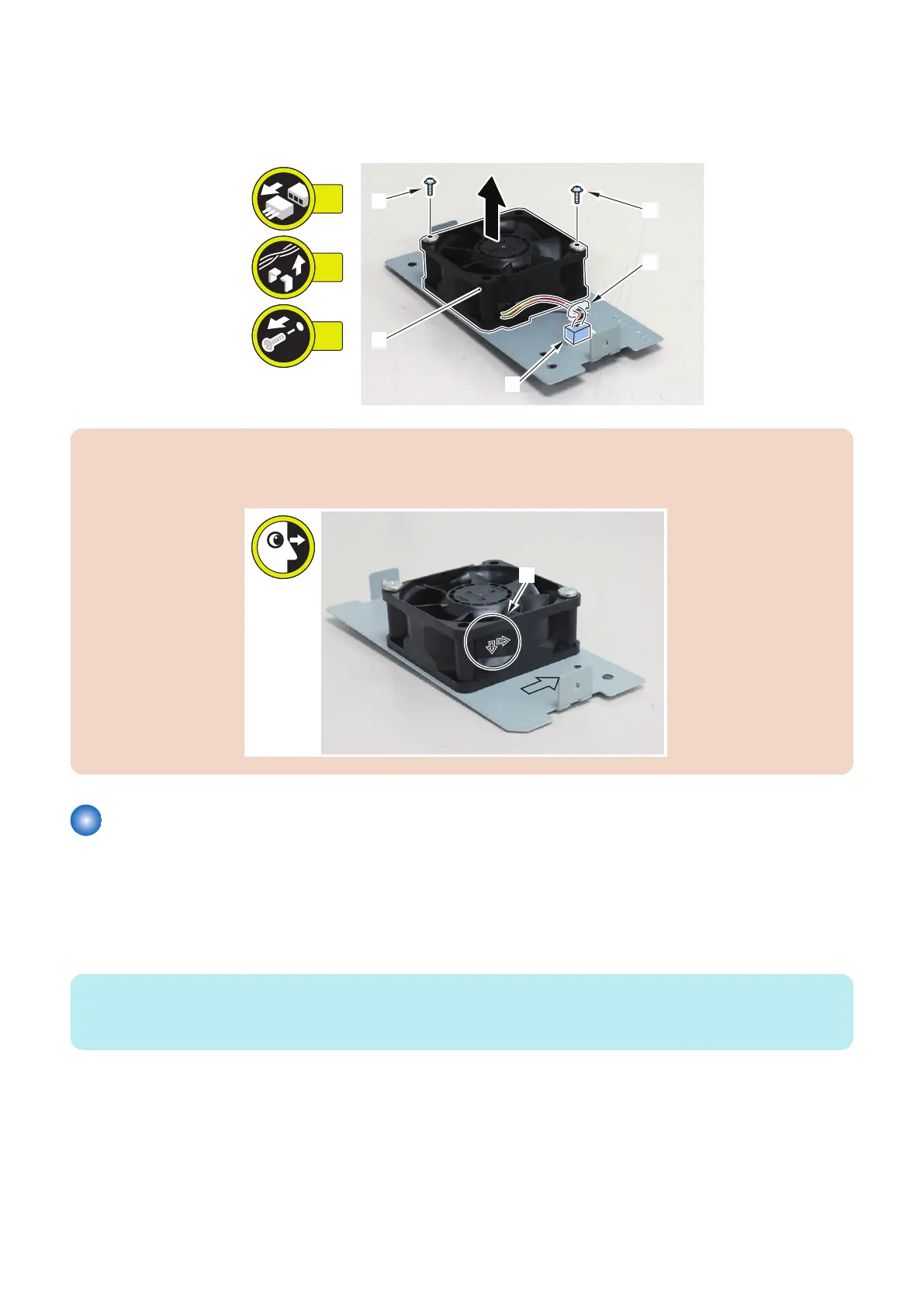
2. Remove the Power Supply Cooling Fan 2 [1].
• 1 Connector [2]
• 1 Wire Saddle [3]
• 2 Screws [4]
CAUTION:
Attach Power Supply Cooling Fan 2 to the bracket so that the arrows [A] on the fan are pointing to the directions shown in
the figure below.
Removing the Deck Flotation Fan 1 (FAN101/201/301)
■ Preparation
1. Release the lock to open the target Deck.“Releasing the Deck” on page 77
2. Remove the Right Cover of the target Deck“Removing the Deck Right Upper Cover” on page 83, “Removing the
Deck Right Middle Cover” on page 82, “Removing the Deck Right Lower Cover” on page 83
NOTE:
When installing the Secondary Multi-drawer Paper Deck, the Stack Bypass or the POD Deck Lite C/XL, remove the Rear Cover
of the target Deck.
3. Remove the Deck.“Removing the Deck Unit” on page 88
4. Remove the Shaft Plate Unit.“Removing the Deck Swing Motor (M102/202/302)” on page 111
5. Remove the Air Heater Unit.“Removing the Air Heater Unit (AHT101/201/301)” on page 147
4. Parts Replacement and Cleaning
126













 To Next Page