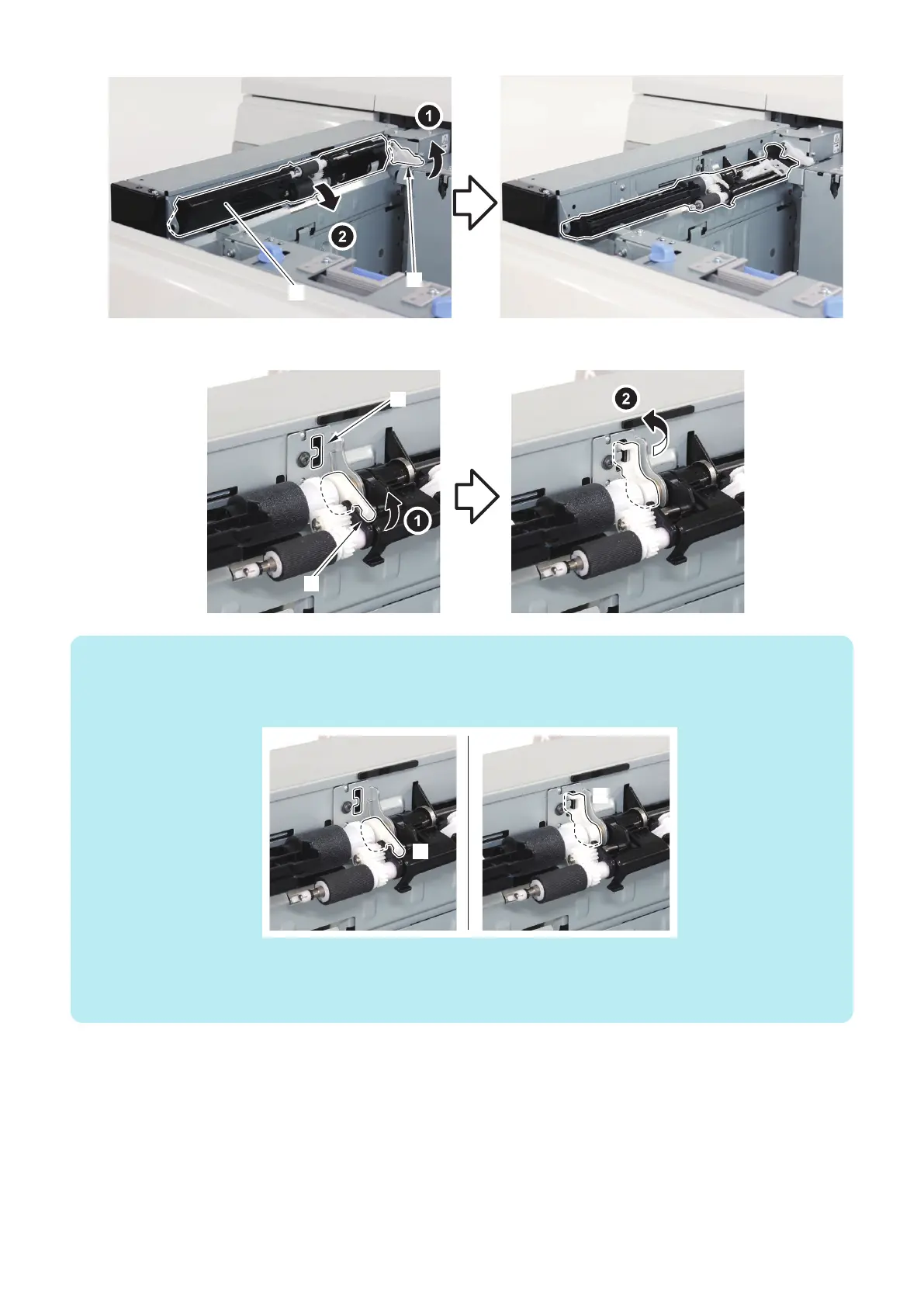
2. Lift the Pickup Roller Pressure Lever [1], and set it to the Lever Keep Hook [2].
NOTE:
• When the position of the Pickup Roller Pressure Lever is [A], the pressure of the Deck Pickup Roller is an initial value.
• When the position of the Pickup Roller Pressure Lever is [B], the pressure of the Deck Pickup Roller is down.
• At the time of shipment, the position of the Pickup Roller Pressure Lever is [A].
Case of down the pressure of the Deck Pickup Roller
• When the double feeding occurs in the high frictional paper (plain paper, recycled paper, matt coated paper, etc).
• When the Pickup Roller trace on the 2nd sheets and later occurs in the matt coated paper, pre-print paper, etc.
When the pickup failure occurs in heavy paper, return the pressure of the Deck Pickup Roller to initial setting.
5. Adjustment
180













 To Next Page