Printing Multiple Originals Next to Each Other (Mac OS X)
Printing Multiple Originals Next to Each Other (Mac OS X)
This topic describes how to use the Free Layout function to arrange multiple originals next to each other before
printing.
1
Choose Print in the application menu.
2
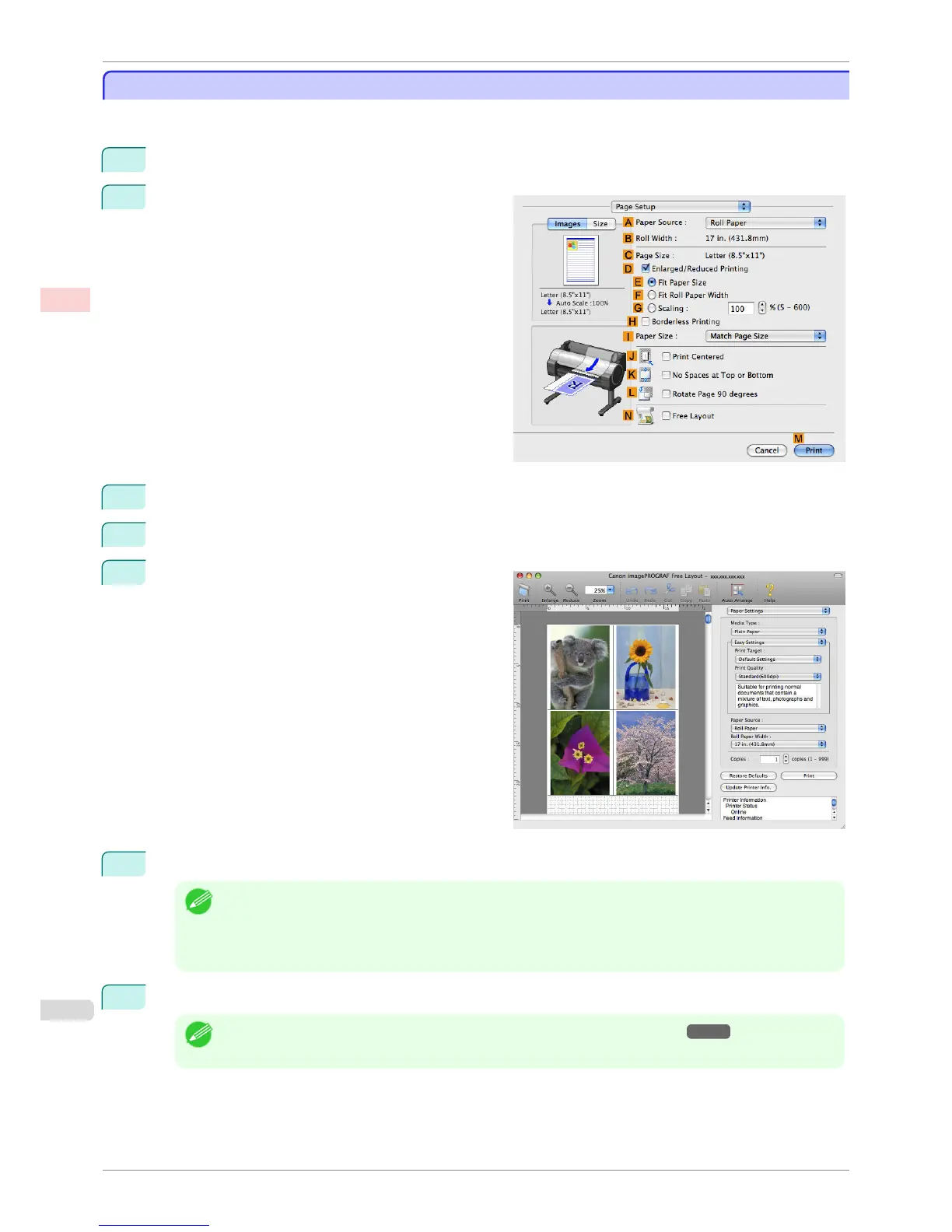
Access the Page Setup pane.
3
Select the N Free Layout check box.
4
Click M Print.
5
The Canon imagePROGRAF Free Layout window
is displayed.
6
Edit and rearrange the image in the Canon imagePROGRAF Free Layout window as desired.
Note
• Without closing the Canon imagePROGRAF Free Layout window, repeat steps 1 to 4 to arrange originals from
multiple applications on the same page.
• For instructions on editing and rearranging images, refer to the Canon imagePROGRAF Free Layout help top-
ic.
7
Print from the Canon imagePROGRAF Free Layout menu.
Note
• For details on Canon imagePROGRAF Free Layout functions, refer to Free Layout →P.332 .
Printing Multiple Originals Next to Each Other (Mac OS X)
iPF760
User's Guide
Enhanced Printing Options Tiling and multiple pages per sheet
114















 To Next Page