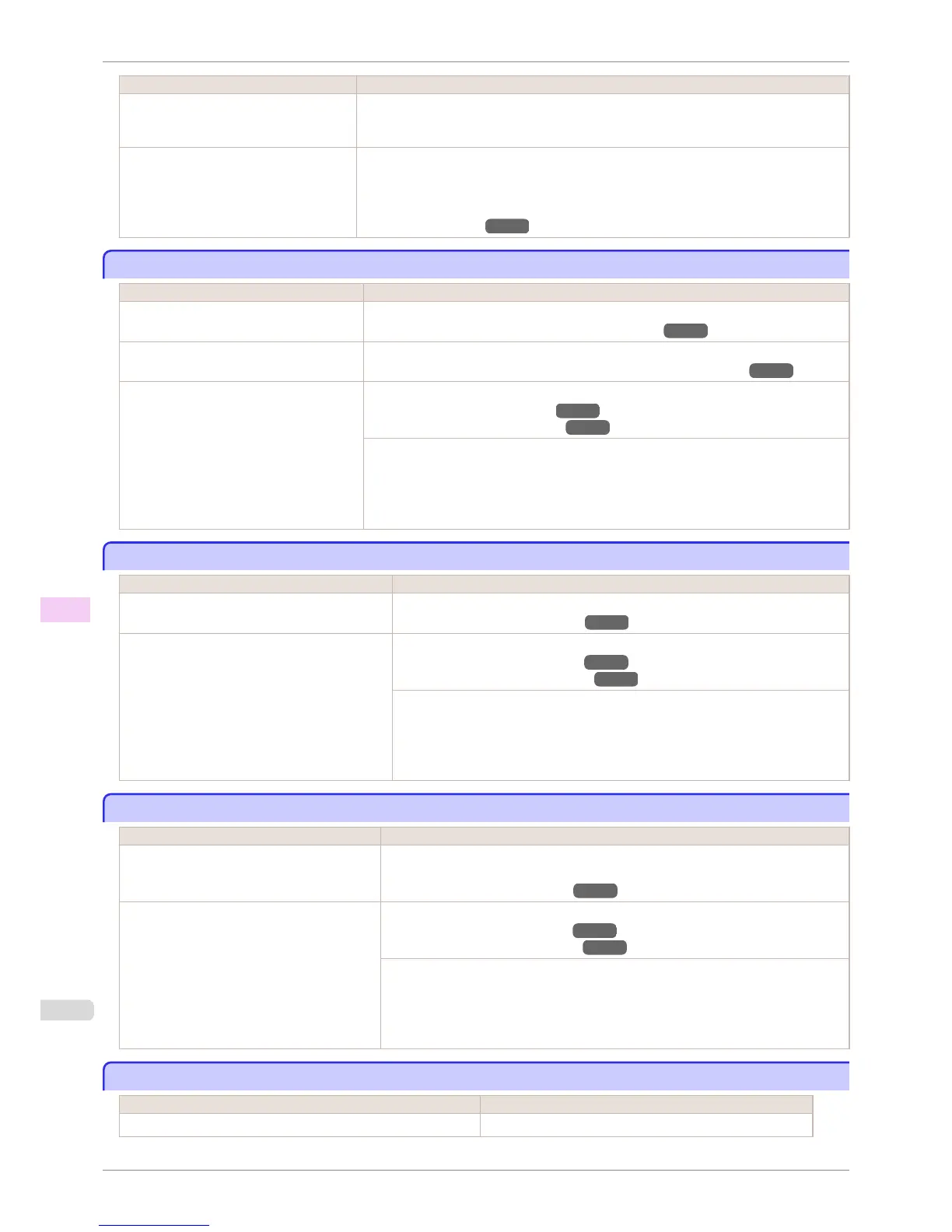
Cause Corrective Action
The type of paper specified in the printer
driver does not match the type loaded in
the printer.
1.
Press the Stop button and stop printing.
2.
Change the type of paper in the printer driver and try printing again.
Scan Wait Time > Area in the Control
Panel menu is set to Leading edge.
When Scan Wait Time > Area is set to Leading edge, colors may be uneven 110–140 mm
from the leading edge. (The position varies depending on the Print Quality setting.)
In this case, select Scan Wait Time > Area > Entire area.
However, note that printing will now take longer.
(See "Menu Settings.")
→P.448
Image edges are blurred or white banding occurs
Image edges are blurred or white banding occurs
Cause Corrective Action
The Platen suction is too strong. In the Control Panel menu, set VacuumStrngth to Weakest.
(See "Adjusting the Vacuum Strength (VacuumStrngth).") →P.515
The Printhead is set too high in the Control
Panel menu.
In the Control Panel menu, set Head Height to Lowest.
(See "Troubleshooting Paper Abrasion and Blurry Images (Head Height).") →P.507
The type of paper specified in the printer
driver does not match the type loaded in the
printer.
Load paper of the same type as you have specified in the printer driver.
(See "Loading Rolls in the Printer.") →P.399
(See "Loading Sheets in the Printer.") →P.417
Make sure the same type of paper is specified in the printer driver as you have loaded in
the printer.
1.
Press the Stop button and stop printing.
2.
Change the type of paper in the printer driver and try printing again.
The contrast becomes uneven during printing
The contrast becomes uneven during printing
Cause Corrective Action
The paper feed amount is out of adjustment. Adjust the feed amount.
(See "Adjusting the Feed Amount.") →P.509
The type of paper specified in the printer driver
does not match the type loaded in the printer.
Load paper of the same type as you have specified in the printer driver.
(See "Loading Rolls in the Printer.") →P.399
(See "Loading Sheets in the Printer.") →P.417
Make sure the same type of paper is specified in the printer driver as you have loaded
in the printer.
1.
Press the Stop button and stop printing.
2.
Change the type of paper in the printer driver and try printing again.
The length of printed images is inaccurate in the feeding direction
The length of printed images is inaccurate in the feeding direction
Cause Corrective Action
In the Control Panel menu, Adj. Priority is set
to Print Quality.
Set Adj. Priority to Print Length in the Control Panel menu, and then execute Adjust
Length.
(See "Adjusting the Feed Amount.") →P.509
The type of paper specified in the printer driver
does not match the type loaded in the printer.
Load paper of the same type as you have specified in the printer driver.
(See "Loading Rolls in the Printer.") →P.399
(See "Loading Sheets in the Printer.") →P.417
Make sure the same type of paper is specified in the printer driver as you have loaded in
the printer.
1.
Press the Stop button and stop printing.
2.
Change the type of paper in the printer driver and try printing again.
Images are printed crooked
Images are printed crooked
Cause Corrective Action
In the Control Panel menu, Skew Check Lv. is set to Loose or Off. In the Control Panel menu, set Skew Check Lv. to Standard.
Image edges are blurred or white banding occurs
iPF760
User's Guide
Troubleshooting Problems with the printing quality
564















 To Next Page