b
Ethernet Port
Connect an Ethernet cable to this port. The lamp is lit if the Ethernet cable is connected correctly and commu-
nication is possible between the computer and printer.
c
USB Port
Connect a USB cable to this port. The printer is compatible with Hi-Speed USB connections.
d
Carrying Handles
When carrying the printer, have three people hold it by these handles on the back at both ends.
e
Power Supply Connector
Connect the power cord to this connector.
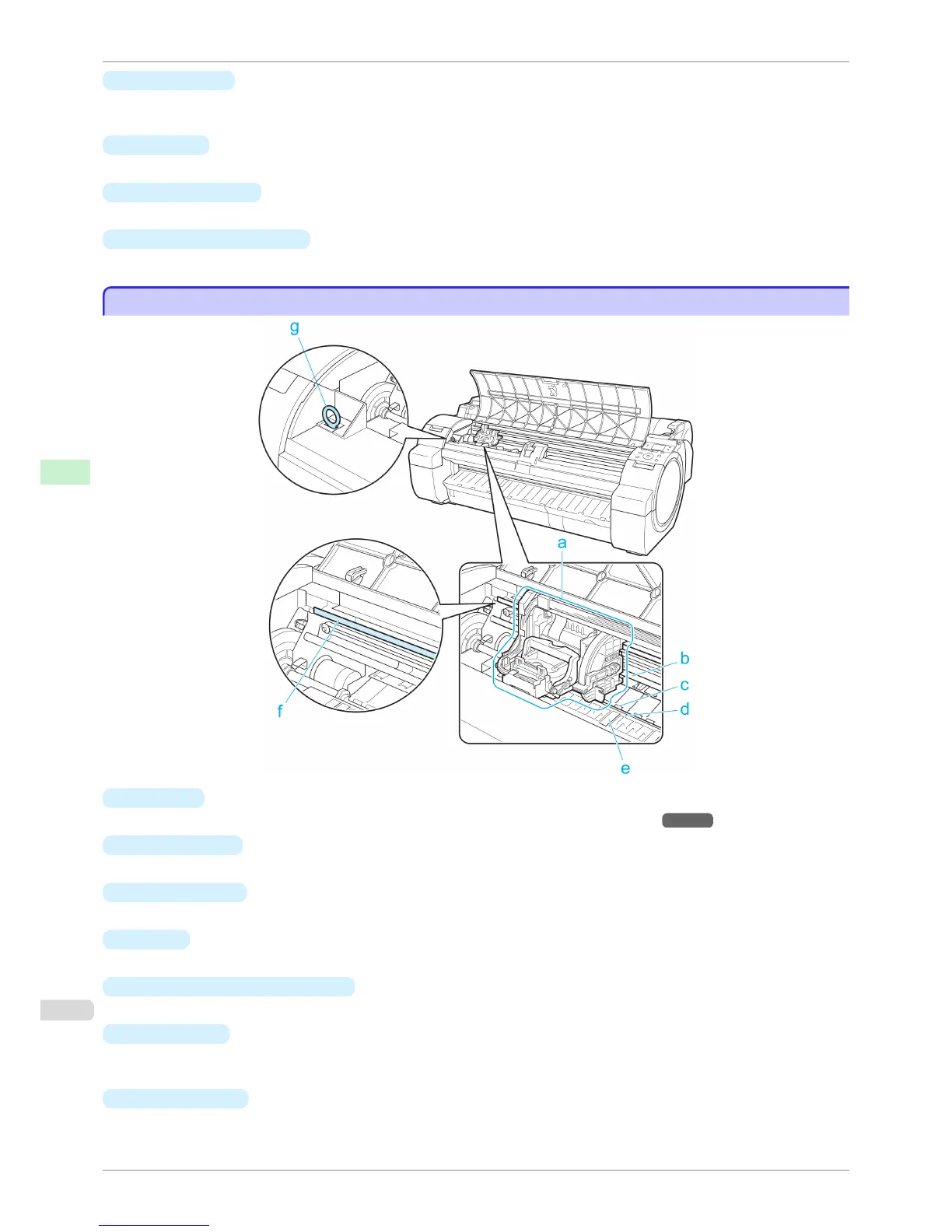
Top Cover (Inside)
Top Cover (Inside)
a
Carriage
Moves the Printhead. The carriage serves a key role in printing. (See "Carriage.") →P.467
b
Carriage Shaft
The Carriage slides along this shaft.
c
Paper Retainer
Important in supplying the paper. This retainer holds paper as it is fed.
d
Platen
The Printhead moves across the platen to print. Vacuum holes on the platen hold paper in place.
e
Borderless Printing Ink Grooves
For catching ink outside the edges of paper during borderless printing.
f
Linear Scale
The linear scale serves a key role in detecting the Carriage position. Be careful not to touch this part when
cleaning inside the Top Cover or clearing paper jams.
g
Cleaning Brush
When cleaning inside the printer under the Top Cover, use this brush to sweep away paper dust on the Platen.
Top Cover (Inside)
iPF760
User's Guide
Printer Parts Printer parts
466















 To Next Page