Operations and Display Screen
Operations and Display Screen
Control Panel ................................................................................................................................................ 430
Control Panel Display ................................................................................................................................... 431
How to View Instructions With Navigate ....................................................................................................... 435
Checking Instructions During Printer Operations ........................................................................................ 436
Control Panel
Control Panel
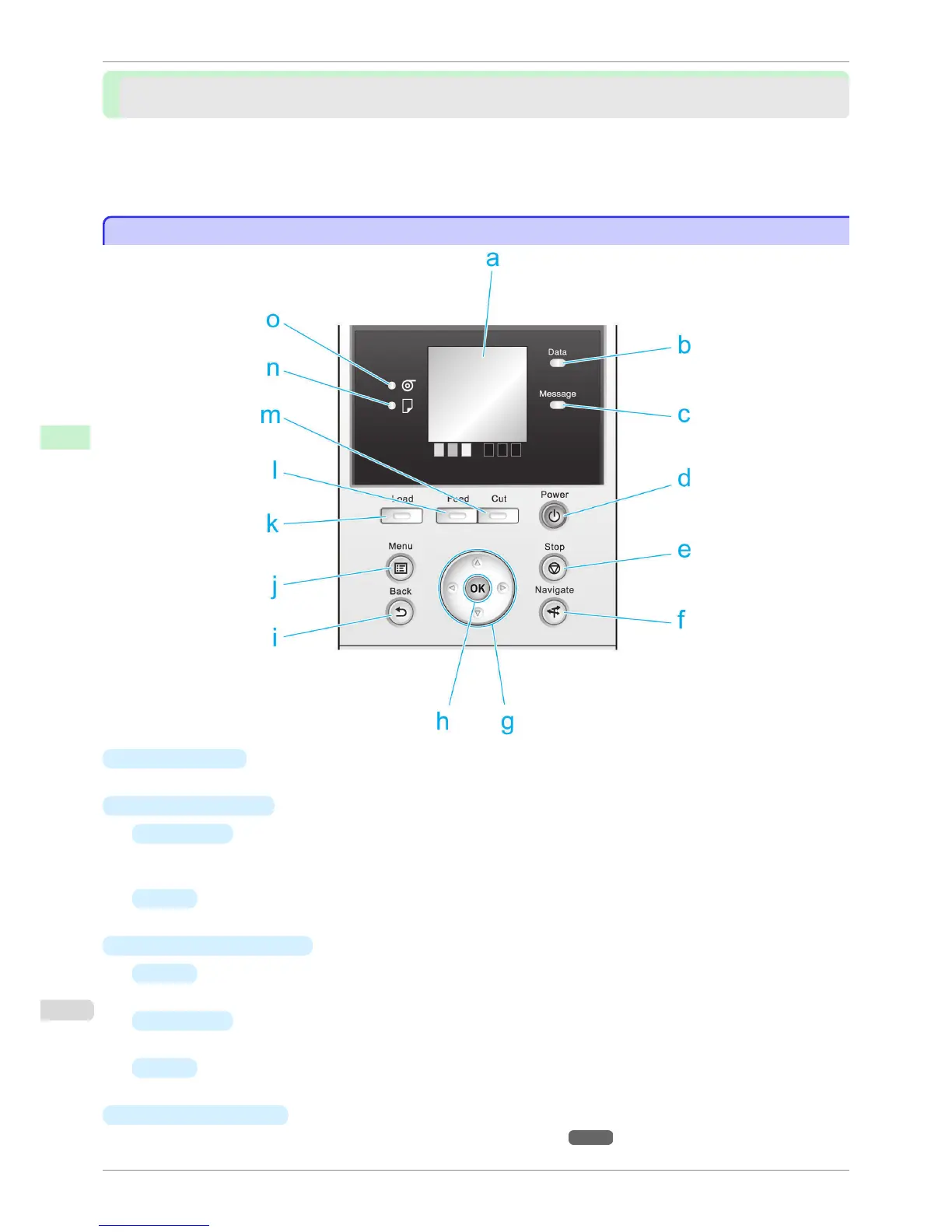
a
Display Screen
Shows printer menus, as well as the printer status and messages.
b
Data Lamp (green)
•
Flashing
During printing, the Data lamp flashes when the printer is receiving or processing print jobs. Otherwise,
this lamp flashes when the print job is paused or the printer is updating the firmware.
•
Off
There are no active print jobs when the Data lamp is off.
c
Message Lamp (orange)
•
On
A warning message is displayed.
•
Flashing
An error message is displayed.
•
Off
The printer is off or is operating normally.
d
Power button (green)
Turns the printer on and off. (See "Turning the Printer On and Off.") →P.17
Control Panel
iPF760
User's Guide
Control Panel Operations and Display Screen
430















 To Next Page