Paper Sizes Dimensions
DIN C0 917.0 × 1296.0 mm (36.10 × 51.02 in)
DIN C1 648.0 × 917.0 mm (25.51 × 36.10 in)
DIN C2 458.0 × 648.0 mm (18.03 × 25.51 in)
DIN C3 324.0 × 458.0 mm (12.76 × 18.03 in)
DIN C4 229.0 × 324.0 mm (9.02 × 12.76 in)
20"x24" 508.0 × 609.6 mm (20.00 × 24.00 in)
18"x22" 457.2 × 558.8 mm (18.00 × 22.00 in)
14"x17" 355.6 × 431.8 mm (14.00 × 17.00 in)
12"x16" 304.8 × 406.4 mm (12.00 × 16.00 in)
10"x12" 254.0 × 304.8 mm (10.00 × 12.00 in)
10"x15" 254.0 × 381.0 mm (10.00 × 15.00 in)
US Photo 16"x20" 406.4 × 508.0 mm (16.00 × 20.00 in)
Poster 20"x30" 508.0 × 762.0 mm (20.00 × 30.00 in)
Poster 30"x40" 762.0 × 1016.0 mm (30.00 × 40.00 in)
13"x22" 329.0 × 558.0 mm (12.95 × 21.97 in)
Poster 300x900mm 300.0 × 900.0 mm (11.81 × 35.43 in)
Custom Paper Size 203.2 x 203.2 mm (8.00 x 8.00 in) to 917.0 x 1600.0 mm (36.10 x 62.99 in)
Note
• For details on non-standard paper sizes, see "Printing on Non-Standard Paper Sizes." →P.105
• Borderless printing is not supported on sheets.
Displaying the Paper Reference Guide
Displaying the Paper Reference Guide
The Paper Reference Guide can be accessed from imagePROGRAF Support Information. Follow these instruc-
tions, as appropriate for your operating system.
•
Windows
1.
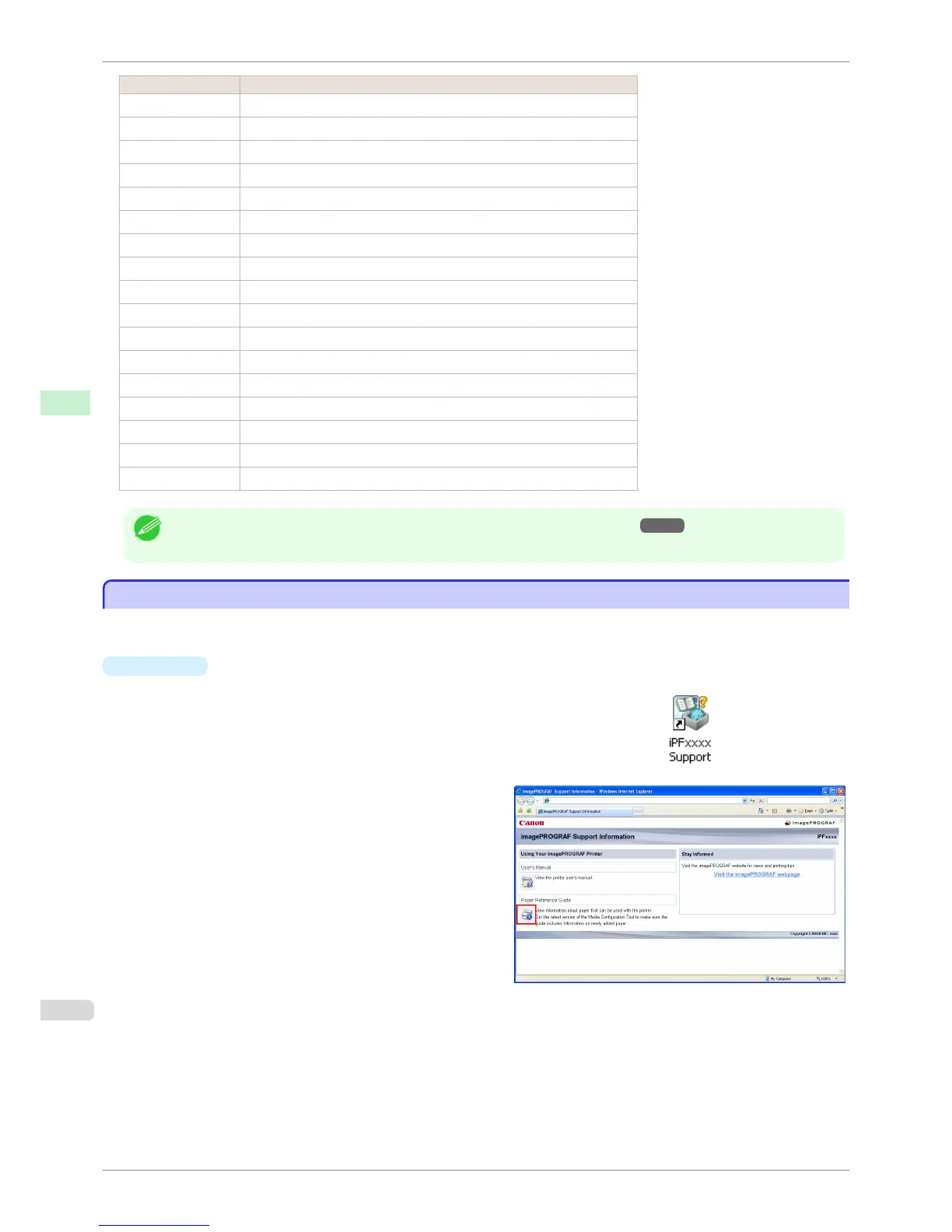
Double-click the iPFxxxx Support desktop icon. (iPFxxxx indicates the
printer model.)
The imagePROGRAF Support Information window is displayed.
2.
Click the Paper Reference Guide button.
Displaying the Paper Reference Guide
iPF760
User's Guide
Handling Paper Paper
394















 To Next Page