Starting Color imageRUNNER Enlargement Copy
Starting Color imageRUNNER Enlargement Copy
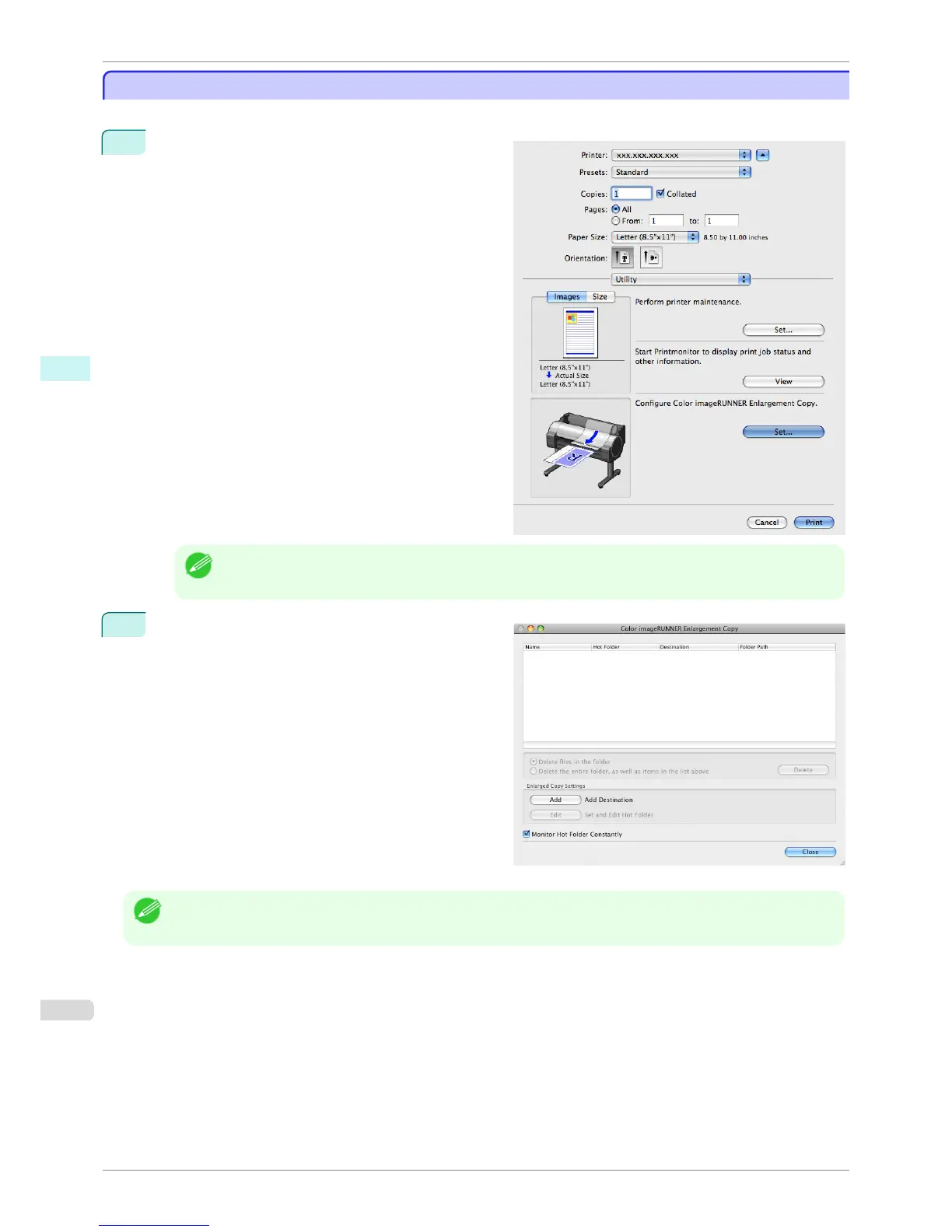
Follow the procedure below to start the Color imageRUNNER Enlargement Copy.
1
Open the Utility panel of the Print dialog box.
Note
• Your printer is depicted in the lower-left area of this screen.
2
Click the Set button in Configure Color imageRUN-
NER Enlargement Copy. to open the Color image-
RUNNER Enlargement Copy dialog box.
Note
• You can also start the utility directly by clicking on the Color imageRUNNER Enlargement Copy.app icon in Applica-
tions > Canon Utilities > iR Enlargement Copy.
Starting Color imageRUNNER Enlargement Copy
iPF760
User's Guide
Mac OS X Software Color imageRUNNER Enlargement Copy
358















 To Next Page