Printing at full size
Printing at full size
Printing on Oversized Paper .......................................................................................................................... 76
Printing at Full Size (Windows) ................................................................................................................. 77
Printing at Full Size (Mac OS X) ................................................................................................................ 78
Borderless Printing at Actual Size .................................................................................................................. 80
Borderless Printing at Actual Size (Windows) .......................................................................................... 81
Borderless Printing at Actual Size (Mac OS X) ......................................................................................... 83
Printing on Oversized Paper
Printing on Oversized Paper
Except in borderless printing, the actual printing area corresponds to your selected paper size minus the space for
a margin (See "Print Area →P.600 "). To print documents or images you prepare without a margin at actual size,
use an oversized paper size.
For example, to print a A4-sized original without a margin at A4 size, print it on paper larger than A4 size and cut
away the excess margin.
Note
• If you prepare an original for printing without a margin and print it on paper of regular size, the image near the edge will
not be printed.
•
Oversize
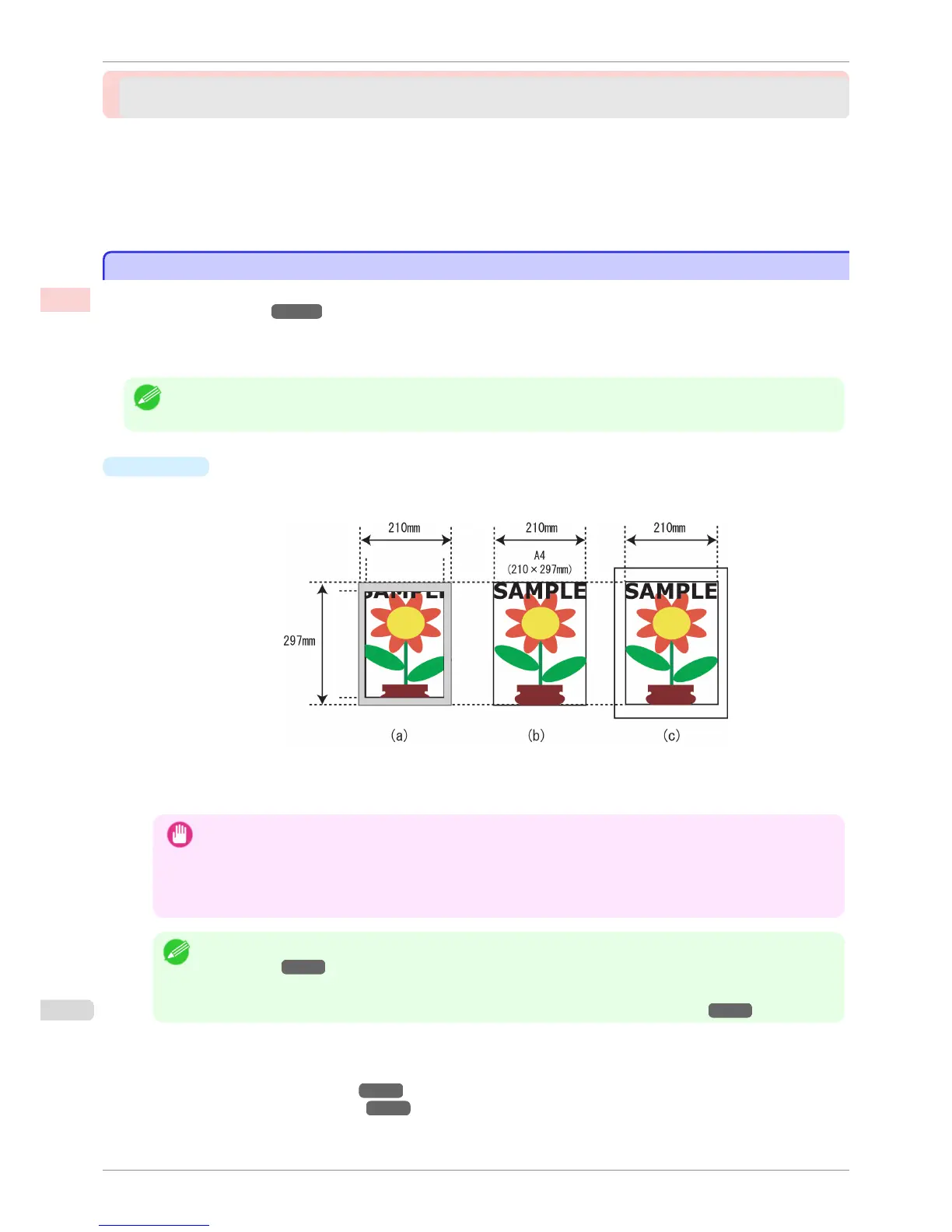
The margin required by the printer is added around the outside of a regular paper size. For example, when
printing a A4-sized original (210×297 mm), you have the following options.
•
(a) Regular paper size: Gray area not printed
•
(b) Page Size
•
(c) Oversized paper size: Print area matches the page size (b)
Important
• When printing on oversize paper, load paper larger than the page size—a size that includes the margin required by
the printer.
• Sheets: Load paper that is at least 6 mm (0.24 in) wider and 26 mm (1 in) higher than the page size
• Rolls: Load paper that is at least 6 mm (0.24 in) wider and 6 mm (0.24 in) higher than the page size
Note
• Paper larger than the maximum size supported by the printer cannot be used as paper for oversized printing.(See
"Paper Sizes →P.392 ")
• To specify a non-standard paper size in oversized printing, register the paper size as a Custom Paper Size. Over-
sized printing is not available with Custom Size.(See "Printing on Non-Standard Paper Sizes →P.105 ")
For instructions on oversized printing, refer to the following topics, as appropriate for your computer and oper-
ating system.
•
Printing at Full Size (Windows) →P.77
•
Printing at Full Size (Mac OS X) →P.78
Printing on Oversized Paper
iPF760
User's Guide
Enhanced Printing Options Printing at full size
76















 To Next Page