• H Copies
Enter the number of copies to print, in a range of 1–999.
•
Reverse Order
Activate this option to print pages in reverse order.
•
Collate
Activate this option to print complete sets in the specified quantity.
• I Page Options
Click to display the Page Options dialog box, which enables you to complete settings for printing the user
name, date, or page number in the header or footer.
•
Page Options Dialog Box →P.181
• J Special Settings
If the printing results are not as you expected, click this option to change how printing is processed.
•
Special Settings Dialog Box →P.182
• S Defaults
Click to restore all settings on the sheet to the default values.
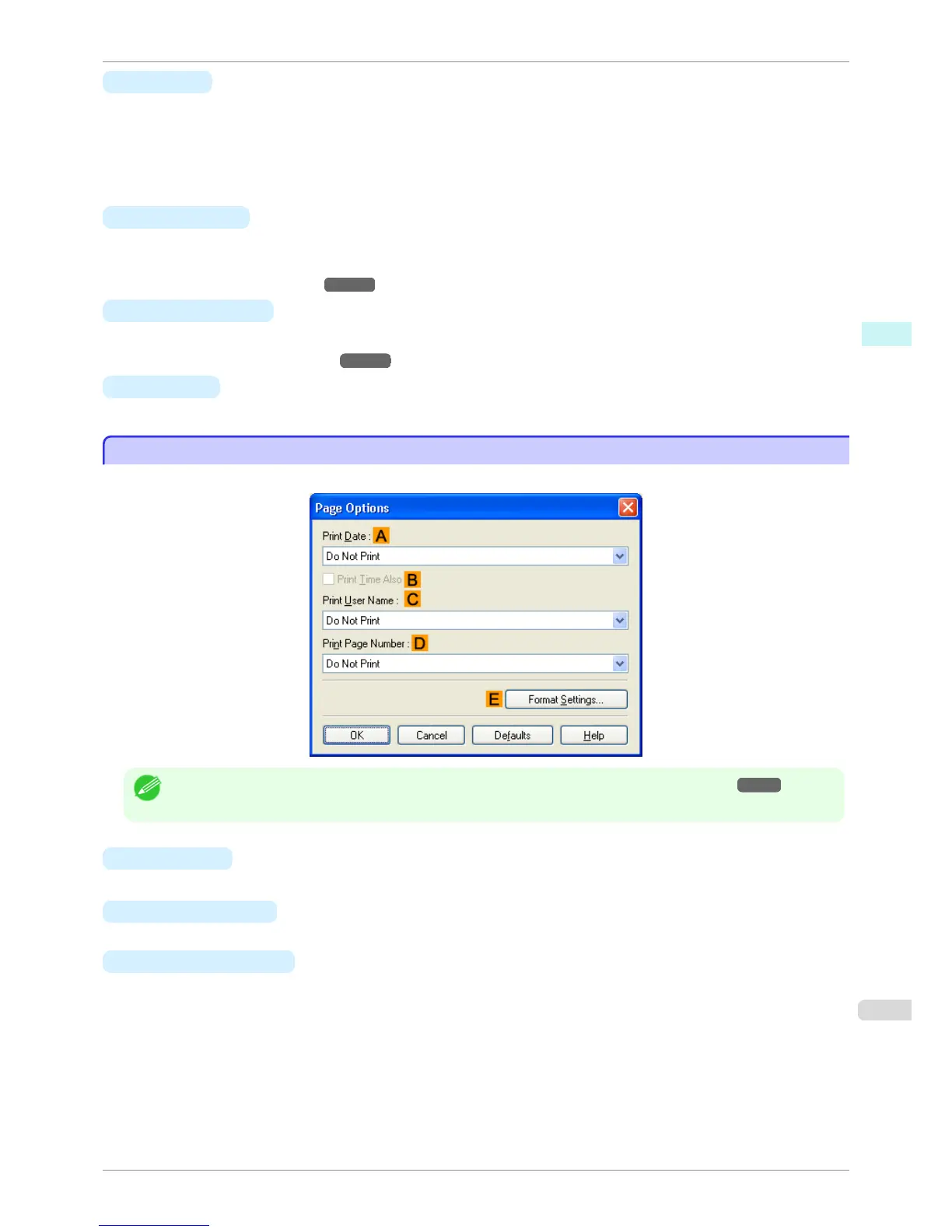
Page Options Dialog Box
Page Options Dialog Box
The Page Options dialog box offers the following settings.
Note
• To display the Page Options dialog box, on the Layout sheet, click Page Options.(See "Layout Sheet →P.180 ")
• A Print Date
Select where the date is printed, as desired. To print the time as well, select B Print Time Also.
• C Print User Name
Select where the user name is printed, as desired.
• D Print Page Number
Select where the page number is printed, as desired.
iPF760
Page Options Dialog Box
User's Guide
Windows Software Printer Driver
181















 To Next Page