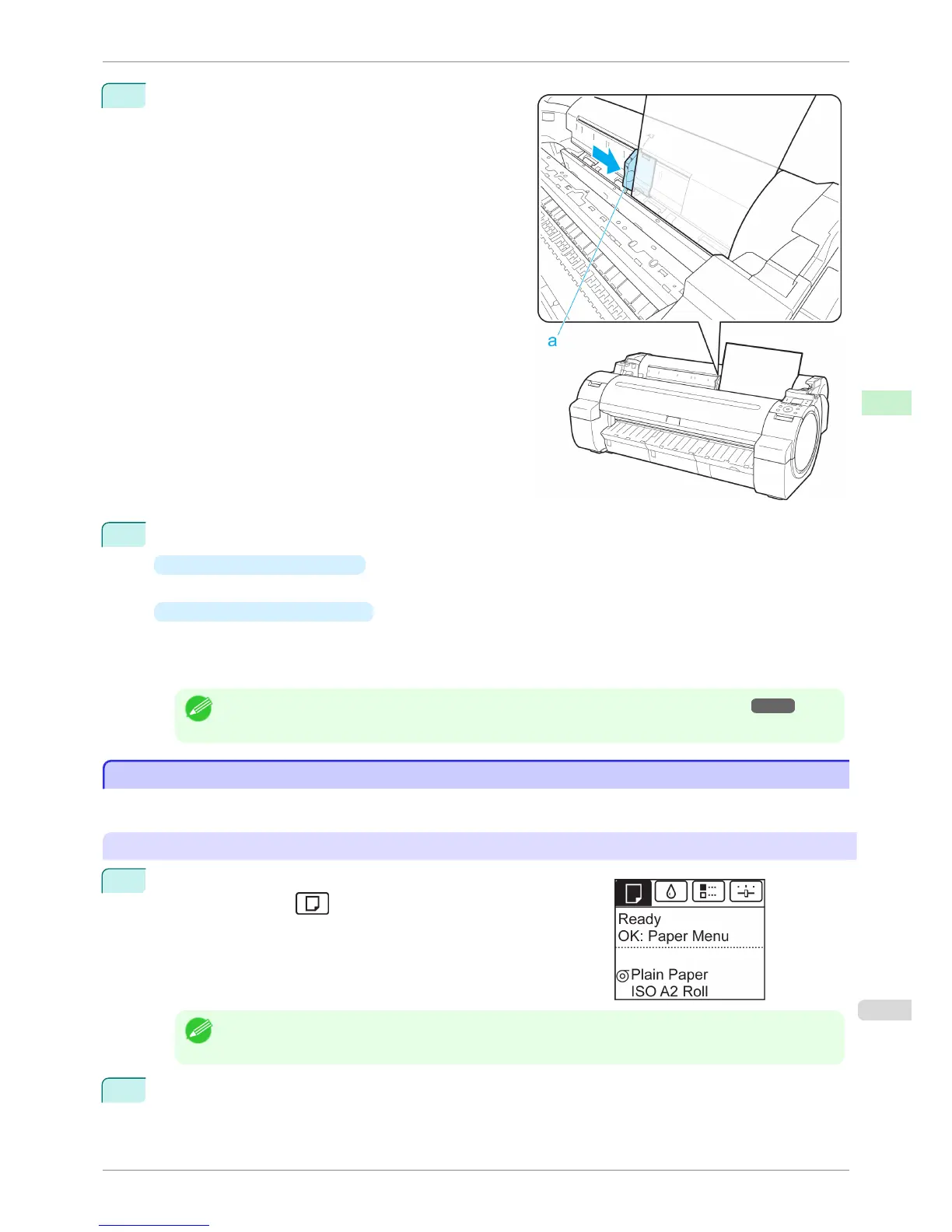
4
Move the Width Guide (a) carefully to match the size of
paper loaded.
Set the Width Guide against the edge of the paper to
prevent the paper from becoming crooked or wrinkled.
5
Press the OK button.
•
If a print job was received
The printer now starts printing the print job.
•
If no print job was received
A menu for selection of the type of paper is automatically shown on the Display Screen.
Press ▲ or ▼ to select the type of paper, and then press the OK button.
The printer now starts feeding the paper.
Note
• For details on types of paper to select, see the Paper Reference Guide. (See "Types of Paper.") →P.392
Printing From a Desired Starting Point
Printing From a Desired Starting Point
When printing inside boundaries or in other situations when you want to specify a particular position to start printing
from, set Width Detection to Off in the printer menu for the type of paper used.
Set Width Detection to Off
1
On the Tab Selection screen of the Control Panel, press
◀ or ▶ to
select the Paper tab (
).
Note
• If the Tab Selection screen is not displayed, press the Menu button.
2
Press the OK button.
The Paper Menu is displayed.
iPF760
Printing From a Desired Starting Point
User's Guide
Handling Paper Handling sheets
419















 To Next Page