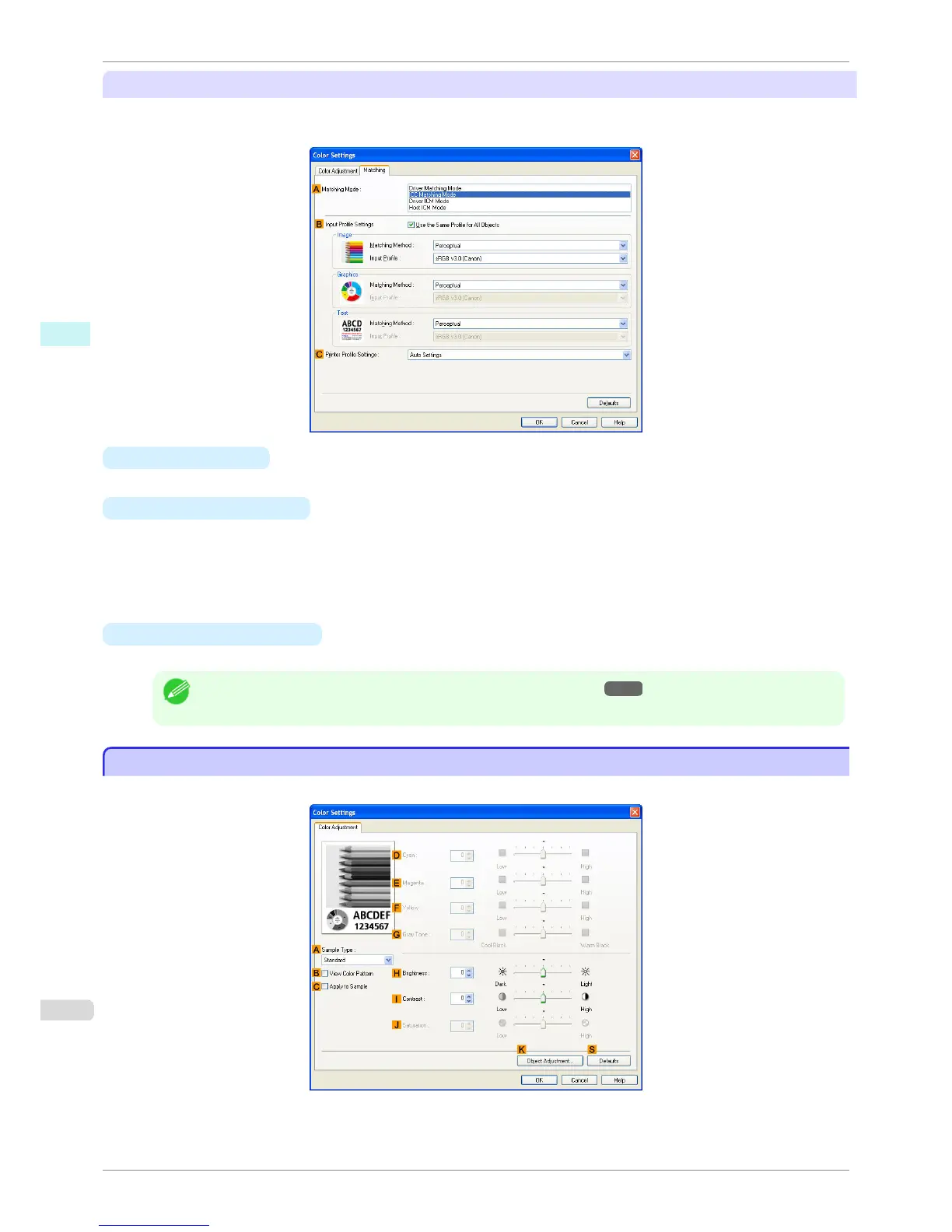
ICC Matching Mode, Driver ICM Mode and Host ICM Mode
The following options are available when you select ICC Matching Mode, Driver ICM Mode, or Host ICM Mode in
the
A Matching Mode list.
• A Matching Mode
Select the color matching mode to use, as desired.
• B Input Profile Settings
You can select Image, Graphics, or Text. You can choose Matching Method and Input Profile.
Various options are available depending on your selected Matching Mode.
To apply the same input profile automatically for Graphics and Text, select Use the Same Profile for All Ob-
jects. To apply separate input profiles to Graphics and Text, clear Use the Same Profile for All Objects and
specify the individual settings.
• C Printer Profile Settings
Specify the printer profile as desired. Normally, select Auto Settings.
Note
• For details on settings items, see "Adjusting the Color in the Printer Driver →P.50 "
Color Adjustment Sheet: Monochrome
Color Adjustment Sheet: Monochrome
On the Color Adjustment sheet for monochrome printing, you can adjust the brightness and contrast.
Color Adjustment Sheet: Monochrome
iPF760
User's Guide
Windows Software Printer Driver
174















 To Next Page