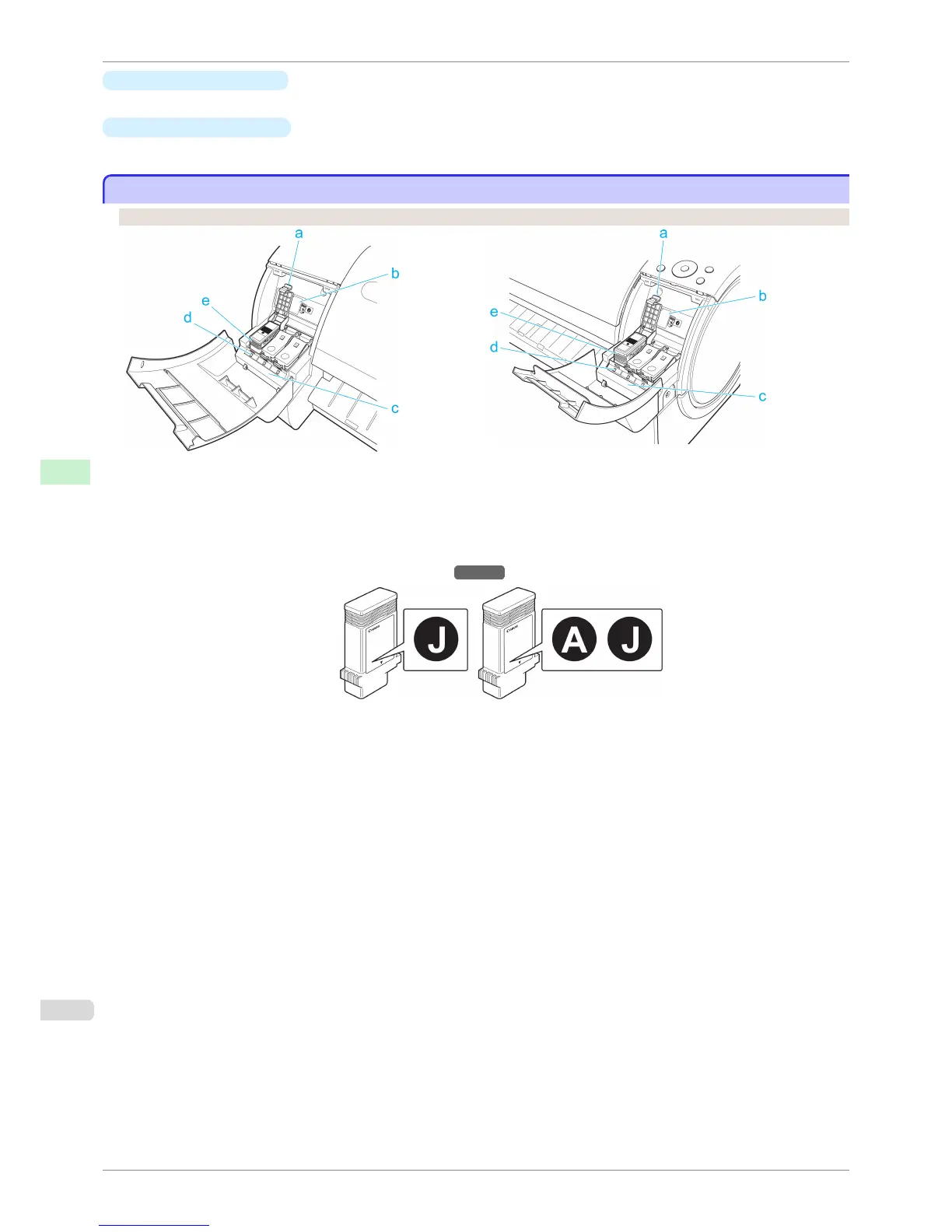
c
Printhead Fixer Lever
Locks the Printhead Fixer Cover.
d
Printhead Fixer Cover
Holds the Printhead in place.
Ink Tank Cover (Inside)
Ink Tank Cover (Inside)
Left Side Right Side
a
Ink Tank Lock Lever
A lever that locks the Ink Tank in place and protects it. Lift and press down the lever when replacing an Ink Tank.
b
Ink Set Label
An Ink Tank that can be used in the printer is labeled with a white letter [W that can be used in the printer is
labeled with a white letter J:: type="normal"J in a black circle on the side. When purchasing an Ink Tank, make
sure a J is printed on the label. (See "Ink Tanks.") →P.518
c
Ink Color Label
Load an Ink Tank that matches the color and name on this label.
d
Ink Lamp (Red)
Indicates the state of the Ink Tank as follows when the Ink Tank Cover is opened.
•
On
The Ink Tank is installed correctly.
•
Off
No Ink Tank is installed, or the ink level detection function has been released.
•
Flashing Slowly
Not much ink is left.
•
Flashing Rapidly
There is no ink left.
e
Ink Tank
Cartridges of ink in various colors.
Ink Tank Cover (Inside)
iPF760
User's Guide
Printer Parts Printer parts
468















 To Next Page