• E Reduce Print Unevenness
If you are concerned about print unevenness, the printing results can be improved by selecting this option.
However, printing may take longer for some images.
• F Adjust faint lines
If fine lines are printed in colors that do not match the colors of other shapes, clearing this option may help
produce the expected results. However, lines in some colors may appear broken.
Favorites Sheet
Favorites Sheet
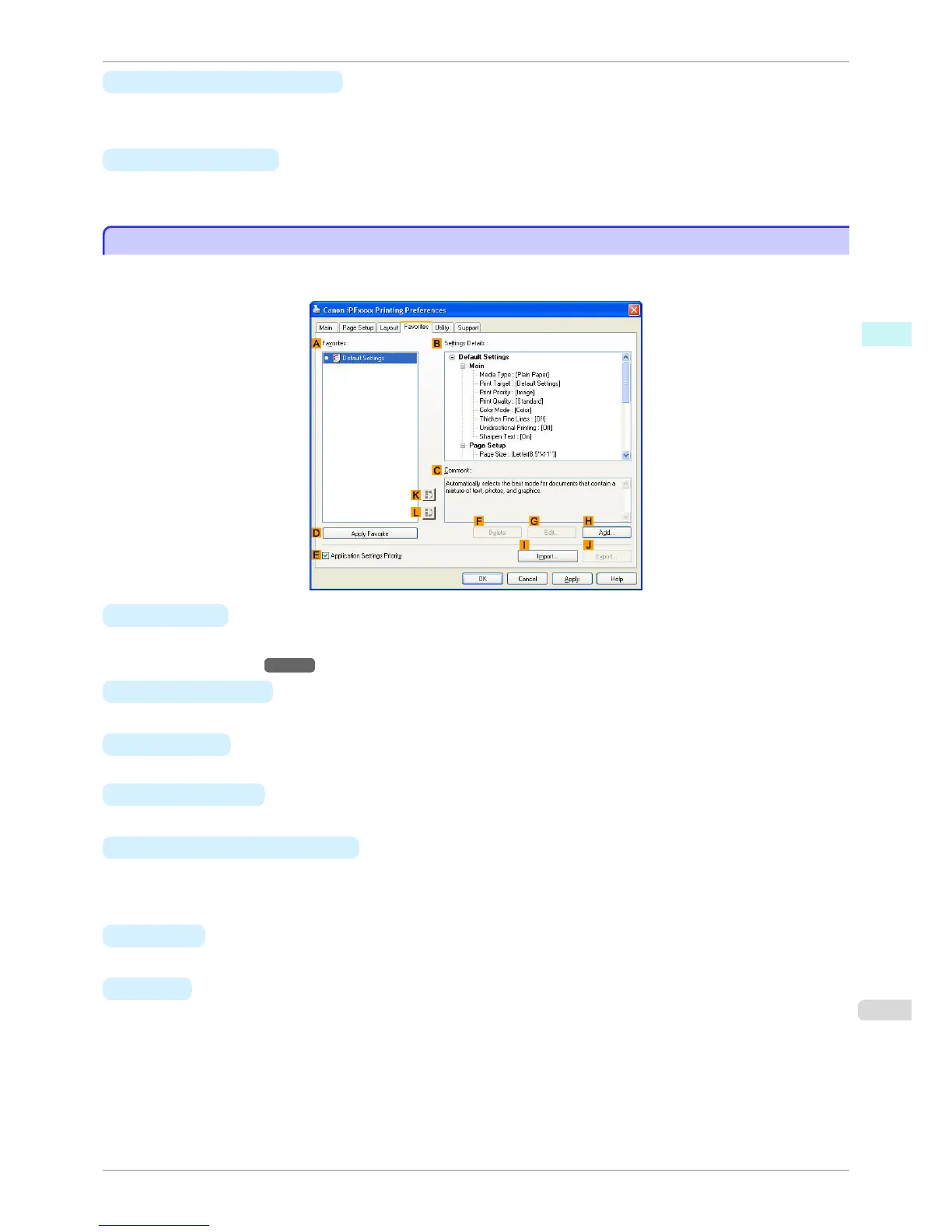
The following settings are available on the Favorites sheet. For details on settings items, refer to the printer driver
help.
• A Favorites
Printing favorites you have created are listed with Default Settings favorites.
•
Using Favorites →P.152
• B Settings Details
Displays details of the favorite selected in the A Favorites.
• C Comment
Displays notes registered in the favorite.
• D Apply Favorite
Click to change the current print settings to those of the favorite selected in the A Favorites.
• E Application Settings Priority
Activate this setting to use settings values specified in the source application in preference to favorite settings
selected in the A Favorites, when clicking D Apply Favorite. For details on the settings items used in prefer-
ence, refer to the printer driver help.
• F Delete
Click to delete the selected favorite from the A Favorites list.
• G Edit
Click to display the Edit dialog box, which enables you to change the name and icon for the favorite selected
in the A Favorites list.
iPF760
Favorites Sheet
User's Guide
Windows Software Printer Driver
183















 To Next Page