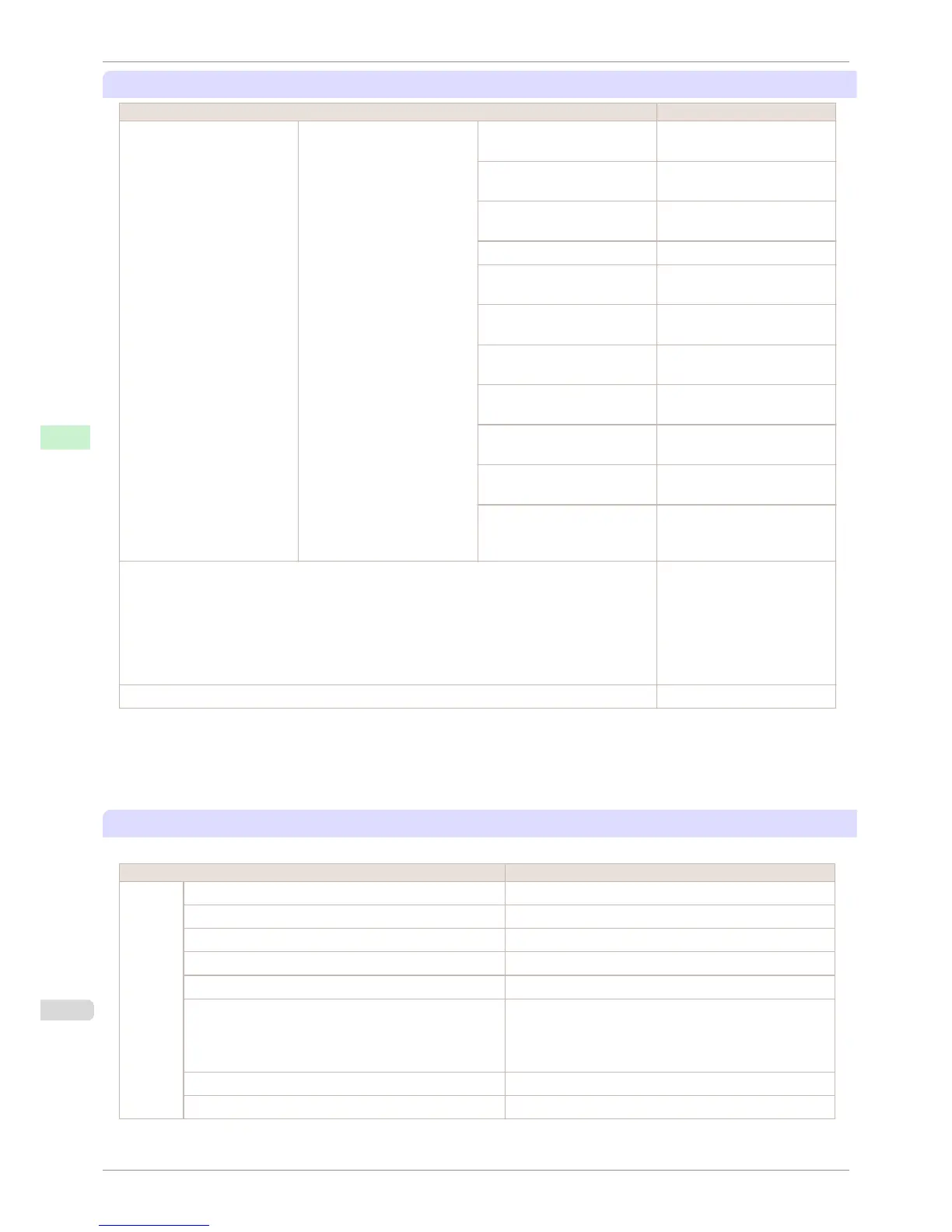
Job Menu
Setting Item Description, Instructions
Job Log (Choose from information about
the last three print jobs.)
Document Name Indicates the document name
in the last print job.
User Name Indicates the name of the user
who sent the print job.
Page Count Indicates the number of pages
in the job.
Job Status Indicates the printing results.
Print Start Time Indicates when the print job
was started.
Print End Time Indicates when the print job
was finished.
Print Time Indicates the time required to
print the job.
Print Size Indicates the paper size in the
print job.
Media Type Indicates the type of paper in
the print job.
Interface Indicates the interface used for
the print job.
Ink Consumed Indicates a rough estimate of
how much ink was consumed
per page.(*1)
Print Job Log Print a record of print jobs, in-
cluding the paper type and size,
amount of ink consumed, and
so on. Ink consumption indi-
cates a rough estimate of how
much ink was consumed per
page.(*1)
Pause Print Choose On to stop printing.
*1: Indicates a rough estimate of how much ink was consumed per page. Actual ink consumption may be different. The average margin
of error for estimates calculated according to Canon measurement conditions for ink costs is ±15%. Canon does not guarantee the
accuracy of these estimates. Estimates may vary depending on conditions of use. Calculation of these estimates does not include
ink consumed when cleaning printheads by forceful ejection of ink.
Set./Adj. Menu
Limited items are displayed during printing. The displayed items are indicated by annotations.
Setting Item Description, Instructions
Test
Print
Nozzle Check Print a test pattern to check the nozzles.
Status Print Print information about the printer.
Interface Print Print interface settings information.
GL2 Set Print Print GL2 settings information.
Paper Details Print the paper settings as specified in Paper Details.
Print Job Log Print a record of print jobs, including the paper type and size,
amount of ink consumed, and so on. Ink consumption indi-
cates a rough estimate of how much ink was consumed per
page.(*1)
Menu Map Print the menu structure.
Color Palette Print the GL2 color palette.
Menu Settings
iPF760
User's Guide
Control Panel Printer Menu
450















 To Next Page