7
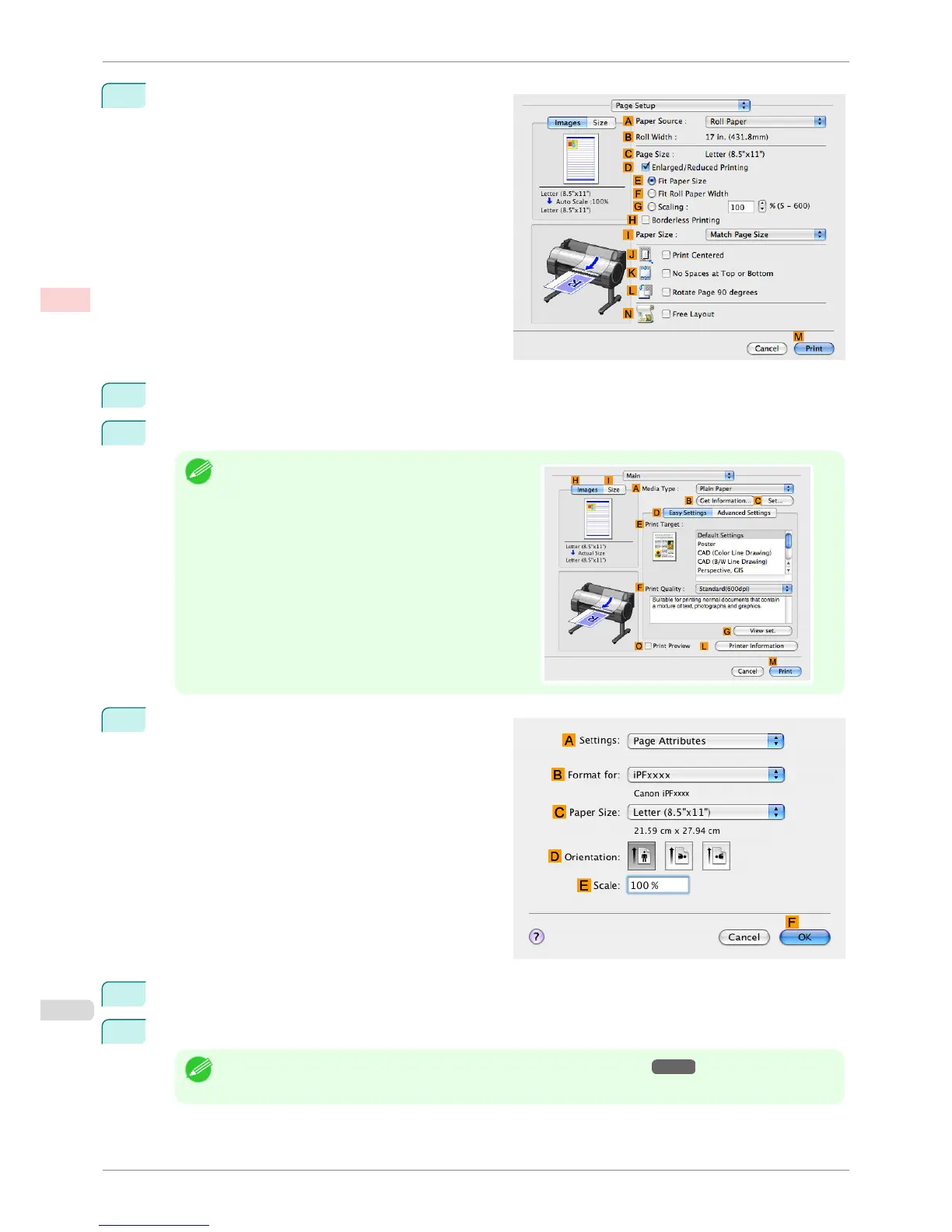
Access the Page Setup pane.
8
Select and click a roll paper in the A Paper Source list.
9
Make sure the width of the loaded roll is displayed in BRoll Width —in this case, ISO A3/A4 (297.0mm).
Note
•
If the width of the roll loaded in the printer is not shown
in
B Roll Width, click L Printer Information on the
Main pane to update the printer information.
10
Make sure the
C Page Size setting matches the orig-
inal size as selected in C Paper Size in the Page At-
tributes dialog box—in this case, ISO A4.
11
Select the L Rotate Page 90 degrees check box.
12
Confirm the print settings, and then click M Print to start printing.
Note
• For tips on confirming print settings, see "Confirming Print Settings(Mac OS X) →P.294 "
Conserving Roll Paper by Rotating Originals 90 Degrees (Mac OS X)
iPF760
User's Guide
Enhanced Printing Options Conserving roll paper
138















 To Next Page