v2.13 Cleverscope CS300 Reference Manual
©Cleverscope 2004-2018 www.cleverscope.com Page 161
24.3 Program USB Serial Number
Connect only one CAU. (If you have multiple CAU’s attached they will all be programmed with the same serial
number!). It is recommended that other USB devices such as USB to serial converters also be disconnected (in
case they use the same FTDI device as the CAU uses, in which case they will also be programmed).
Download MProg230_Setup.zip from http://www.cleverscope.com/resource/ , and unzip into a folder of your
choice. Run MProg_Setup.exe.
After installation run Mprog 2.3 and use File/Open, and navigate to the folder where you unzipped the files.
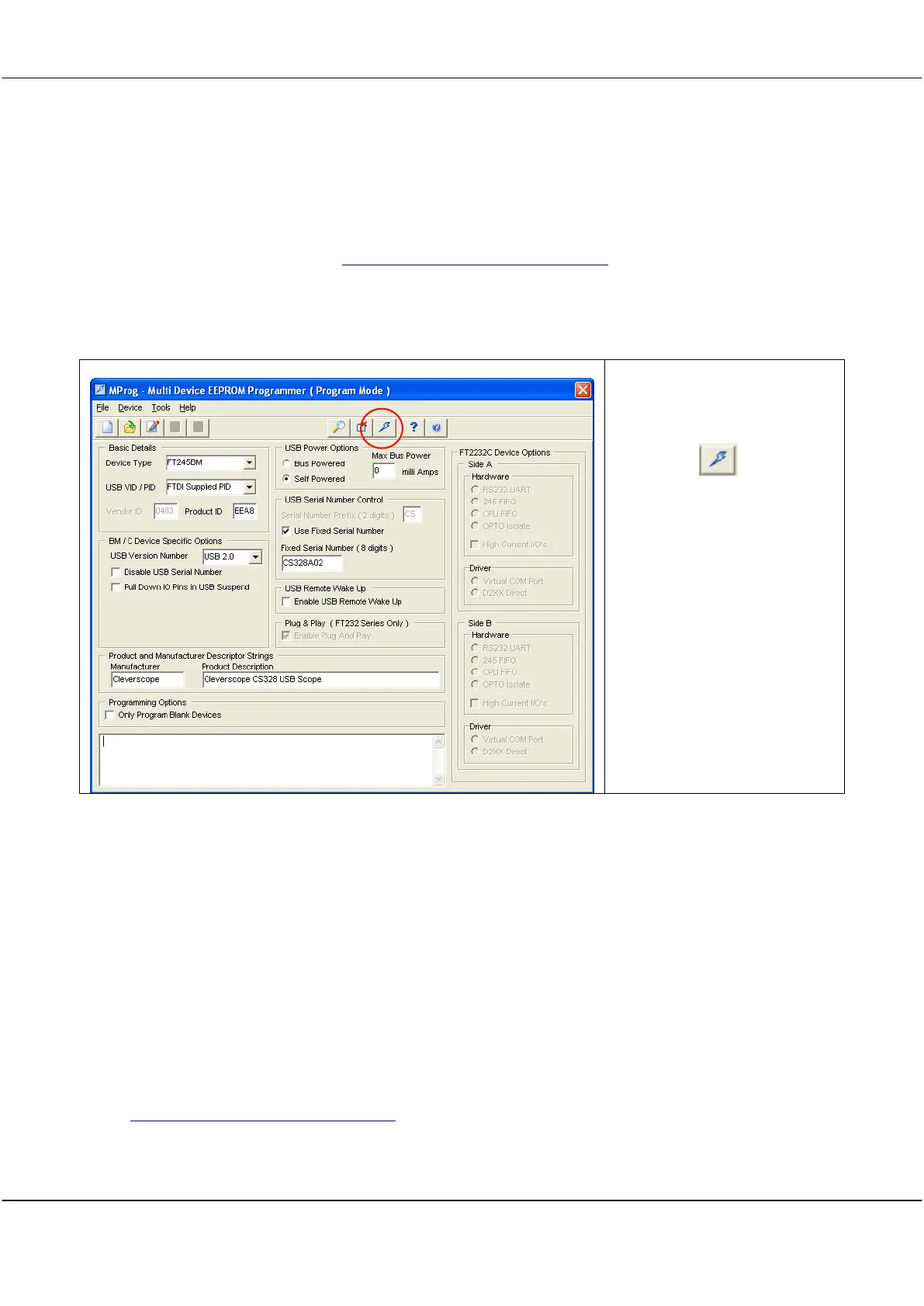
Open Cleverscope CS328 Unit 2.ept. You will see the following screen:
Do not change any values
Click on the button.
This will program the Unit 2 CAU
with the serial number
CS328A02.
Cycle the power on the CAU to
register the new serial number.
24.4 Connect the Units
It’s useful to place the CAU’s on top of each other. Connect the CS022 link cable between the two units. Plug
into the Link socket, and make sure the line on the plastic housing is uppermost for both plugs.
Connect each unit to the computer using a USB cable. You should hear the computer ding as you plug in each
unit. [If you want, you can copy the program Files/cleverscope directory to a new directory such as program
files/cleverscope_dual. If you do this you can run two copies of the Cleverscope application (one from the
original cleverscope directory, and the other from the cleverscope dual directory), and each one will pick the
next higher available USB serial number to work with. In this way you can run both CAU’s at the same time to
make sure they work properly, or have two independent scopes running).
Connect some signal sources, and you are nearly ready to go.
24.5 Ready the Cleverscope4 Application
Go to http://www.cleverscope.com/resource/ and download Cleverscope4.zip into your ‘program
files\cleverscope’ directory. Unzip into the same directory. You may make a short cut to cleverscope4.exe and
put it onto the desktop (we do offer an installer, but if you do it this way you only have to download a 3.7
Mbytes!).



 To Next Page