v2.13 Cleverscope CS300 Reference Manual
©Cleverscope 2004-2018 www.cleverscope.com Page 75
12 Streaming
The Cleverscope Streaming system is used to capture, manipulate and analyse signals over a much longer time
frame - from seconds to weeks.
The Streaming system saves a continuous record to Hard Disk, at a sample rate of between 200 Samples/sec
and 3.2 M Samples/sec. The streaming system can handle very large signal streams - up to about 300 G
Samples. You can zoom, pan, use the Tracking, Spectrum and Maths Displays on portions of the stream, and
use the Protocol Analyser to decode serial data.
12.1 Capturing a Stream
The Cleverscope application defaults mean that you can simply click on the control panel, and
streaming will start. Once streaming starts you can adjust the time/division, pause and restart, turn on other
displays, and zoom on a portion as capture continues.
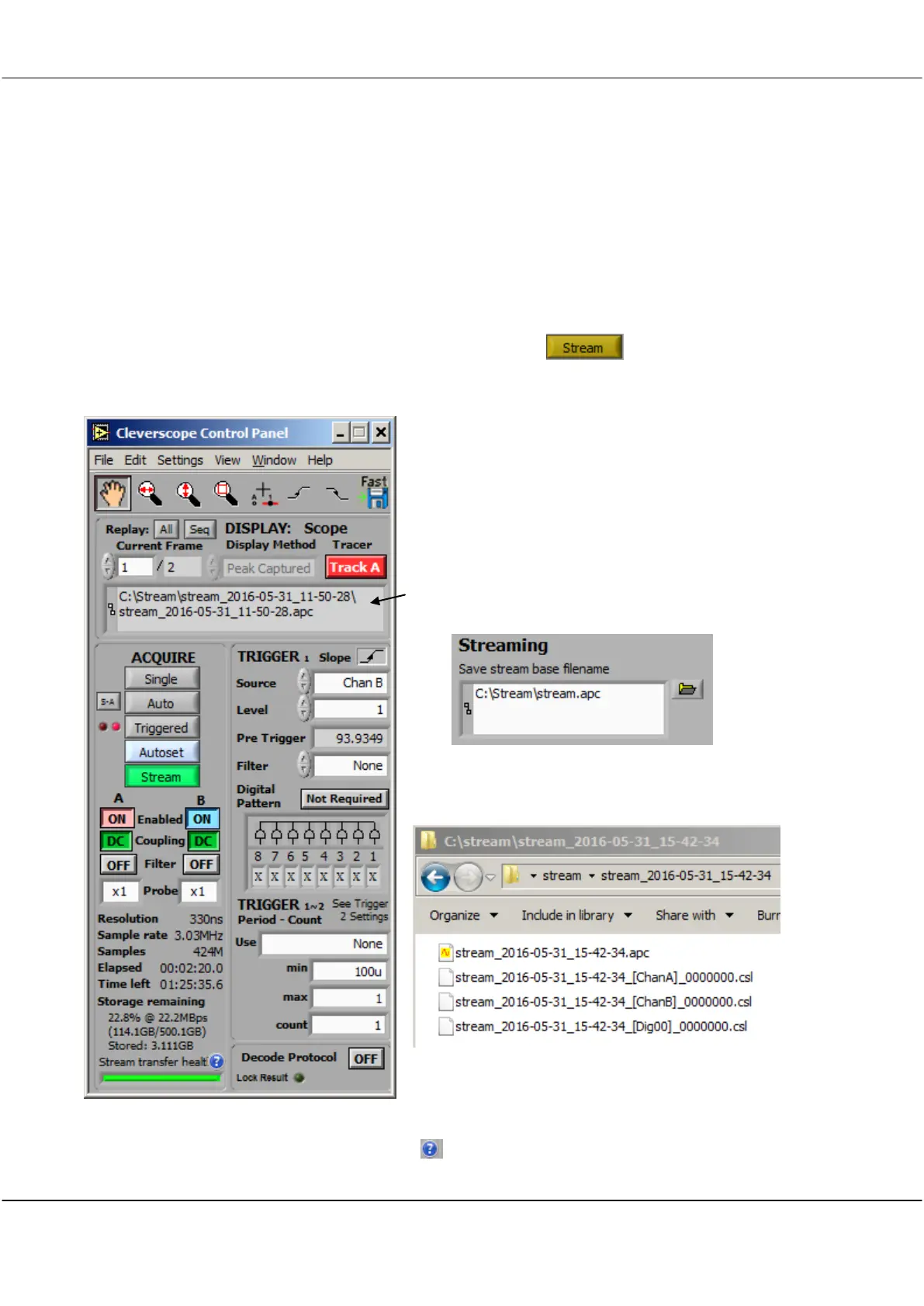
Once Streaming starts, the Stream button is illuminated green,
and status information is displayed on the Control Panel.
This is the location of the stream control file. All streams are
saved in their own folder. To delete a stream from Hard Disk,
delete the folder. The folder location is specified in
File/File Options/Streaming:
The base name and appended date and time are used to
generate the stream folder. The .apc control file, and
cleverscope stream files (*.csl) are contained within the folder,
which can be moved to a different location if needed.
The lower left part of the panel displays the sample resolution
(330ns here), the Sample Rate (3.30 MSPS), the number of
samples captured (424M), the elapsed time (00:02:20.0) and
the time remaining calculated from the hard disk free space remaining, which is detailed next. Here the Storage
remaining is 22.8% of the hard disk (114.1 GB of 500.1 GB), and so far 3.111 GB have been stored. The
Stream transfer health display is explained by the button.



 To Next Page