User's Manual
271
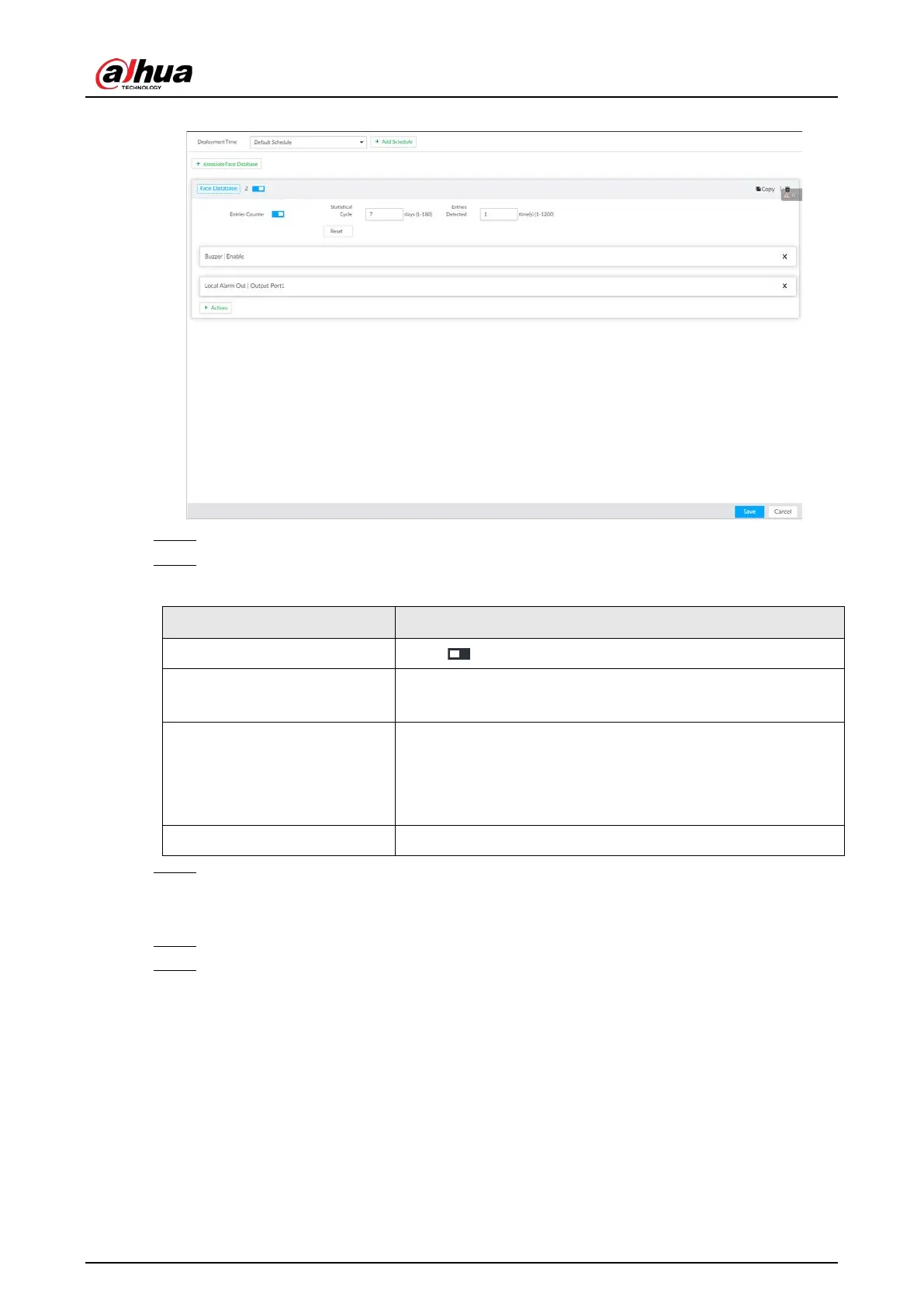
Figure 8-56 Entries frequency
Step 4 Click Associate Face Database, and then select the database to be linked.
Step 5 Configure the parameters.
Table 8-20 Entries frequency parameters
Entries Counter Click to enable entries counter. Entries will be counted.
Statistical Cycle
●
Set the statistical cycle as needed.
●
The statistical cycle is 7 days by default.
Entries Detected
●
Set the threshold of entries frequency as needed. When
the entries detected reaches or exceeds the threshold, an
alarm is triggered.
●
The value is 1 by default.
Reset Clear all entry counts.
Step 6 Click the Deployment Time drop-down list to select or add a schedule as needed.
After setting the deployment time, only an alarm occurring within the schedule triggers
linkage actions.
Step 7 Click
Actions to set alarm linkage actions.
Step 8 Click Save.
After setting entries frequency, when the entries detected of a person reach or exceed the
threshold, the features panel on the right side of the view window displays a high
frequency tag. You can find the tag using live view or AI search.
●
For details about live view, see "6.2.3 Live View of Face Detection".
●
For details about face search, see "6.2.4 Face Search".


 To Next Page
 Loading...

