Home
Epson
All in One Printer
AcuLaser CX11
Page 218
Epson AcuLaser CX11 - Page 218
494 pages
Manual
To Next Page
To Next Page
To Previous Page
To Previous Page
Loading...
218
Scannin
g
For W
indo
ws Me
and
98 us
ers
1.
Click
Start
, poin
t to
Settings
, and
the
n se
lect
Contro
l Pa
nel
.
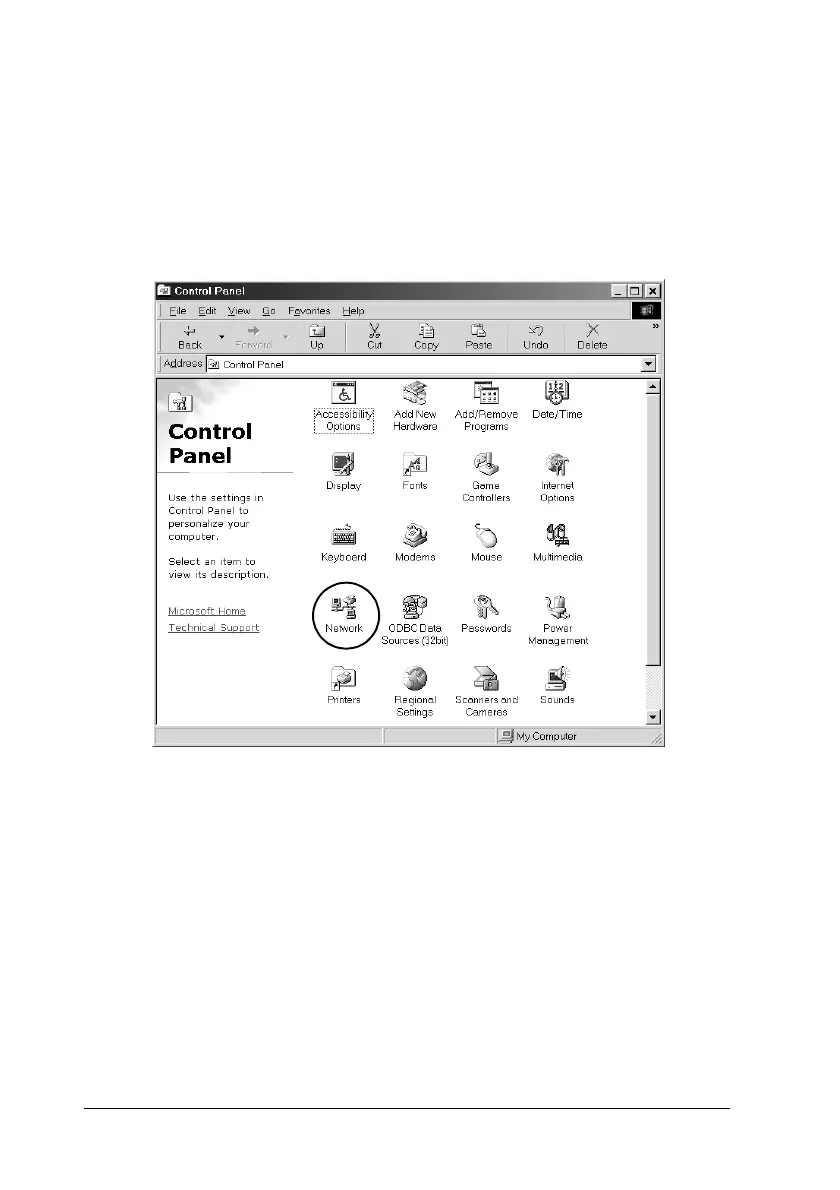
Control Pan
el appea
rs.
2.
D
ouble
-click t
he
Netwo
rk
ic
on in
Contr
ol Pane
l.
The Network
dialog b
ox appears.
3.
Click the
Configuration
tab.
217
219
Table of Contents
Main Page
Default Chapter
2
Basic Operation Guide
2
Network Guide
2
Setup Guide
2
Where to Find Information
2
Table of Contents
4
Safety Information
17
Warnings, Cautions, and Notes
17
Safety Precautions
18
Important Safety Instructions
21
Power On/Off Cautions
22
Chapter 1 Getting to Know Your Printer
23
Product Parts
23
Front View
23
Rear View
24
Inside the Product
25
Scanner Parts
26
Control Panel
27
Options and Consumable Products
31
Options
31
Consumable Products
31
Product Features
32
About the EPSON Aculaser CX11 Series
32
High-Quality Printing
32
Pre-Defined Color Settings in the Printer Driver
32
Toner Save Mode
33
Resolution Improvement Technology and Enhanced Microgray Technology
33
Chapter 2 Printer Features and Various Printing Options
34
Various Options
34
Fit to Page Printing
34
Pages Per Sheet Printing
35
Watermark Printing
36
Chapter 3 Paper Handling
37
Paper Sources
37
MP Tray
37
Optional 500-Sheet Paper Cassette Unit
38
Selecting a Paper Source
39
Loading Paper
40
MP Tray
40
Optional Paper Cassette
43
Output Tray
46
Printing on Special Media
47
EPSON Color Laser Paper
48
EPSON Color Laser Transparencies
48
EPSON Color Laser Coated Paper
50
Envelopes
51
Labels
53
Thick Paper and Extra Thick Paper
54
Loading a Custom Paper Size
54
Chapter 4 Using the Printer Software with Windows
56
About the Printer Software
56
Accessing the Printer Driver
56
Making Changes to Printer Settings
58
Making the Print Quality Setting
58
Duplex Printing
68
Resizing Printouts
72
Modifying the Print Layout
74
Using a Watermark
76
Making Extended Settings
79
Making Optional Settings
81
Setting Information about Consumables
82
Monitoring Your Printer Using EPSON Status Monitor 3
83
Installing EPSON Status Monitor 3
83
Accessing EPSON Status Monitor 3
87
Getting Printer Status Details
88
Order Online
90
Setting Monitoring Preferences
92
Status Alert Window
95
Job Management Function
96
Stopping Monitoring
100
Monitored Printers Settings
100
Setting up the USB Connection
101
Canceling Printing
103
Uninstalling the Printer Software
104
Uninstalling the Printer Driver
104
Uninstall the USB Device Driver
107
Sharing the Printer on a Network
108
Sharing the Printer
108
Setting up Your Printer as a Shared Printer
110
Using an Additional Driver
111
Setting up Clients
116
Installing the Printer Driver from the Software
123
CD-Rom
123
Chapter 5 Using the Printer Software with Macintosh
125
About the Printer Software
125
Accessing the Printer Driver
125
Making Changes to Printer Settings
126
Making the Print Quality Settings
126
Modifying the Print Layout
132
Duplex Printing
133
Making Extended Settings
136
Monitoring Your Printer Using EPSON Status Monitor 3
138
Accessing EPSON Status Monitor 3
138
Getting Printer Status Details
140
Setting Monitoring Preferences
142
Status Alert Window
144
Using the Job Management Function
145
Setting up the USB Connection
147
Canceling Printing
148
Uninstalling the Printer Software
148
Sharing the Printer on a Network
149
Sharing the Printer
149
Chapter 6 Scanning
150
About the Scanner Software
150
EPSON Scan
150
TWAIN-Compliant Applications
151
Accessing EPSON Scan
152
Setting Your Originals
154
Document Table
154
Auto Document Feeder (Fax Model Only)
159
Scanning an Image
162
Saving a Scanned Image
164
From a TWAIN-Compliant Application
164
Using EPSON Scan Directly
166
Selecting the Scanning Mode
169
Choosing Appropriate Scanning Mode
169
Changing the Scanning Mode
171
Making Changes to Scanner Settings
171
Make Suitable Settings
171
Create Beautiful Reproductions
183
Scan Multiple Images Simultaneously
188
Using the Preview Window in EPSON Scan
193
Preview Images
193
Thumbnail Preview
195
Using Marquees
197
Uninstalling the Scanner Software
199
Using the Start Button on the Control Panel
202
Scanning to Your Computer
202
Assigning a Different Application on Windows
205
Canceling Scanning
210
Scanning in a Network Environment
210
Starting EPSON Scan Settings
210
Scanning an Image
213
Setting up a Client Computer
214
Using the Application Software
221
Software Information
221
Pagemanager for Epson
222
Accessing the Software
227
For Windows
228
Chapter 7 Copying
231
Setting Originals to Copy
231
Basic Copying
232
Canceling Copying
234
Making Changes to Copy Settings
234
Changing the Number of Copies
234
Selecting the Paper
235
Document Type
236
Adjusting the Density
237
Adjusting the Contrast
238
Adjusting the RGB Color
238
Specifying the Zoom Ratio
239
Making 2 Pages Per Sheet Copies
241
Reset the Copy Settings
243
Restrictions on Copying
244
Chapter 8 Faxing (Fax Model Only)
245
Setting Originals to Fax
245
Sending Faxes
245
Basics of Sending Faxes
246
Sending Faxes Using the Speed-Dial Function
248
Sending Faxes Using the One-Touch Function
250
Sending Faxes Using Group-Dial Function
251
Sending Faxes by Dialing from a Telephone
253
Receiving Faxes
254
Output Paper Size
254
Basics of Receiving Faxes
255
Receiving Faxes When You Hear Fax Tones
257
Receiving Faxes Using Fax Polling
257
Making Changes to Fax Settings
258
Selecting the Appropriate Settings
258
Document Size
258
Density
259
Image Quality
259
Polling Reception
260
Overseas Transmission Mode
260
Changing Outgoing Faxes Settings
261
Changing Incoming Faxes Settings
263
Managing Communication Setup Function
264
Printing Report
264
Fax Job Information
267
Canceling a Fax Job
267
Registering Recipients
268
Using the EPSON Speed Dial Utility
268
(For Windows Only)
268
Using the Setup Menu on the Control Panel
272
Chapter 9 Using the Control Panel
283
Selecting a Mode
283
Mode Menus
284
Print Mode
284
Copy Mode
285
Fax Mode (Fax Model Only)
286
Scan Mode
287
Using the Setup Menu
288
When to Make Setup Menu Settings
288
How to Access the Setup Menu Settings
289
Setting Menus
291
Information Menu
291
Tray Menu
293
Setup Menu
294
Reset Menu
296
Support Menu
297
Printer Adjust Menu
297
USB Menu
299
Network Menu
300
Basic Settings
300
Transmission Settings
301
Reception Settings
301
Speed Dial Settings
302
Communication Setup
302
Factory Settings
303
Copy Settings
303
Scan Settings
303
Printing a Status Sheet
304
Canceling a Job
306
Canceling Printing
306
Canceling Scanning
307
Canceling Copying
307
Canceling Faxing
307
Status and Error Messages
309
Printer Error Messages
309
Scanner Error Messages
320
Fax Error Messages
321
Copier Error Messages
323
System Error Messages
323
Chapter 10 Installing Options
325
Optional Paper Cassette Unit
325
Handling Precautions
325
Installing the Optional Paper Cassette Unit
326
Removing the Optional Paper Cassette Unit
330
Memory Module
331
Installing a Memory Module
331
Removing a Memory Module
335
Chapter 11 Maintenance and Transportation
336
Replacement Messages
336
Toner Cartridge
338
Handling Precautions
338
Replacing a Toner Cartridge
339
Photoconductor Unit
342
Handling Precautions
342
Replacing the Photoconductor Unit
343
Cleaning the Product
350
Cleaning the Pickup Roller
351
Cleaning the Print Head
352
Cleaning the Exposure Window
355
Cleaning the Document Table
355
Cleaning the ADF Pickup Roller
356
Transporting the Product
357
For Long Distances
357
For Short Distances
358
Finding a Place for the Product
361
Chapter 12 Other Problems
363
Clearing Jammed Paper
363
Precautions for Clearing Jammed Paper
363
Jam C (Cover C)
364
Jam E (Cover E)
368
Jam F (Cover F)
369
Jam MP (MP Tray)
374
Jam LC/G (Optional Paper Cassette and Cover G)
376
When Transparencies Are Jammed at the MP Tray
379
Paper Jams in the Auto Document Feeder
381
Paper Handling Problems
383
Paper Does Not Feed Properly
383
Problems Using Options
384
Paper Does Not Feed from the Optional Paper Cassette
385
Feed Jam When Using the Optional Paper Cassette
385
An Installed Option Cannot be Used
386
Correcting USB Problems
386
USB Connections
386
Windows Operating System
387
Printer Software Installation
387
Printing a Status Sheet
393
Chapter 13 Printing Problems
395
Printer Operational Problems
395
The Print Light Does Not Turn on
395
The Product Does Not Print (Print Light Off)
395
The Print Light Is on but Nothing Prints
396
The Order Online Function Does Not Work
397
Information about Consumables on the Screen May Differ Slightly from the Actual Consumables
397
Printout Problems
398
Printout Is Garbled
398
Color Printing Problems
398
Cannot Print in Color
398
The Printout Color Differs When Printed from Different
399
Printers
399
The Color Looks Different from What You See on
400
The Computer Screen
400
Print Quality Problems
401
The Background Is Dark or Dirty
401
White Dots Appear in the Printout
401
Print Quality or Tone Is Uneven
402
Half-Tone Images Print Unevenly
402
Toner Smudges
403
Areas Are Missing in the Printed Image
404
Completely Blank Pages Are Output
405
The Printed Image Is Light or Faint
406
The Non-Printed Side of the Page Is Dirty
407
Memory Problems
407
Print Quality Decreased
407
Insufficient Memory for Current Task
408
Insufficient Memory to Print All Copies
408
Chapter 14 Scanning Problems
409
Scanner Operational Problems
409
The Print Light Does Not Come on
409
The Product Does Not Scan
409
Pressing the Start Button Does Not Start Scanning
410
Pressing the Start Button in a Mac os X Environment
411
Starts the Classic Mode
411
You Cannot Scan Multiple Images
411
Software Problems
411
You Cannot Start EPSON Scan
411
The Scanner Software Does Not Work Properly
412
Scanned Image Problems
413
The Edges of a Document Are Not Scanned
413
The Scanned Area Is Inappropriate
413
Document Is Not Scanned or Only a few Dots Appear as the Scanned Image
414
A Line of Dots Is Always Missing from the Scanned
414
Image
414
A Line of Dots Always Appears in the Scanned Image
414
Black Vertical Lines Appear on the Scanned Image or the Image Is All Black
414
When Scanning an Original, Straight Lines in the Image
415
Come out Jagged
415
The Image Is Distorted or Blurred
415
Colors Are Patchy or Distorted at the Edges of the Image
416
The Image Is Dark
416
Moiré (Cross-Hatch) Patterns Appear in the Scanned
417
Image
417
Poor Character Recognition During OCR Scanning
418
The Image Is Larger or Smaller than the Original
418
Scanned Images Cannot be Printed or Come out Garbled
418
When Printed
418
Colors Differ from the Original
419
Images Cannot be Located Properly in the Thumbnail
420
Preview
420
The Scanned Image Differs from the Original
420
Color Matching Problems
421
Colors on Your Monitor Are Different from those in
421
The Original Image
421
Printed Colors Are Different from those in the Original
421
Image
421
ADF Scanning Problems (Fax Model Only)
422
A Blank Copy Is Output Even Though an Original Is Set on the Auto Document Feeder During Scanning
422
You Cannot Scan Using the Auto Document Feeder
422
Paper Jams in the Auto Document Feeder
423
You Cannot Scan Multiple Documents
424
Chapter 15 Copying Problems
425
Copy Operational Problems
425
The Product Does Not Copy
425
Copy Quality Problems
426
Printout Is Not Fine Enough
426
The Information on the Back Side or Background Color Is
427
Printed on the Copy
427
Copies Are Blank, or Images Are Missing or Faded
428
Improving Copy Quality
428
Completely Blank Pages Are Output
429
The Background Is Dark and Dirty
429
Black Vertical Lines Appear on the Scanned Image or
430
The Image Is All Black
430
The Scanned Area Is Inappropriate
430
A Blank Copy Is Output Even Though an Original Is Set on the Auto Document Feeder During Scanning
430
ADF Copying Problems (Fax Model Only)
431
Paper Jams in the Auto Document Feeder
431
You Cannot Scan Using the Auto Document Feeder
433
High Quality Color Copy Stops Halfway
433
Chapter 16 Faxing Problems
434
Sending and Receiving Faxes Problems
434
The Document Stops Feeding During Faxing
434
The Product Is Receiving Faxes but Not Sending Them
435
Outgoing Fax Calls Keep Dialing
435
Faxes You Send Are Not Arriving
435
Incoming Fax Calls Are Not Being Answered
436
Faxes Are Transmitting or Being Received very Slowly
436
A Blank Copy Is Output Even Though an Original Is Set on the Auto Document Feeder During Scanning
437
Time Setting Is Incorrect
437
Printout Problems
438
Black Vertical Lines Appear on the Scanned Image or
438
The Image Is All Black
438
The Scanned Area Is Inappropriate
438
Faxes Are Not Printing or Are Printing Incorrectly
438
Of the Page
438
Reports Are Not Printing Correctly
439
Appendix A Customer Support
440
Contacting Customer Support
440
Technical Support Web Site
441
Appendix B Technical Specifications
442
Paper
442
Available Paper Types
442
Paper that Should Not be Used
443
Printable Area
444
Product
444
General
444
Environmental
448
Mechanical
448
Electrical
449
Standards and Approvals
450
Interfaces
452
USB Interface
452
Ethernet Interface
453
Options and Consumables
454
Optional 500-Sheet Paper Cassette Unit
454
Memory Modules
455
Toner Cartridge
455
Photoconductor Unit
456
Appendix C Working with Fonts
458
EPSON Barcode Fonts (Windows Only)
458
System Requirements
460
Installing EPSON Barcode Fonts
460
Printing with EPSON Barcode Fonts
461
Barcode Font Specifications
466
Print Sample
476
Appendix D Notices
477
Notice for Windows XP Service Pack 2 Users
477
Unblocking Eeventmanager
477
Unblocking Licensecheck
478
Notice for EPSON Aculaser CX11NF or EPSON Aculaser
479
CX11F Users
479
Sending Faxes by Dialing from a Telephone
479
Receiving Faxes When You Hear Fax Tones
479
Receiving Faxes Using Fax Polling
479
Paper Sources When Receiving Faxes
480
Printing Fax Sender Information
480
Glossary
481
Other manuals for Epson AcuLaser CX11
Service Manual
668 pages
Basic Operation Gude
26 pages
Related product manuals
Epson AcuLaser CX16
213 pages
Epson AcuLaser CX11NF
144 pages
Epson Artisan 835
327 pages
Epson Artisan 800
8 pages
Epson Artisan 710 Series
56 pages
Epson Artisan 810 Series
64 pages
Epson All in One Printer
210 pages
Epson Artisan 700 Series
8 pages
Epson WorkForce AL-MX200DNF
410 pages
Epson NX100 - Stylus All-In-One
1 page
Epson XP-4100
194 pages
Epson Stylus Printer SX100
3 pages



 To Next Page
 Loading...









