System Basics 51
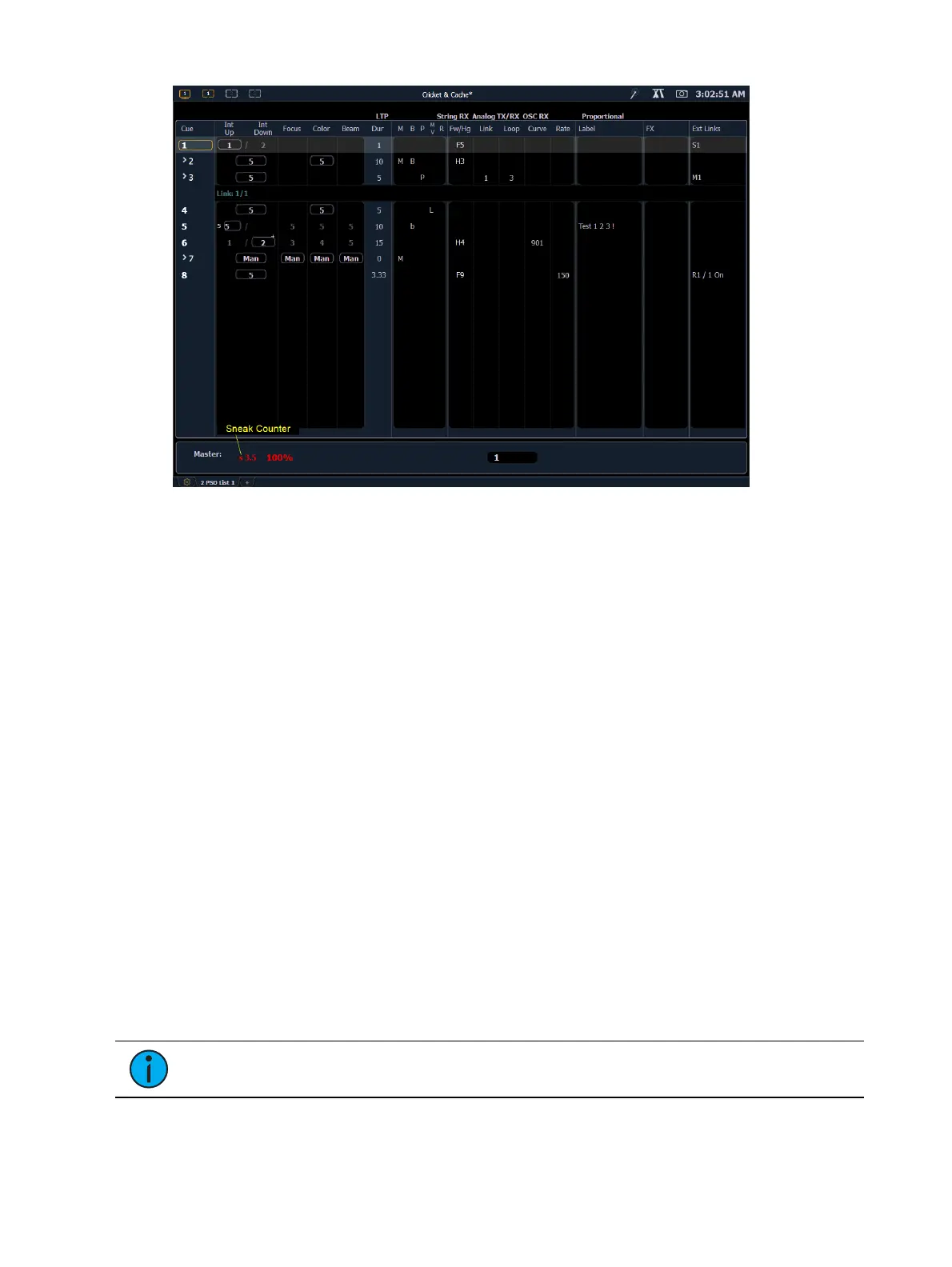
Color indicators
Cue List
Gold - Any item (cue, list, page) highlighted in gold indicates “current”.
Outlined in gold indicates “selected”.
Red - Cue fade is in progress
Text indicators
* - Indicates a link to a non-existent cue. Found in the cue display "Link" area.
+ (see cue 6) - Indicates that there is discrete timing within the associated cue. Found in
the cue display “Timing” area.
B or b (see cues 2 & 5) - Indicates a blocked cue. “B” indicates the entire cue is blocked.
“b” indicates a channel/parameter block only. Found in the cue display “Flags” area.
F5 (see in cue 1) - Indicates a follow time associated with the cue (in this case, 9 seconds).
Found in the cue display. Notice the arrow on Cue 2.
H3 (see cue 2) - Indicates a hang time associated with the cue (in this case 4 seconds).
Found in the cue display. Notice the arrow on Cue 3.
M (see cue 7) - Indicates a marked cue. “M” indicates an AutoMark.
L - Indicates a live move. A "D" in the Move column would indicate a dark move. A “+” is
used to show that both types of moves are in that cue.
P (see cue 3) - Indicates the cue will preheat. Found in the cue display “Flags” area.
Number in the FXcolumn - Indicates a cue level effects override.
M1 (see in cue 3) - Indicates a linked macro.
S1 (see in cue 1) - Indicates a linked string. The string will display here.
Relay 1/1 (see in cue 8) - Indicates a linked relay.
Note: The playback status display will show a red counter for sneak time.



 To Next Page