7-10 031914
BLADE
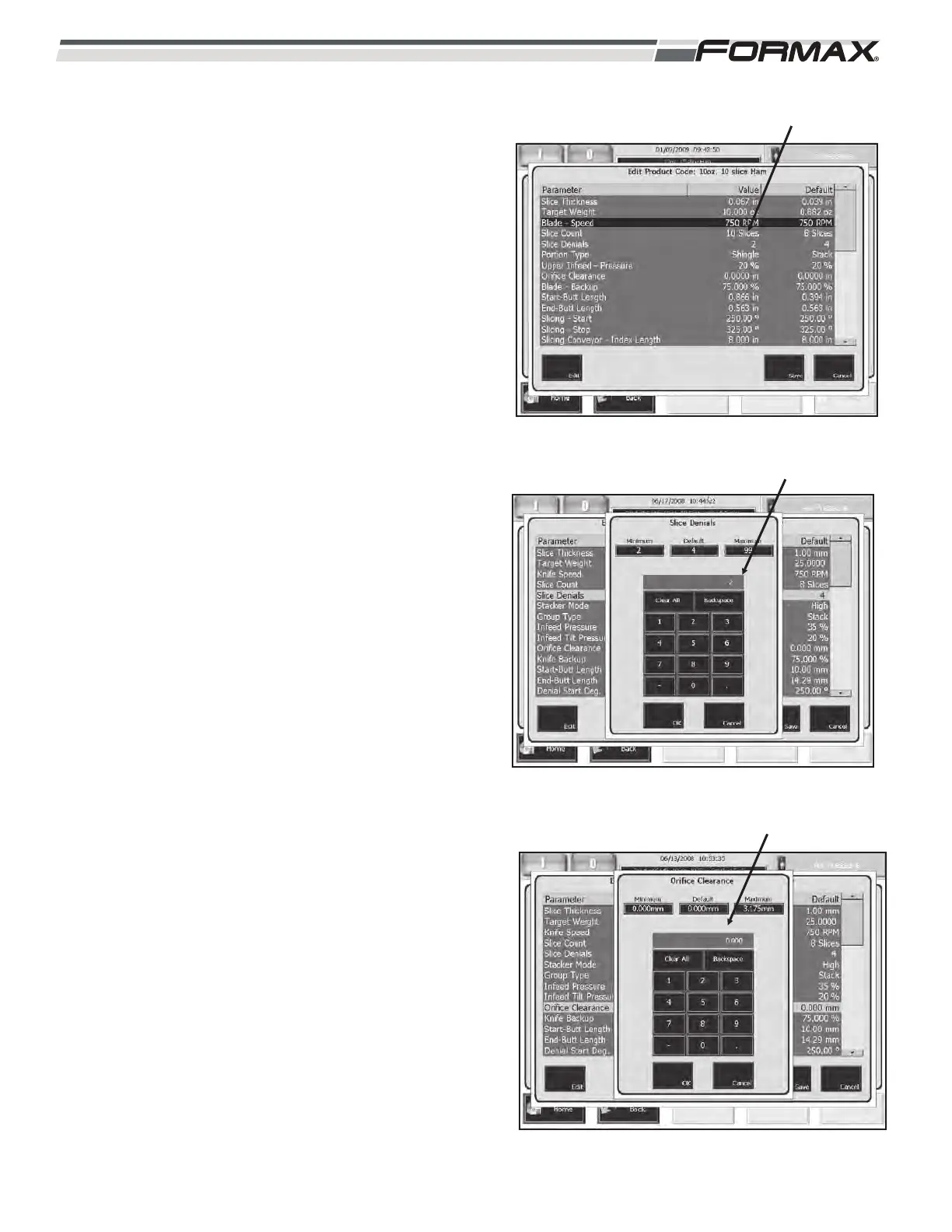
BLADE SPEED: The “Blade Speed” parameter controls
the revolutions per minute of the Blade. (Illustration 22)
The “Blade Speed” can also be adjusted on the “Run”
screen. The Slicing Speed may vary from day to day
depending on the product quality and temperature. The
Blade Speed can be set from “1” to “1500” RPM.
SLICE DENIALS: This parameter sets the number of
uncut slices or blade rotations, between completed
stacks or drafts. (Illustration 23) The Blade retracts
away from the product during the Slice Denial period.
The Slice Denial period also allows time to transfer the
completed stacks off the Jump Conveyor before the start
of the next stacks.
Running too few Slice Denials will result in product jams.
Running with a high Slice Denial will lower the
production output of the Slicer.
ORIFICE CLEARANCE: The “Orifice Clearance”
parameter sets the “distance” between the Blade and
Orifice while slicing. (Illustration 24) A running clearance
of .5 mm (.020 inches) is pre-programmed into the
software. This parameter allows you to increase this
distance when necessary.
ILLUSTRATION 22
BLADE SPEED
ILLUSTRATION 23
SLICE DENIALS
ILLUSTRATION 24
ORIFICE CLEARANCE



 To Next Page