M2-28 031914
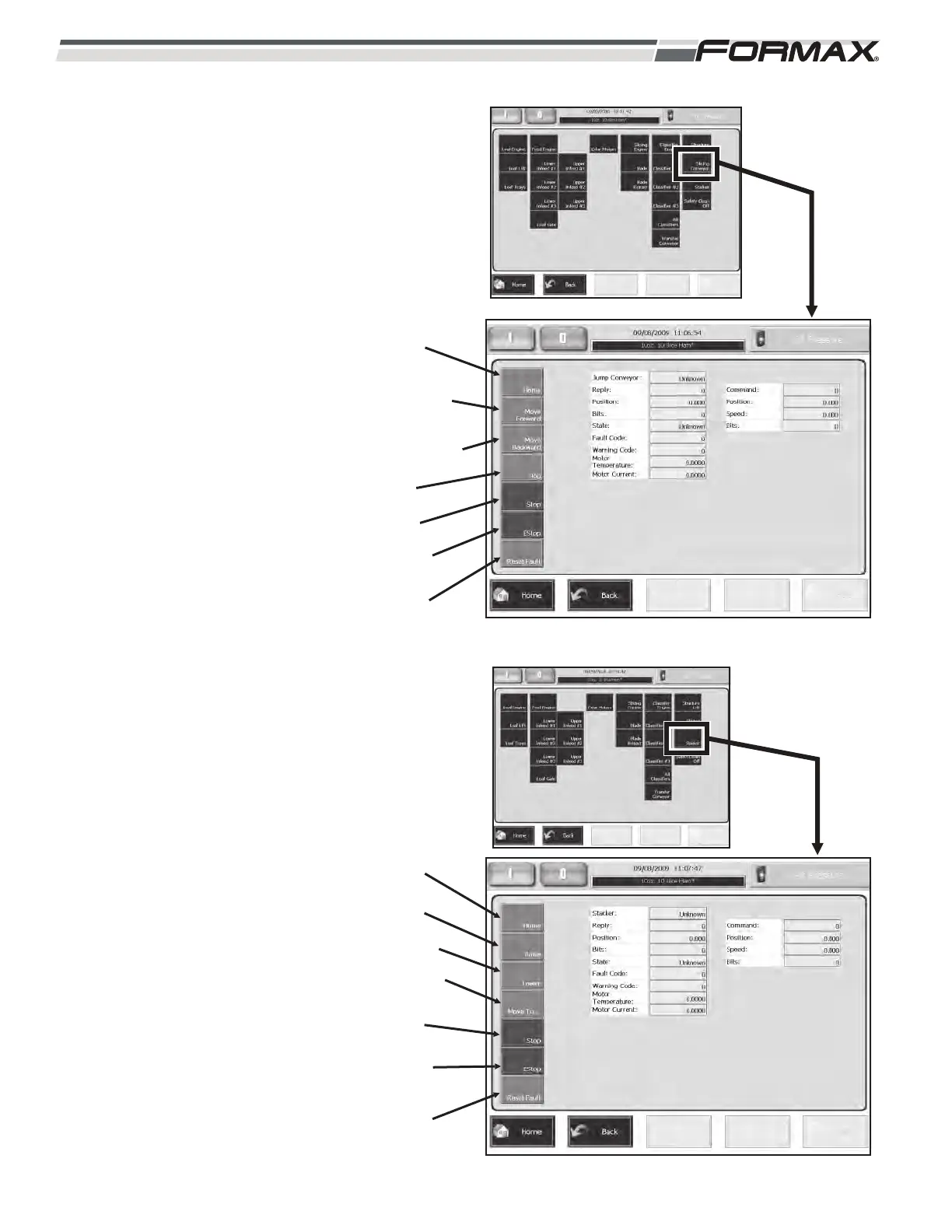
Slicing Conveyor: The Slicing
Conveyor screen allows you to test the
operation of the Slicing Conveyor Belts.
(Illustration 44)
Home: Does Not Apply.
Move Forward: Jogs the conveyor
Belts forward.
Move Backward: Jogs the
Conveyor Belts backwards.
Jog: Runs the Slicing Conveyor
belts.
Stop: Stops the movement of the
Conveyor Belts.
EStop: Stops the movement of the
Conveyor Belts.
Reset Fault: Resets Faults.
Stacker: The Stacker screen allows
you to test the up/down stacking
movement of the Slicing Conveyor.
(Illustration 45)
Home:
Raise: Raises the Slicing Conveyor
to the top.
Lower: Lowers the Slicing
Conveyor to the bottom.
Move To...: Enter a “Position” in the
keypad and touch “OK.” The Slicing
Conveyor will raise or lower to that
position.
Stop: Stops up/down cycle.
EStop: Stops the Conveyor Belts.
Reset Fault: Reset Faults.
ILLUSTRATION 44
HOME
MOVE
FORWARD
MOVE
BACKWARD
RESET
FAULT
STOP
ESTOP
JOG
ILLUSTRATION 45
HOME
LOWER
RESET
FAULT
STOP
ESTOP
RAISE
MOVE TO



 To Next Page