031914 M2-33
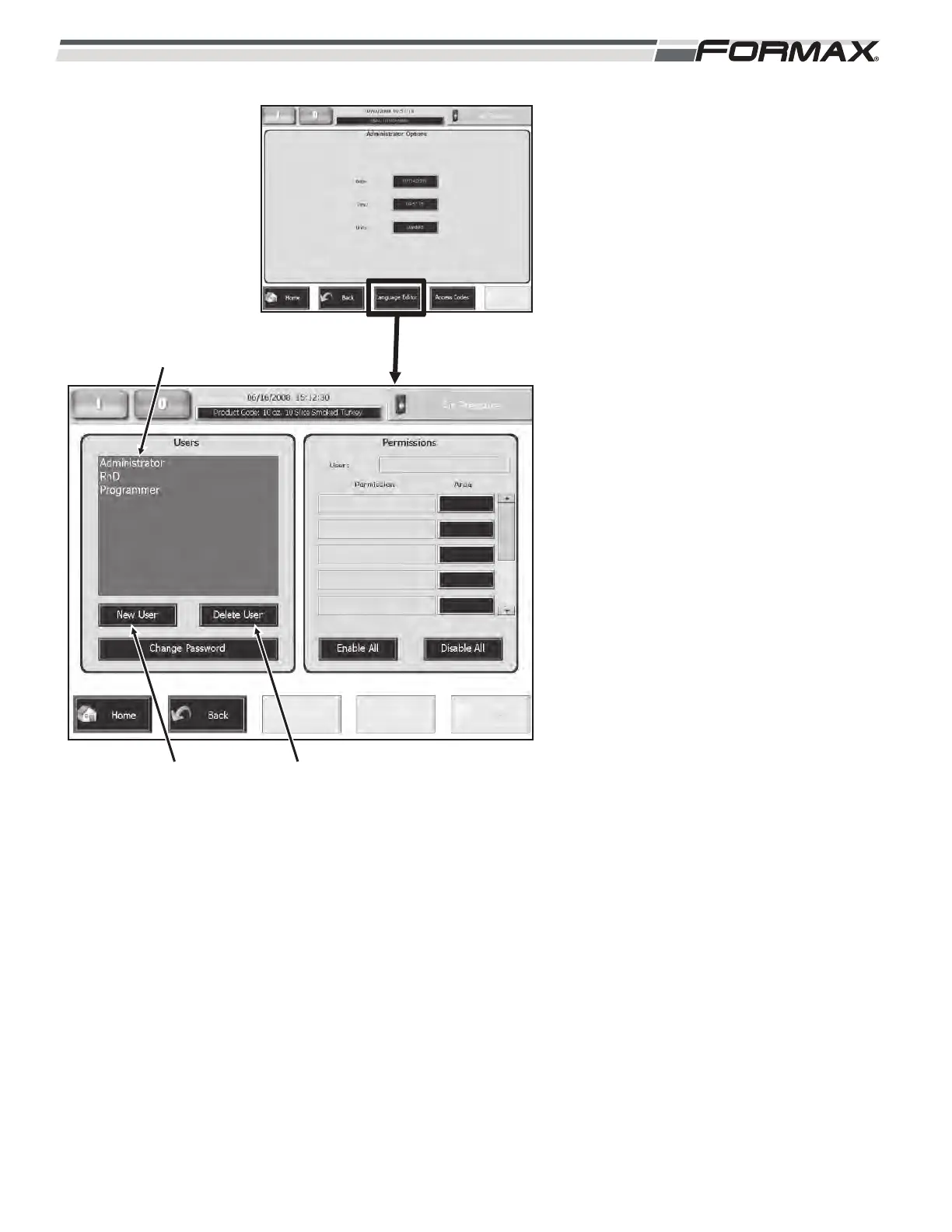
Access Codes: The “Access Codes” screen
allows you to create new “Users” and set the
“Access” permissions for all “Users” operating
and servicing the Slicer. (Illustration 51) Use
this screen to limit the Access of certain
“Users” to only the screens that are required
for their job.
To create a new User:
1. Touch the “New User” button on the
Users window. (Illustration 51)
2. Type in the new “User” name on the
keyboard and touch the “OK” button.
To set the User Permissions:
1. Touch and highlight the “User” name.
(Illustration 51)
2. Use the “Up/Down” arrows to scroll
through all of the “Permission”
categories.
3. Touch the button next to the allowed
Permission Categories to increment
the button to “Granted.”
4. Leave all of the non-allowed
categories set to “Denied.”
Important!
You can also use the “Enable All” button
to grant all permissions or the “Disable
All” to deny all permissions.
To delete a User:
1. Touch the “Delete User” button.
(Illustration 51)
2. A window will display, Are you sure
you want to delete user: xxxx.”
3. Touch the “OK” button.
ILLUSTRATION 51
“NEW USER” BUTTON
“USER” NAMES
“DELETE USER” BUTTON



 To Next Page