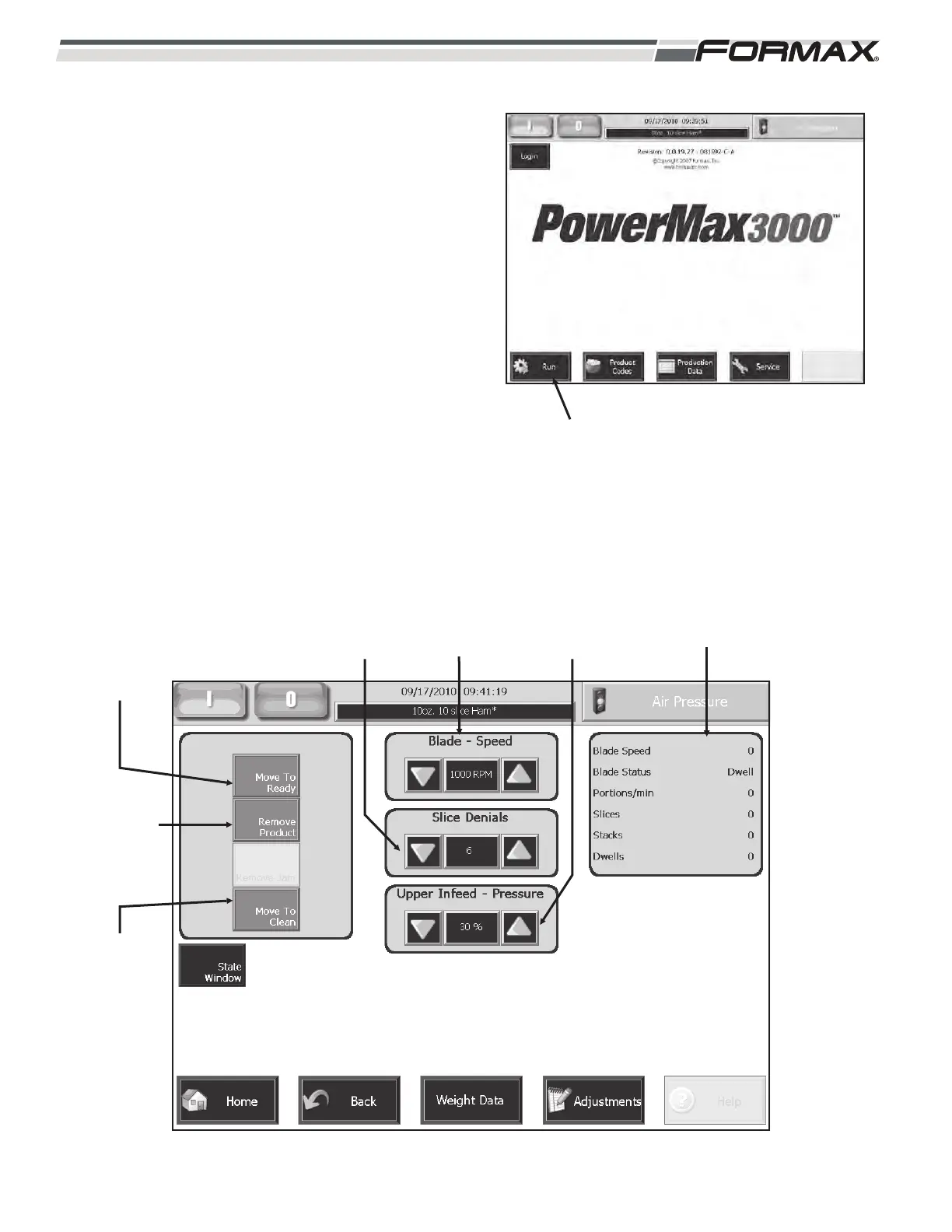
“RUN” SCREEN
The “Run” screen displays the basic adjustments
necessary to operate the Slicer. The “Run” screen is
accessed by touching the “Run” button on the “Home”
screen. (Illustration 20) The “Move To Ready,”
“Remove Product” and “Move To Clean” buttons are
located in the “Tooling” window on the upper left
corner of the “Run” screen. (Illustration 21) The “Knife
Speed,” “Slice Denials,” “Upper Infeed Pressure” and
the “Upper Infeed Cycle Height" adjustments are
located on the center of the “Run” screen. The
“Production Rate,” (portions per minute) displays on
the right side of the screen.
6-8 031914
ILLUSTRATION 20
“RUN” BUTTON
ILLUSTRATION 21
“MOVE TO
READY”
BUTTON
“REMOVE
PRODUCT”
BUTTON
“MOVE TO
CLEAN”
BUTTON
“SLICE
DENIALS”
BUTTON
“BLADE
SPEED”
BUTTON
“UPPER INFEED
PRESSURE”
BUTTON
“PRODUCTION
RATE” DISPLAY



 To Next Page