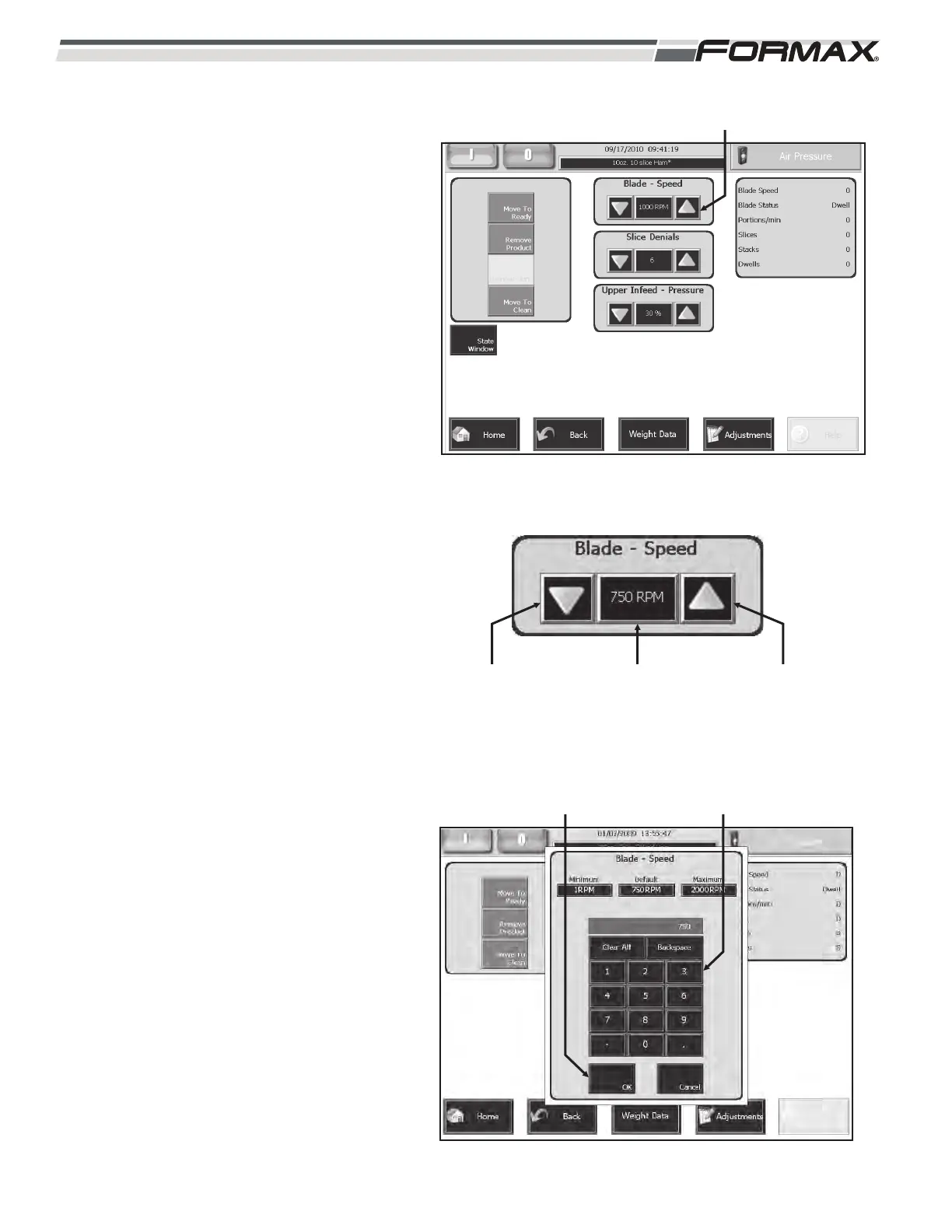
BLADE SPEED: The “Blade Speed” adjustment
controls the revolutions per minute of the Knife
Blade. (Illustration 28) The “Blade Speed” can
also be pre-set in the “Product Code
Parameters.” The “Slicing” Speed may vary
from day to day depending on the product
quality and temperature. The Blade Speed can
be set from “1” to “2000” RPM.
To adjust the Blade Speed:
1. For small “Blade Speed” adjustments,
use the “up/down” arrows next to the
RPM display window to adjust the Blade
Speed. (Illustration 29)
2. For large Blade Speed adjustments,
touching the RPM window will display
an adjustment keypad. (Illustration 30)
Enter the new setting on the keypad and
touch the “OK” button. The new setting
will take effect immediately.
6-12 031914
ILLUSTRATION 28
“BLADE SPEED” ADJUSTMENT
“RPM” WINDOW“DOWN” ARROW “UP” ARROW
ILLUSTRATION 29
ILLUSTRATION 30
ADJUSTMENT KEYPAD“OK” BUTTON



 To Next Page