SLICING
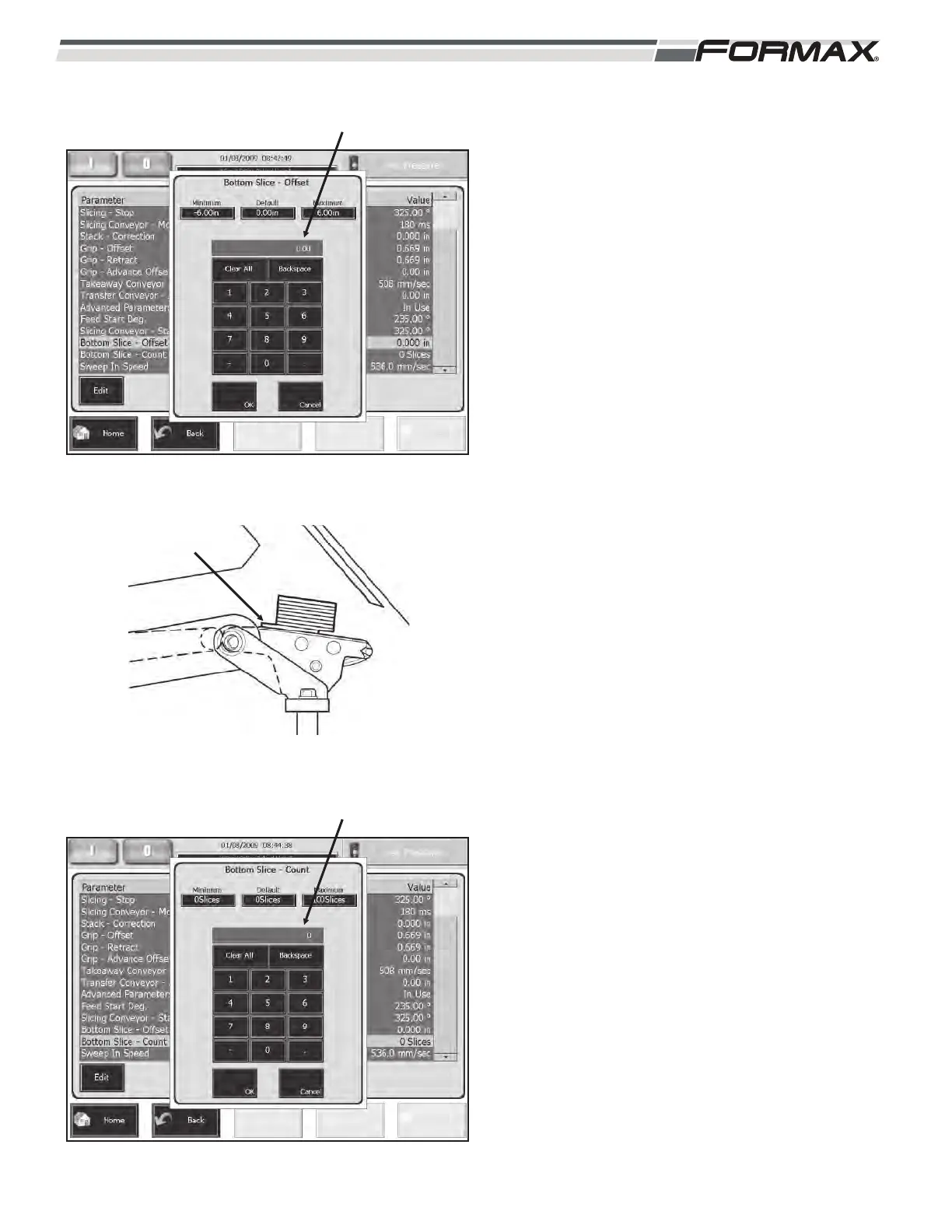
BOTTOM SLICE OFFSET: The “Bottom Slice Offset”
adjustment allows you to adjust the position for a
selected number of slices in a stack or draft.
(Illustration 65 and 66) The number of slices is
selected in the “Bottom Slice Offset Count”
adjustment. This adjustment is set in millimeters or
inches and can be set from +152 mm (+6 inches) to
152 mm (6 inches).
To correct an offset “bottom slice” problem, set this
adjustment to the direction and distance of the
“offset,” and set the “Bottom Slice Offset Count”
adjustment to “1.” (Illustration 65)
To change the position of the first slice or slices in a
draft, set this parameter to the direction and distance
of the “offset.” Set the “Bottom Slice Offset Count”
adjustment to the number of slices you would like to
re-position. (Illustration 65)
BOTTOM SLICE COUNT: The “Bottom Slice Count”
adjustment sets how many slices will be affected by
the “Bottom Slice Offset” adjustment. (Illustration 67)
Setting this adjustment to “0” disables the “Bottom
Slice Offset” adjustment.
031914 6-25
ILLUSTRATION 65
“BOTTOM SLICE OFFSET” ADJUSTMENT
ILLUSTRATION 66
BOTTOM SLICE
OFFSET
ILLUSTRATION 67
“BOTTOM SLICE COUNT” ADJUSTMENT



 To Next Page