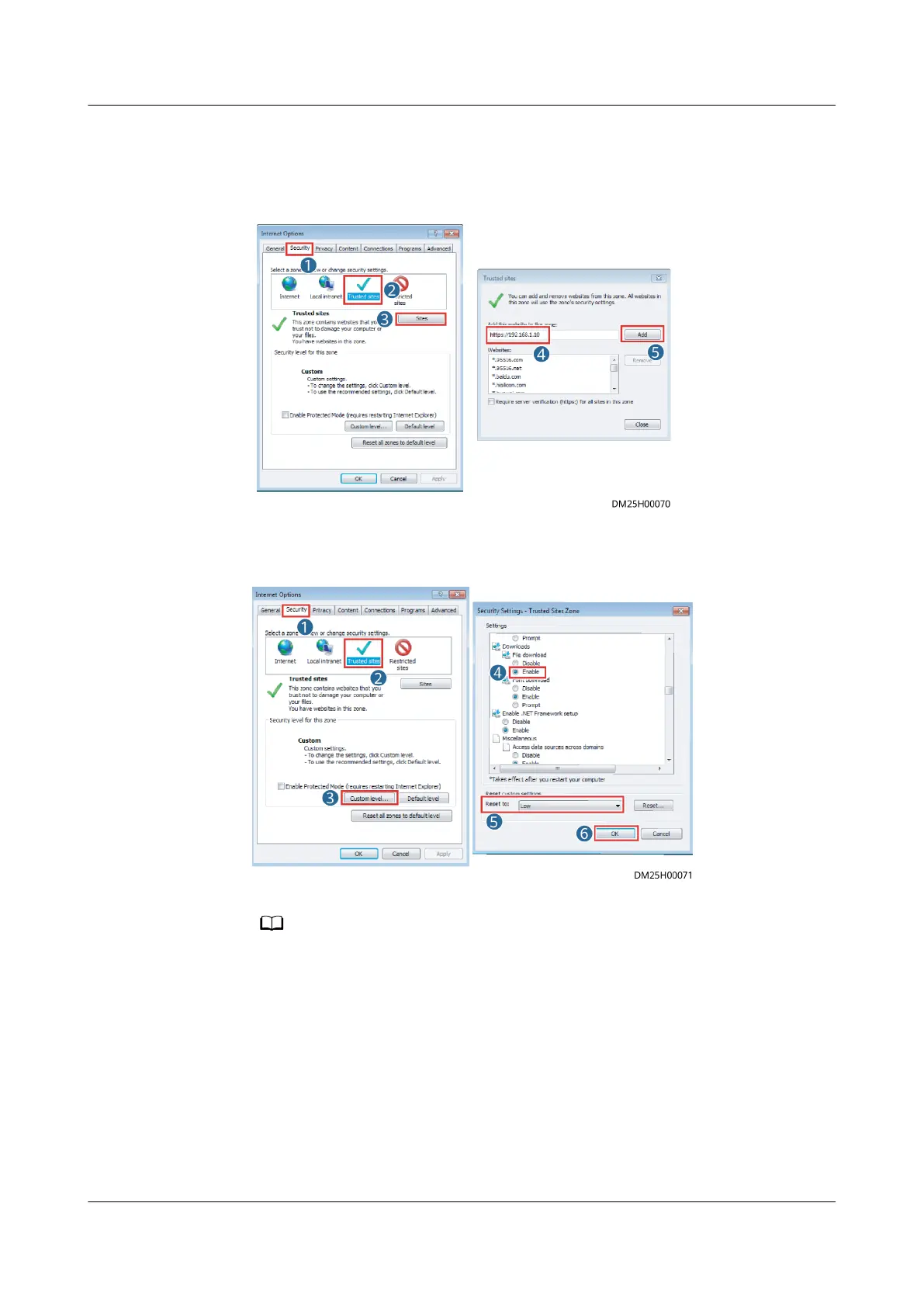
2. Choose Tools > Internet options > Security, choose Add the ECC800-Pro IP
address to the list of trusted sites.
Figure 5-1 Adding an address
3. Enable le download and set the security level of the trusted site to low.
Figure 5-2 Setting parameters
When switching between dierent versions of the ECC800-Pro on your PC, you are
advised to clear the historical Internet Explorer cache. Failing to do so may cause some
information missed or exception after login. The following provides the details:
1. Open Internet Explorer and choose Tools > Internet Options > General.
2. Select Delete browsing history on exit and click Delete.
3. In the Delete Browsing History dialog box, select all options except Password,
and click Delete.
Step 5 Log in to the ECC800-Pro WebUI.
1. Enter https://monitoring IP address (such as monitoring IP address https://
192.168.8.10) in the address box of the browser, and then press Enter to
enter the WebUI login page.
ECC800 Data Center Controller
User Manual (for ECC800-Pro) 5 Power-On Commissioning
Issue 02 (2020-09-07) Copyright © Huawei Technologies Co., Ltd. 103



 To Next Page