Step 8 Connect the communications cables and antennas to the ECC800-Pro main control
module.
Step 9 Choose Maintenance > Conguration File and import the backup conguration
le, or set parameters for the devices that connect to the ECC800-Pro to ensure
normal communication.
----End
7.3.2 Replacing an ECC800-Pro PSU
Prerequisites
Do not touch the terminals in the rear of a removed PSU to avoid electric shocks.
● Tool: insulation gloves
● Materials: a reserved undamaged and undeformed PSU of the appropriate
model.
Context
The PSU is hot-swappable.
Procedure
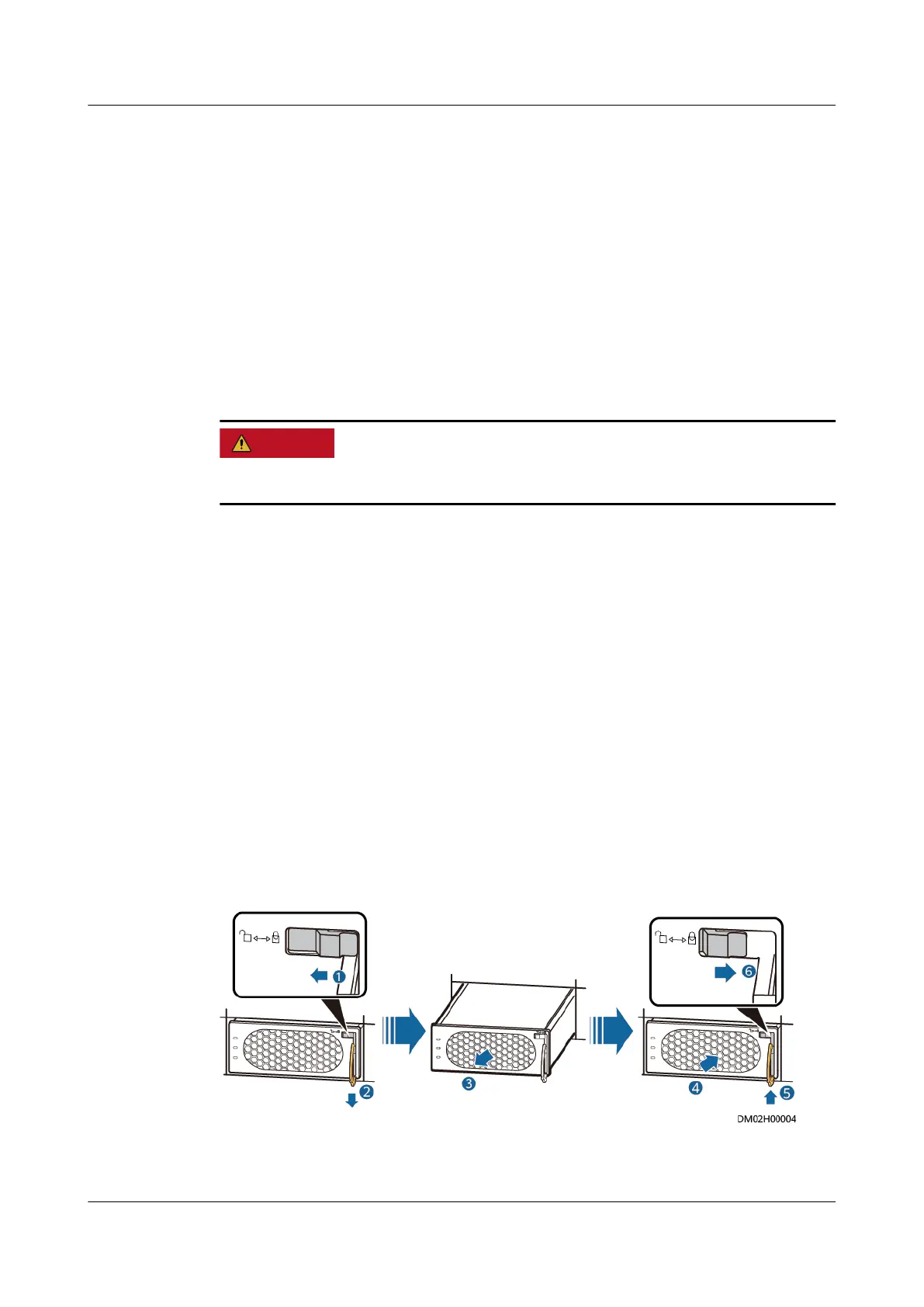
Step 1 Push the locking latch in the upper right corner of the PSU panel leftwards.
Step 2 Pull out the handle of the PSU to remove the PSU from the subrack.
Step 3 Gently push the reserved PSU into the subrack along guide rails, and push the
locking latch rightwards to secure the handle.
Figure 7-3 Replacing a PSU
----End
ECC800 Data Center Controller
User Manual (for ECC800-Pro) 7 Maintenance
Issue 02 (2020-09-07) Copyright © Huawei Technologies Co., Ltd. 251



 To Next Page