Procedure
Step 1 Set smoke sensor parameters.
In this example, the smoke sensor is connected to the AI/DI_1 port on the skylight actuator.
1. Log in to the ECC800-Pro WebUI as an administrator.
2. Choose Monitoring > Aisle > Skylight Actuator Group > Skylight Actuator
1 > Running Parameters > DI1 alarm level.
3. Set DI1 alarm level to Low voltage alarm or High voltage alarm, and click
Submit.
– Set DI1 alarm level to Low voltage alarm if the smoke sensor is connected over
NO.
– Set DI1 alarm level to High voltage alarm if the smoke sensor is connected over
NC.
Step 2 Check the monitoring functions of smoke sensor.
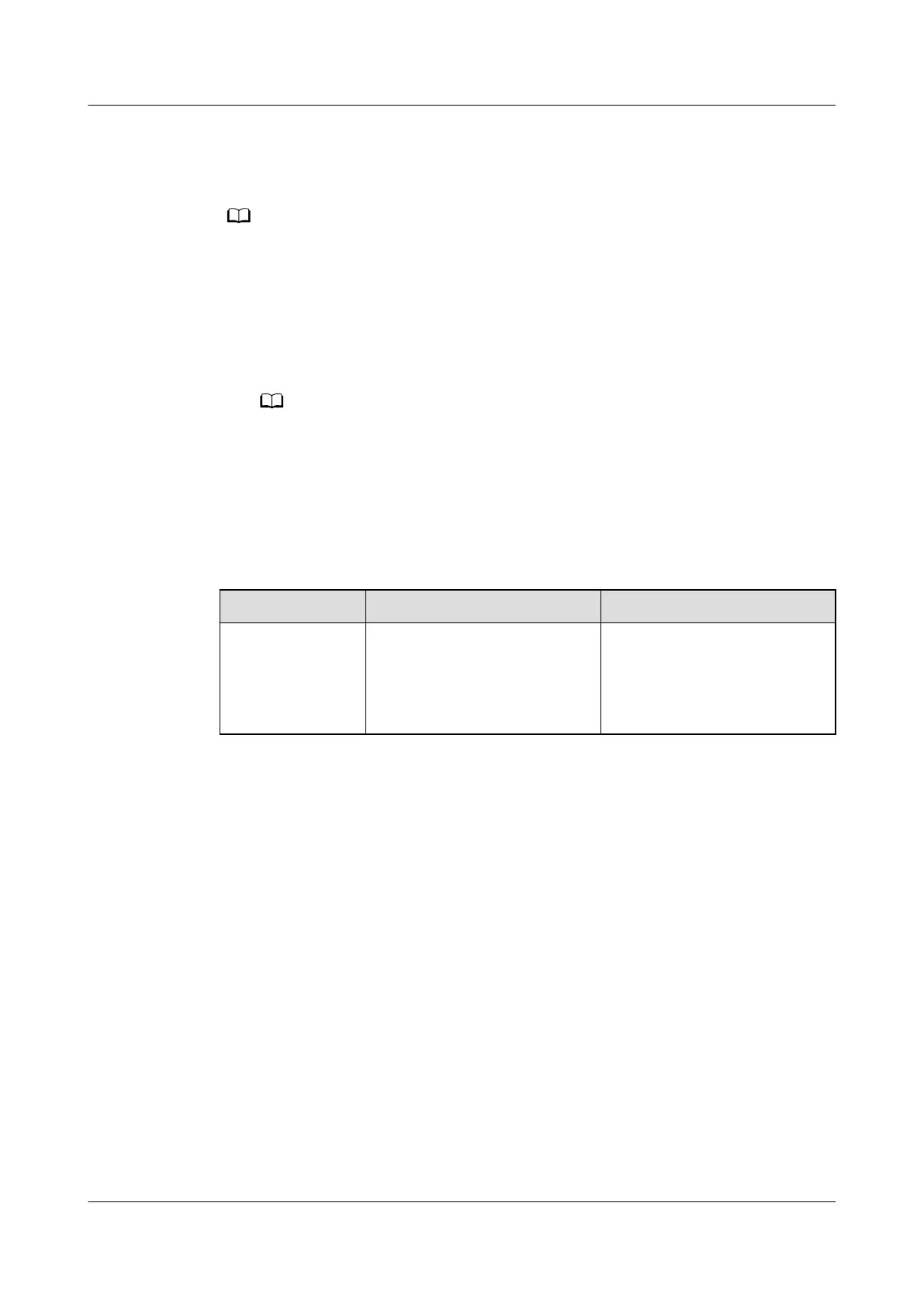
Table 8-28 Function check
Check Method
Normal Connection Status Alarm Clearance Method
Simulate a
smoky
environment
under the smoke
sensor.
DI1_smoke alarm is
displayed on the active
alarm page of the app or
WebUI.
Press the reset button on the
smoke sensor to clear the
alarm.
----End
8.1.7.31 How Can I Set and Add the Smoke Sensor (Connected to the AI/DI
Port on the Rack Environment Unit)?
If a smoke sensor is installed, perform the following steps to congure it.
Prerequisites
One end of the network cable has been stripped, core wires 1, 5 and 8 have been
short-circuited, core wires 6 and 7 have been connected to the cable delivered
with the smoke sensor, and the other end of the network cable has been
connected to the AI/DI port on the rack environment unit.
Context
● If the sensor is prefabricated, only check its settings.
● The actual value prevails. Only the method of the parameter settings is
described.
ECC800 Data Center Controller
User Manual (for ECC800-Pro) 8 FAQ
Issue 02 (2020-09-07) Copyright © Huawei Technologies Co., Ltd. 301



 To Next Page