Table 6-28 IP address parameters
Parameter Description
IPv4 address
assignment
Method for obtaining the IP address. The options are
Obtain IP address automatically and Use the
following IP address. The default value is Obtain IP
address automatically.
IPv4 address Camera IP address. This parameter is available only
when IPv4 address assignment is set to Use the
following IP address.
Enter the planned IP address, for example,
192.168.1.161. IP addresses starting with 127 are
invalid. You must enter an IP address starting with a
value that ranges from 1 to 223.
IPv4 gateway Gateway IP address of the network where the camera is
located. The default value is 192.168.0.1.
IPv4 subnet
mask
Subnet mask of the network where the camera is
located. The default value is 255.255.255.0.
Primary DNS Primary DNS IP address. The default value is 0.0.0.0.
Secondary DNS Secondary DNS IP address. The default value is 0.0.0.0.
3. On the View tab page, click the General tab to access the General tab page.
Click Video.
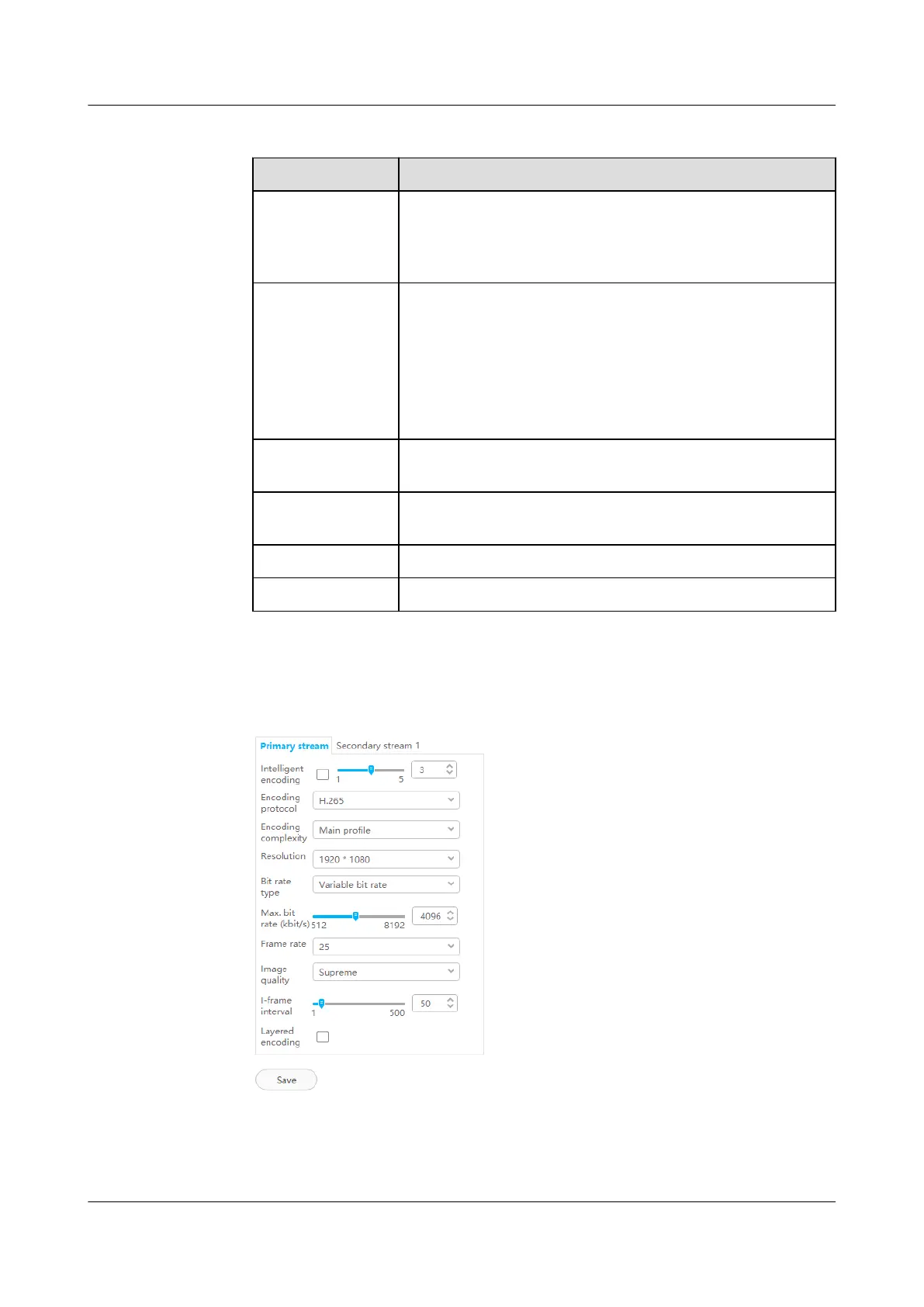
Figure 6-41 Setting primary stream parameters
ECC800 Data Center Controller
User Manual (for ECC800-Pro) 6 Feature Description
Issue 02 (2020-09-07) Copyright © Huawei Technologies Co., Ltd. 173



 To Next Page