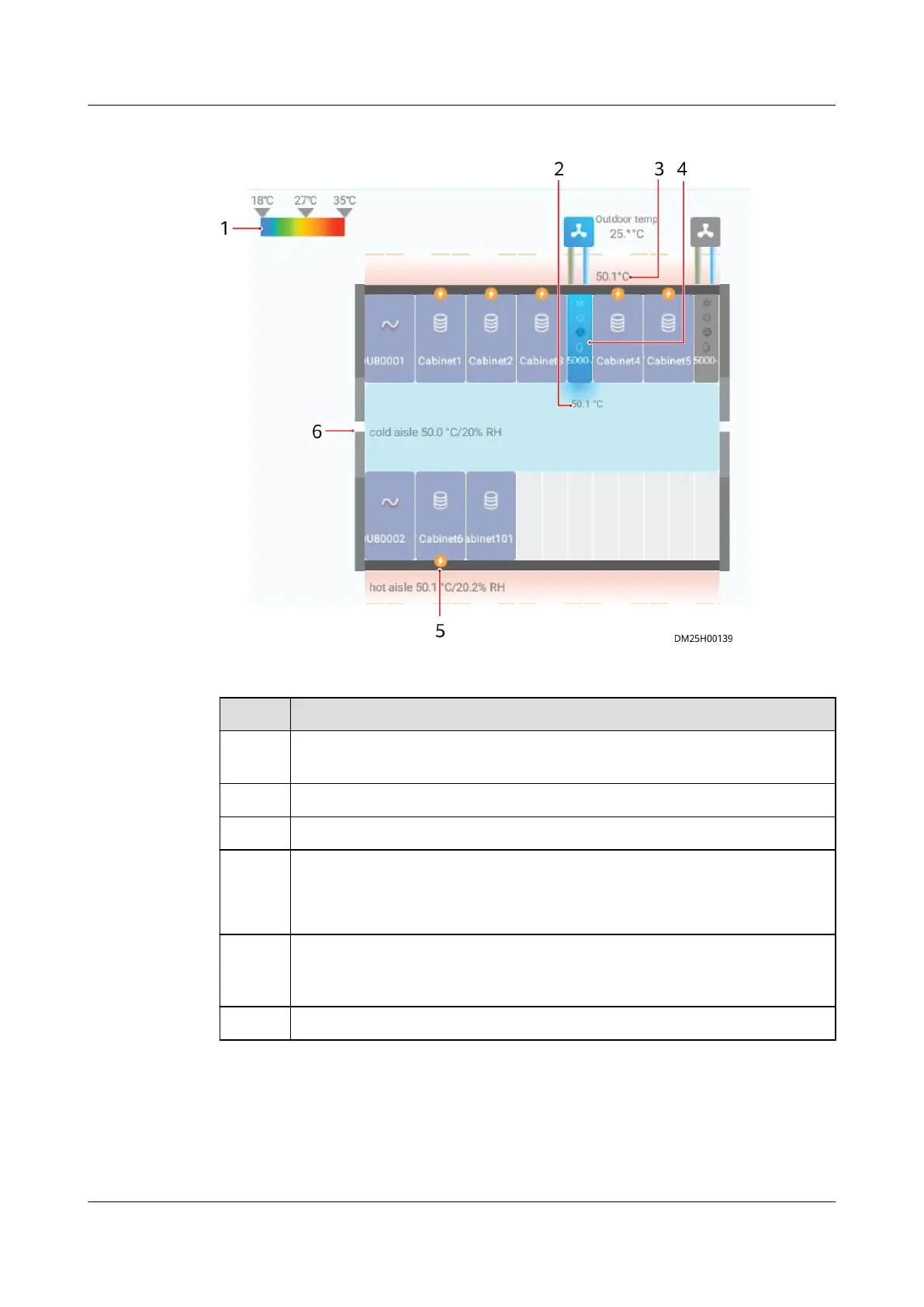
Figure 6-77 Cooling links diagram
Table 6-46 Specications of the cooling links diagram
Item
Specications
1 Color band (Determine whether the temperature of the cooling system
is normal based on the color band.)
2 Air outlet temperature of the smart cooling product
3 Air inlet temperature of the smart cooling product
4 Smart cooling product status
● Blue: The smart cooling product is running.
● Gray: The smart cooling product is not running.
5 Alarm status (The alarm icon is displayed based on the alarm severity
of the smart cooling product. You can tap the smart cooling product to
view the alarm.)
6 Temperature and humidity inside the aisle
Step 6 Tap the corresponding smart cooling product to check the operating status and
working mode of each component in the smart cooling product.
ECC800 Data Center Controller
User Manual (for ECC800-Pro) 6 Feature Description
Issue 02 (2020-09-07) Copyright © Huawei Technologies Co., Ltd. 228



 To Next Page