Specications
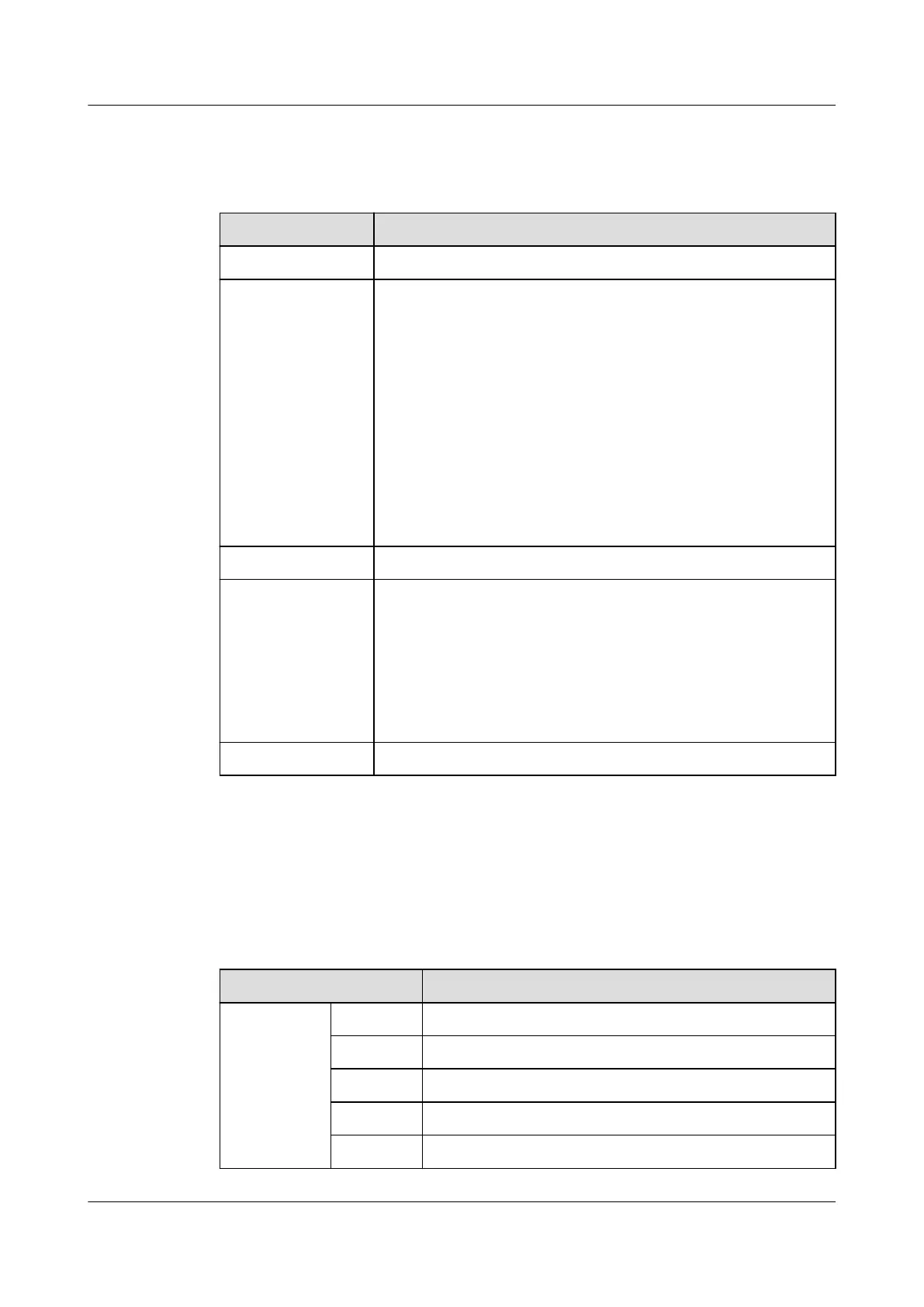
Table 3-18 UIM20A technical specications
Item Specications
Power input Supports the RS485 or PoE power supply.
COM/AIDI (RJ45) ● Supports eight RS485 or AI/DI signal inputs.
● Can connect to sensors such as the smoke sensor, water
sensor, door status sensor, and infrared sensor.
● Each port can supply power. Two RJ45 ports share one
12 V DC power supply that is controlled independently.
The maximum output current is 900 mA when the
voltage is 12 V. (COM1/AIDI_1 and COM2/AIDI_2 form a
group, COM3/AIDI_3 and COM4/AIDI_4 form a group,
COM5/AIDI_5 and COM6/AIDI_6 form a group, and
COM7/AIDI_7 and COM8/AIDI_8 form a group).
● The 12 V DC power supply can be switched on or
o
and is on by default.
POE Connects to the ECC800-Pro through the PoE port.
DIP switch ● One 4-bit DIP switch is used to set the RS485 address.
● OFF indicates 0 and ON indicates 1.
● Bit 1 is the least signicant bit, and bit 4 is the most
signicant bit. For example, if the board address is 5, the
corresponding bits are ON, OFF, ON, and OFF, and the
corresponding binary number is 1010 (ON is 1 and OFF
is 0).
E-label 4.0 Supported
Communications Port
The following table describes the pin assignment for ports COM1/AIDI_1 to
COM8/AIDI_8.
Table 3-19 Pin assignment for ports COM1/AIDI_1 to COM8/AIDI_8
Item
Description
Pin
sequence
Pin1 RS485+
Pin2 RS485-
Pin3 12V
Pin4 RS485+
Pin5 RS485-
ECC800 Data Center Controller
User Manual (for ECC800-Pro) 3 Device Description
Issue 02 (2020-09-07) Copyright © Huawei Technologies Co., Ltd. 26



 To Next Page