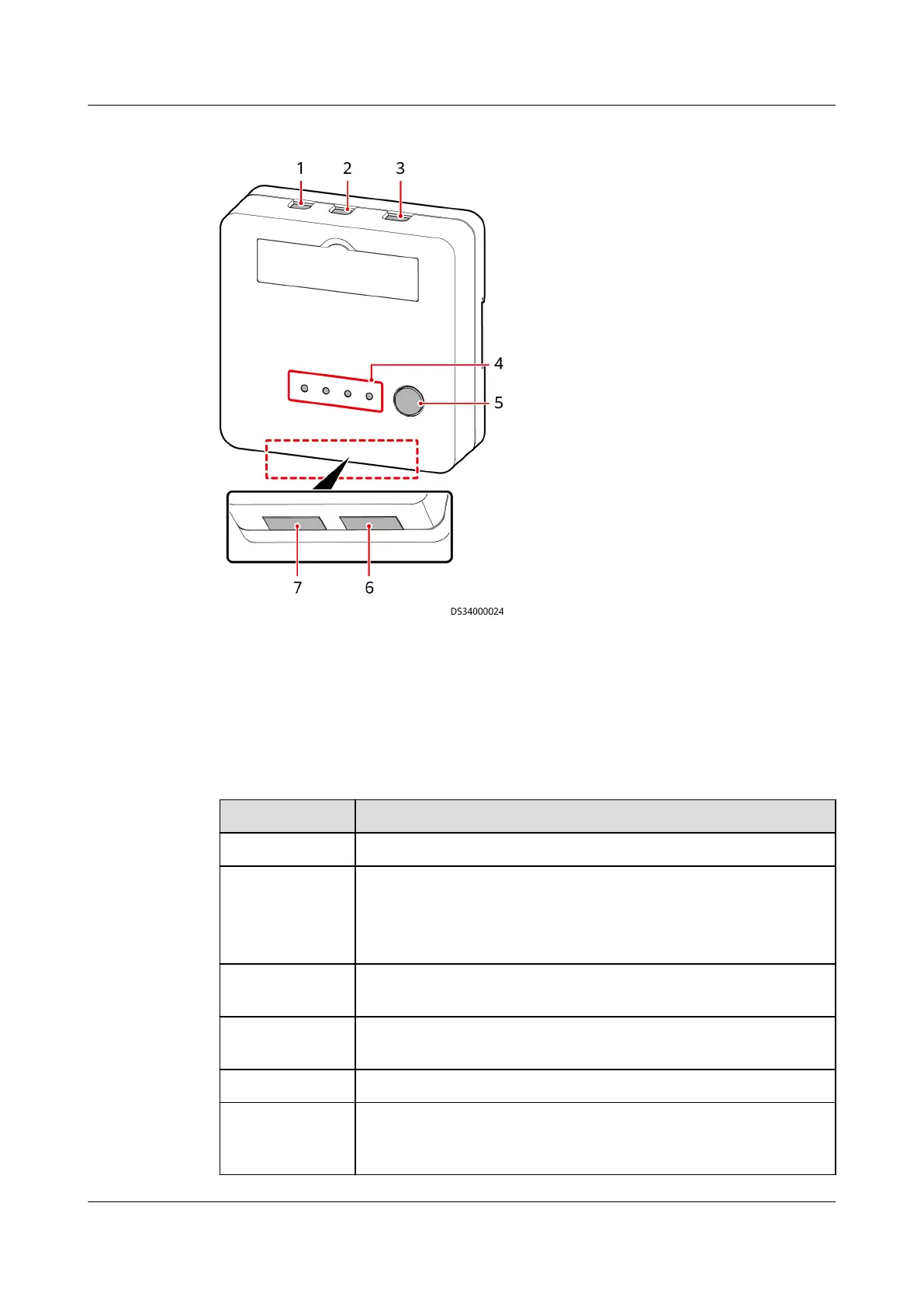
Figure 3-21 AC actuator
(1) AC OUT2 port (2) AC OUT1 port (3) AC IN port (4) Status indicator
(5) BLINK button (6) AIDI_1 and AIDI_2 (7) COM1 and COM2
Specications
Table 3-41 AC actuator technical specications
Item
Specications
Power input One AC input, 100 V AC to 240 V AC.
Power output ● AC OUT1: two AC outputs, 100 V AC to 240 V AC,
maximum total current: 5 A.
● AC OUT2: one AC output, 100 V AC to 240 V AC, maximum
current: 5 A.
Wireless
communication
One wireless communication port that complies with
IEEE802.15.4
RS485 serial
port
One route of dual RS485 ports, not isolated (reserved)
AI/DI detection Two AI/DI dry contacts, connecting to two light buttons
PAD intelligent
charging
Charging stops when the PAD battery level reaches 100%.
When the battery level is lower than 40% (default value,
which can be set to 30, 40, or 50), charging starts.
ECC800 Data Center Controller
User Manual (for ECC800-Pro) 3 Device Description
Issue 02 (2020-09-07) Copyright © Huawei Technologies Co., Ltd. 48



 To Next Page