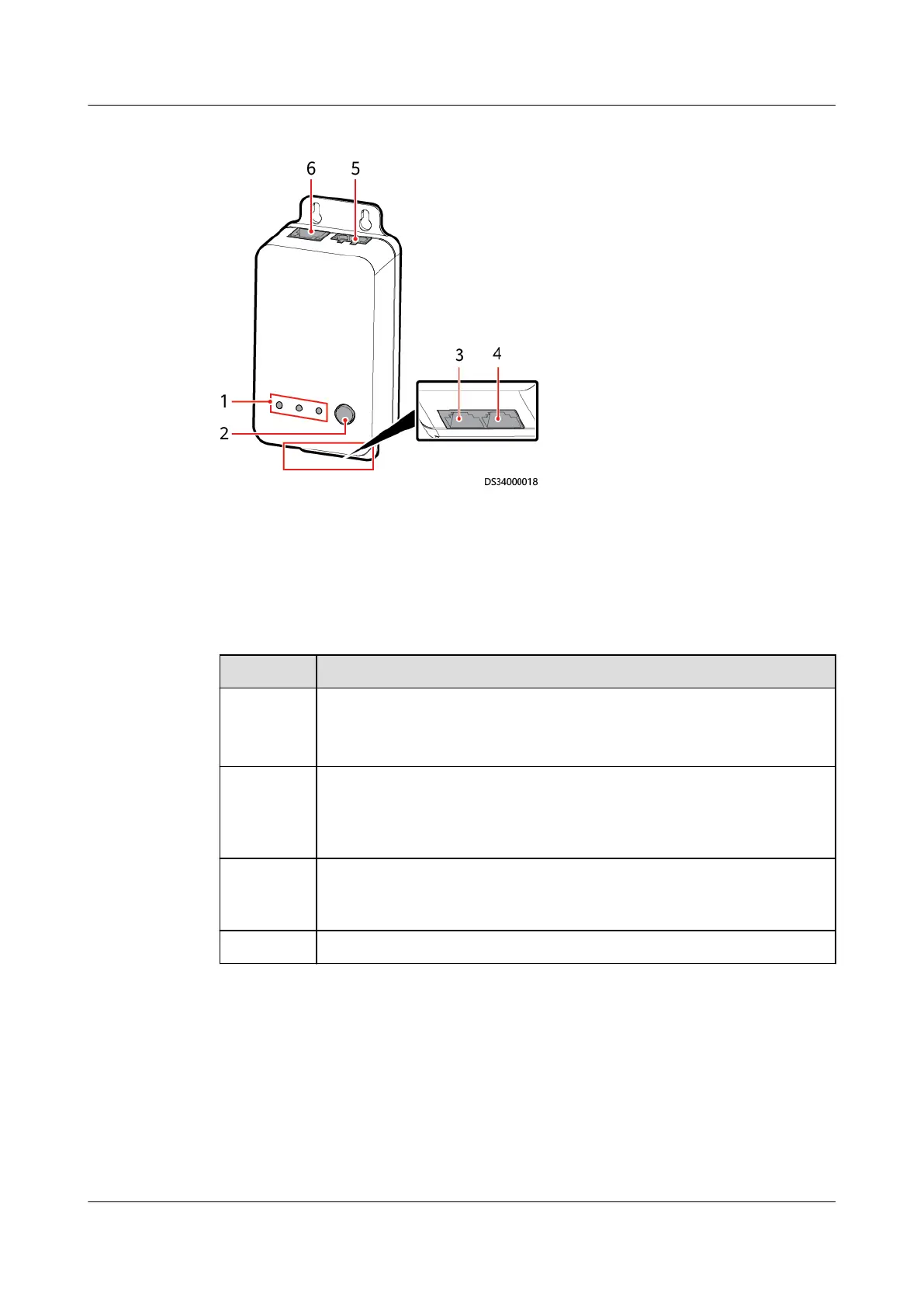
Figure 3-34 ETH converter
(1) Status indicator (2) BLINK button (3) COM1 communications port
(4) COM2 communications port (5) 48 V power port (6) PoE port
Specications
Table 3-60 ETH converter technical specications
Item
Specications
Power
input
● DC input: terminal, with an input voltage of 36 V DC–60 V DC
● PoE power supply: one PoE port, 10/100M communication rate,
complying with IEEE802.3at
RS485/CA
N
Provides two RS485/CAN ports. The default communications rate
for the RS485 port is 9600 bit/s, and that for the CAN port is 125
kbit/s. Both ports match the RJ45 terminal shared by RS485 and
CAN.
BLINK
button
If you press the BLINK button, the RUN indicator blinks
intermittently at super short intervals (blinking at super short
intervals for 0.5s and then o for 0.5s) for 10 seconds.
E-label Supported
ECC800 Data Center Controller
User Manual (for ECC800-Pro) 3 Device Description
Issue 02 (2020-09-07) Copyright © Huawei Technologies Co., Ltd. 67



 To Next Page