16 Issue 3.3.2 / April, 2011
Site Requirements
Location
Choosing the Right Environment
• System should be installed in a clean, dry, secure location. This location must have adequate
ventilation, and a temperature from 0 ℃ to 30℃ (32℉ to 86℉), with 10% to 95% non-condensing
relative humidity. DO NOT install the equipment near sources of static electricity, excessive
vibration, or water. Avoid direct sunlight.
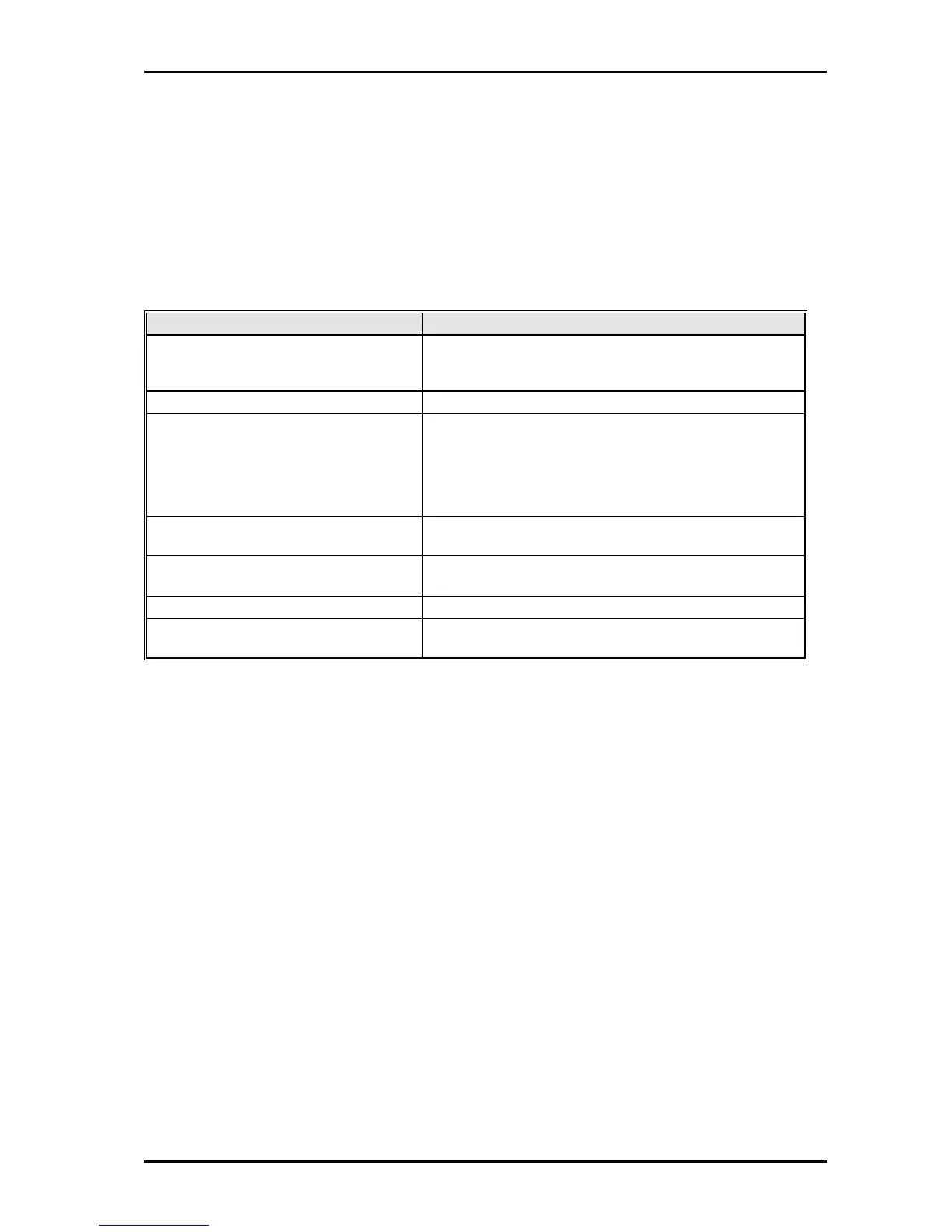
Installation Checklist
INSTALLATION REQUIREMENTS VERIFICATION
MOUNTING SURFACE Flat surface with adequate space for main cabinet,
power supply, wiring and optional Battery Backup
cabinet.
AC LINE AC line should be dedicated exclusively to the system.
POWER OUTLET Power Outlet must be a 3-wire grounded outlet plug.
The socket outlet shall be installed near the system and
be easily accessible.
Input power Line capacity requirements - 10 amperes.
CAUTION DOUBLE POLE/NEUTRAL FUSING ON
EUROPEAN PLUGS
SURGE PROTECTION A Surge Protector is recommended on the dedicated
AC line.
VENTILATION AND TEMPERATURE Humidity: 10% to 95% relative non-condensing
Temperature:32℉ to 113℉ (0 ℃ to 45 ℃).
EARTH GROUND A proper ground connection. (14 AWG)
SERVICEABILITY Lighting conditions and working space adequate for
future service.
Equipment Requirements
• Unpack, Check and Verify Equipment - Unpack the telephone equipment boxes and verify the
contents in accordance with the packing list provided. If any discrepancies are noticed, please
contact Auto Telecom or Authorized Dealers.
• Damaged Boxes - If you notice any damage to the packages, please notify both the shipper and
Auto Telecom or Authorized Dealers at once.
• List of parts included in basic KSU box:
• KSU Main Cabinet
• Mounting Template
• Mounting Screws
• Station Quick Connectors
• Spare Fuses
• Cable Cover
• User guide



 To Next Page