G1E Programming Manual
43
Access Control Telephone – ACP
z A cable cover is provided with the KSU. Station cables enter from bottom of the KSU. Remove the
cover as required and route the station cable through the hole. Terminate the station wires with the
connectors that are provided. The stations will connect to the KSU as shown on the main panel
(above) on connector locations 11 – 38
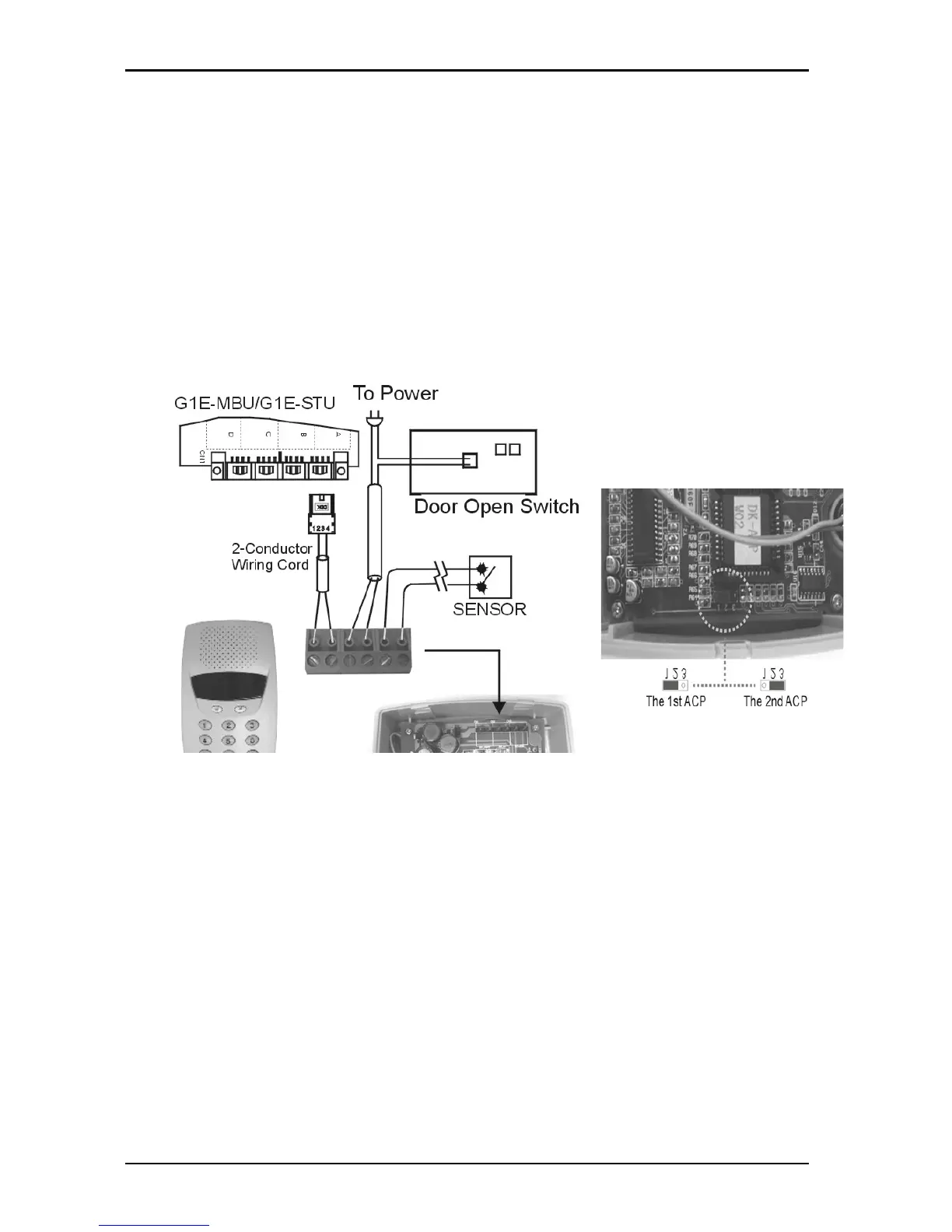
z Connect Tip/Ring terminals from KSU(G1E-MBU/G1E-STU) to the ACP connector (6 contacts).
z There is no polarity requirement on Tip and Ring.
z Connect Relay for applications such as door open to the ACP connector (6 contacts).
z Connect Sensor for applications such as door open alarm to the ACP connector (6 contacts).
z Mount ACP connector on to ACP itself.
z Select the 1
st
station jumper as shown in diagram below.
z Mount ACP on the wall.
CAUTION!: Avoid shorting Tip and Ring together. It may damage the G1E-MBU or G1E-STU board.



 To Next Page