G1E Programming Manual
57
Alphanumeric Entry:
The following table indicates the capabilities of the name programming functions if they are selected on
the system. System Speed Dial, Personal Speed Dial, Stations, CO Lines and Sensors may be
programmed with names.
Key 1 = (Blank Space) – 1 Key 2 = A - B - C – 2
Key 3 = D - E - F – 3 Key 4 = G - H - I – 4
Key 5 = J - K - L – 5 Key 6 = M - N - O – 6
Key 7 = P - Q - R - S – 7 Key 8 = T - U - V – 8
Key 9 = W - X - Y - Z – 9 Key 0 = (Period). : & – 0
Key # = ( ) $ # Key * = (Dash) / ! *
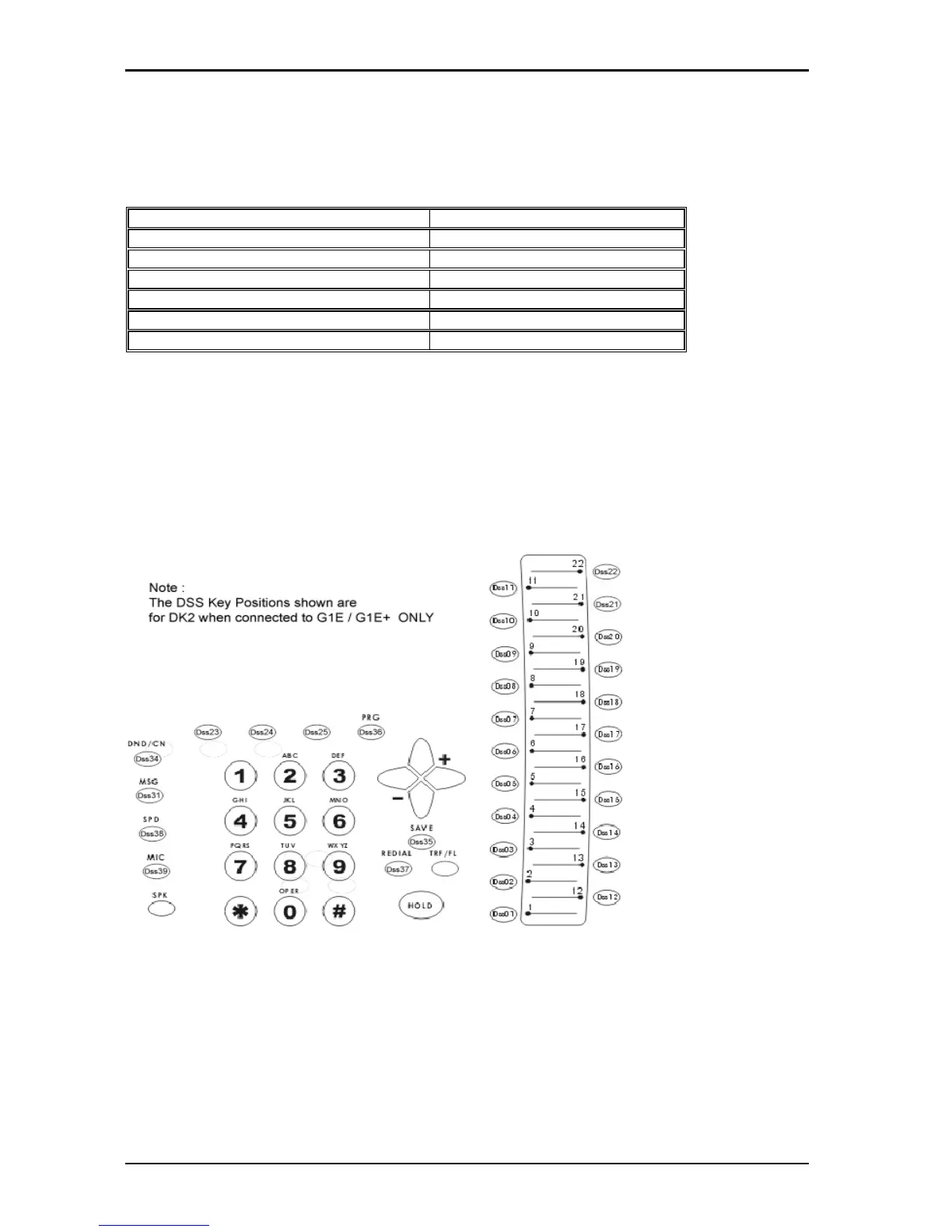
DSS Key 1 = Backspace Cursor (Left) DSS Key 2 = Cursor Forward
If an entry is made that is not within valid system parameters, the HYBREX system will not accept the
entry when [SAVE] is pressed. The Speaker on the programming set will return a busy tone and the
LCD Display will place the programming cursor under the offending entry. You may make corrections
and press [SAVE] again. If multiple errors are made, the system will continue to return you to the illegal
entries as others are corrected.
It is not necessary to re-enter existing information on a multi-item form. You need enter only the
information that is to be changed. You may move the cursor to the left or right in order to access only
the specific entry that you want to change. You may press [SAVE] without regard for the placement of
the cursor on the LCD display.
On the DK2-3 phone the function keys (21-29) will follow the same numbering scheme as the DK6
phone on a G1E. Connecting a DK2 on a softkey plan designed for a DK6 will still allow all
function keys to work as per the markings on the phone as well as DSS buttons 1 to 22. When
programming a new softkey plan for a DK2/3 it will be necessary to program all function keys as
if for a DK6 and that will then translate correctly to the DK2/3. The keys entries 1 to 22 will line up
with buttons 1 to 22 on a DK2 phone.
DO NOT USE THESE LAYOUTS ON ANY SYSTEM OTHER THAN A G1E/G1E+



 To Next Page