Section 4 – SEARCHER HOOK MONITOR Mini-Crawler Crane M A E D A
4-126 1/2019 MC285C-3
SEARCHER HOOK MONITOR
Home Screen
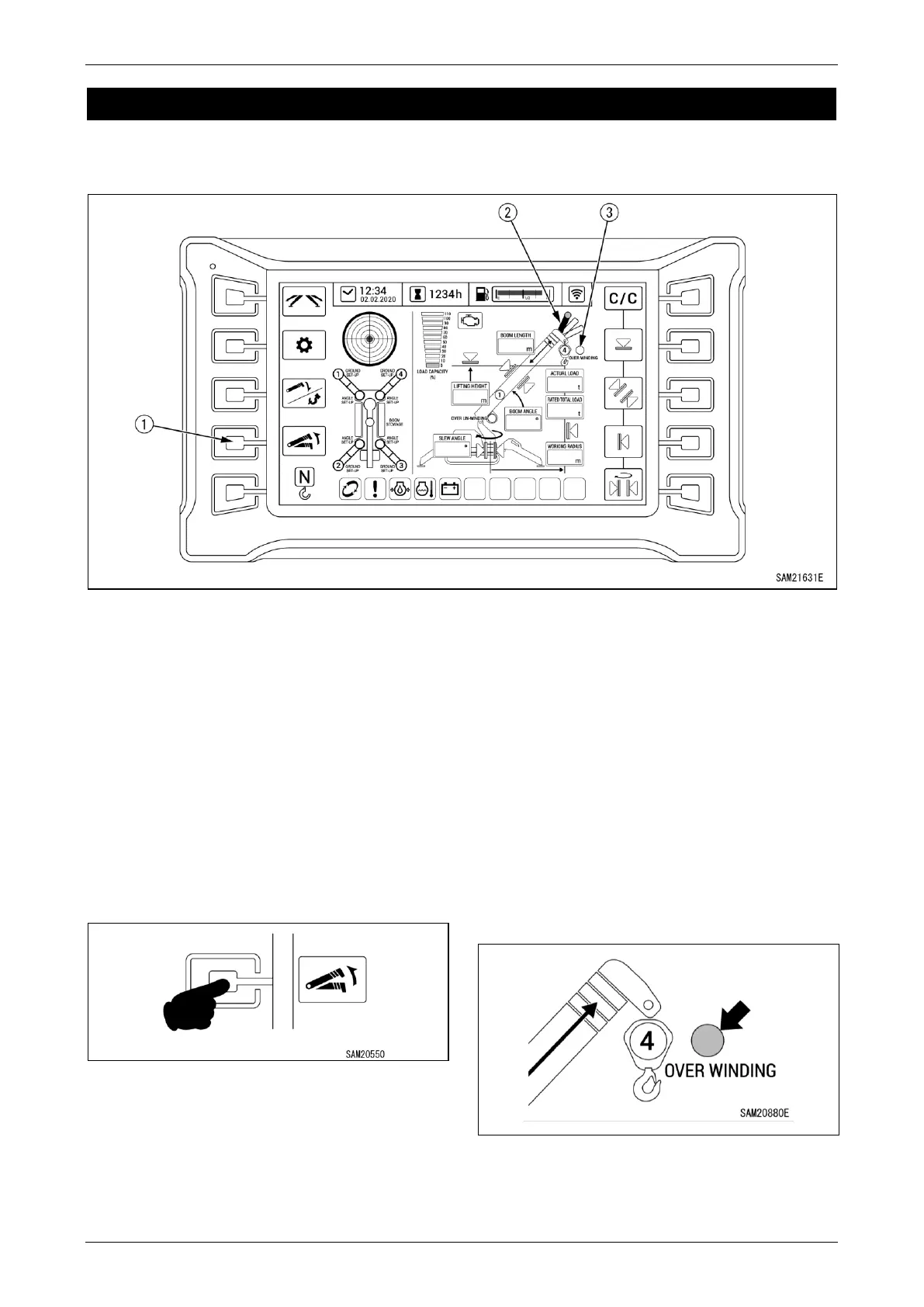
Fig.4-334
1 - Boom Lift Bypass Switch
2 - Searcher Hook Position Display
3 - Over Winding Display
NOTICE: This section describes only those
indications and operations that differ from normal
use when using a searcher hook. For more
information on indications and switch operations
not described in this section, see “Home Screen”
on page 4-10.
Boom Lift Bypass Switch
If it becomes necessary to raise the boom while
automatically stopped, the boom can be raised
only while the Boom Lift Bypass Switch is
depressed.
Fig.4-335
Searcher Hook Position Display
The display will change depending on the
searcher hook position setting.
For more information on the position and display
details, see “Moment Limiter Settings” on page
4-124.
Over Winding Display
The red light illuminates if the hook is overwound
during operation.
The green light illuminates only if the over winding
detector is disabled while using the searcher
hook.
Fig.4-336



 To Next Page