NICE3000
new
User Manual
6 System Commissioning and Functions
- 117 -
Continue
Func.
Code
Parameter Name Default Commissioning
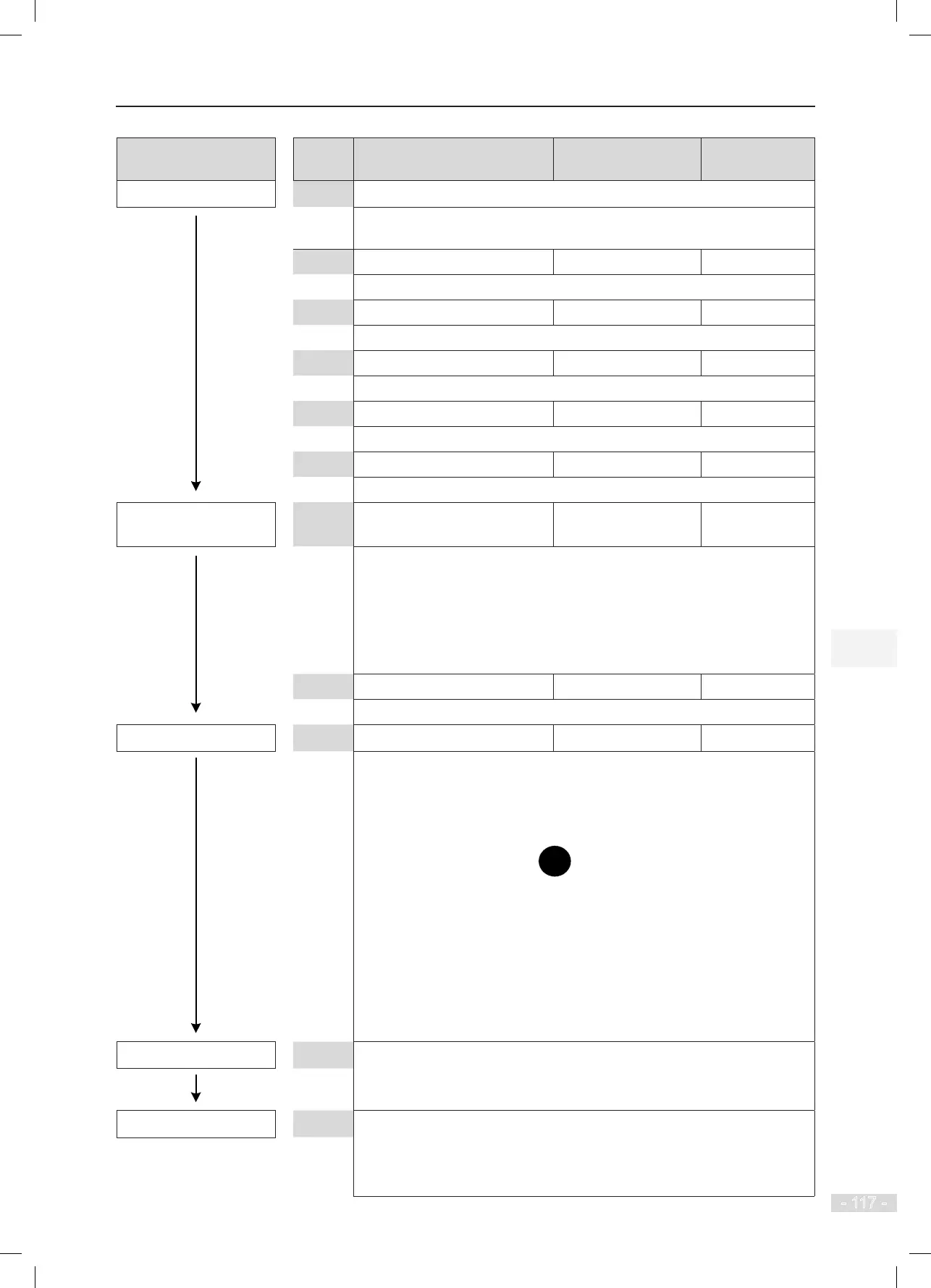
Set motor parameters
Motor Nameplate
Be sure that motor parameters are set correctly. Otherwise, faults will occur.
F1-01 Rated motor power Model dependent
Unit: kW
F1-02 Rated motor voltage Model dependent
Unit: V
F1-03 Rated motor current Model dependent
Unit: A
F1-04 Rated motor frequency Model dependent
Unit: Hz
F1-05 Rated motor speed Model dependent
Unit: RPM
Set encoder
parameters
F1-00 Encoder type 0
0: SIN/COS encoder
1: UVW encoder
2: ABZ incremental encoder
3: ECN413/1313 absolute encoder
Set F1-00 according to the actual encoder type.
F1-12 Encoder pulses per revolution 2048
Set this parameter according to the encoder nameplate.
Set auto-tuning mode
F1-11 Auto-tuning mode 0 1
0: No operation
1: With-load auto-tuning
2: No-load auto-tuning
3: Shaft auto-tuning
After setting F1-11 to 1, press
on the operation panel. If the operation
panel displays
"
TUNE", the system enters motor auto-tuning state.
If the operation panel displays "F1-12", the system fails to enter motor auto-
tuning state.
You need to check:
1. Whether the elevator is inspection state.
2. Whether the MCB displays faults to be rectied
3. Whether F0-01 is set to 1
Perform auto-tuning
Hold down the inspection UP/DOWN button during auto-tuning. After auto-
tuning is completed, the controller automatically stops output, and then you
can release the button.
Auto-tuning completed
1. After auto-tuning is completed, the keypad on the MCB displays the learnt
encoder angle for 3s.
2. Ensure that the value deviation of F1-06 is within ±5° through multiple
times of auto-tuning.



 To Next Page